
Apache Spark is a powerful, open-source, distributed computing system designed for large-scale data processing and analytics. It allows for fast in-memory data processing, which makes it ideal for big data workloads, such as those found in data lakes and data warehouses.
Apache Spark in fabric is a SaaS service. Microsoft Fabric provides a fully managed Apache Spark experience, so users don’t need to install or maintain Spark clusters. Spark integrates natively with One Lake, Lakehouse, Data Warehouse, Real-Time Intelligence, and Data Factory, enabling end-to-end analytics within a single platform
Apache Spark is a distributed data processing framework that facilitates large-scale data analytics by managing workloads across multiple nodes in a cluster, referred to as a Spark pool in Microsoft Fabric. Simply put, Spark processes large volumes of data quickly using a “divide and conquer” strategy, distributing tasks across multiple computers and automatically handling the task distribution and result aggregation.
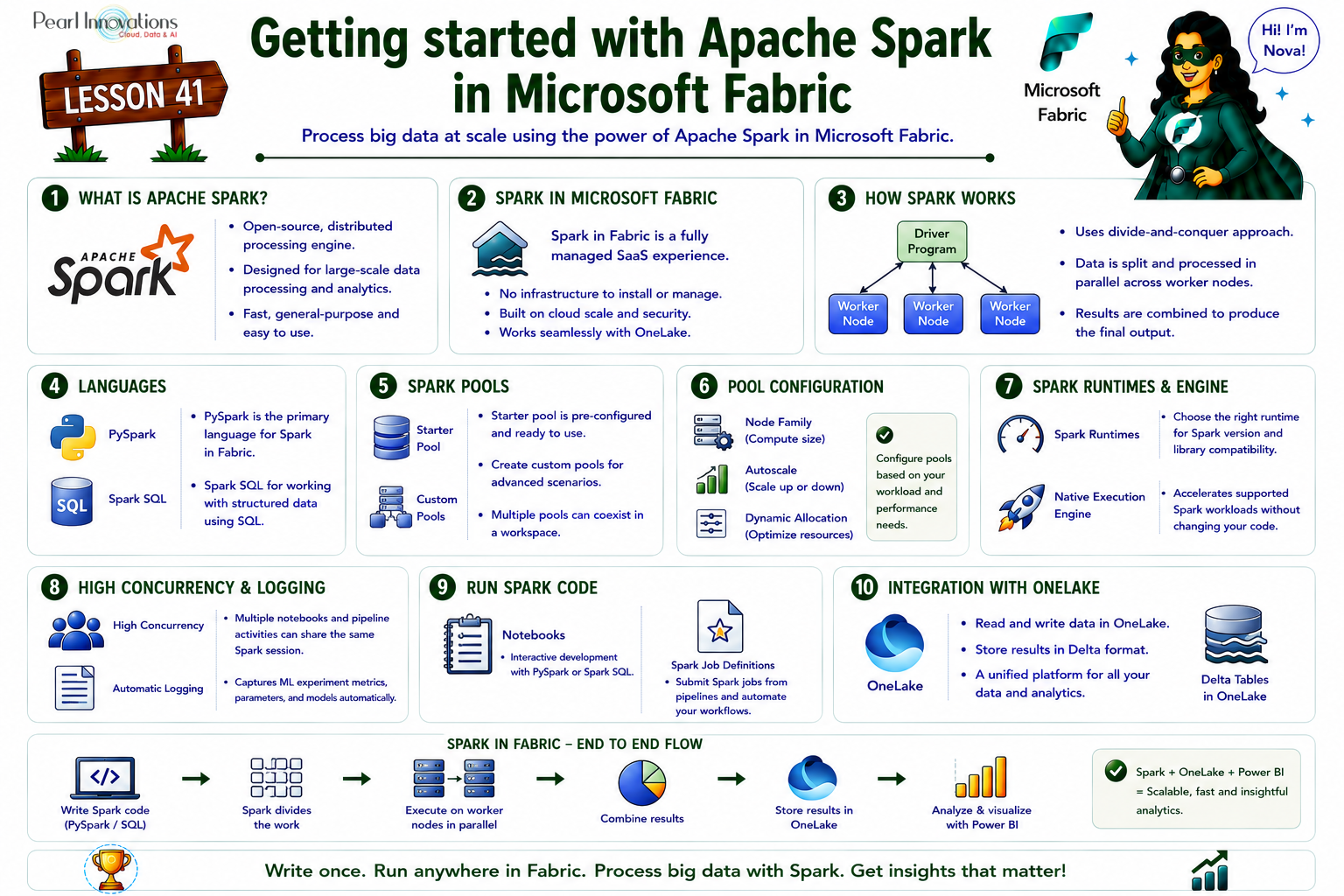
🚀 Learn It in 5 Minutes
Skip the long read.
See the key concepts in one easy-to-follow infographic.
Spark supports code written in several programming languages, including Java, Scala (a Java-based language), Spark R, Spark SQL, and PySpark (a Spark-specific version of Python). In practice, most data engineering and analytics tasks are typically performed using a combination of PySpark and Spark SQL.
Note: SparkR is now deprecated in Spark 4.x and may be removed in a future version PySpark and Spark SQL remain the recommended combination.
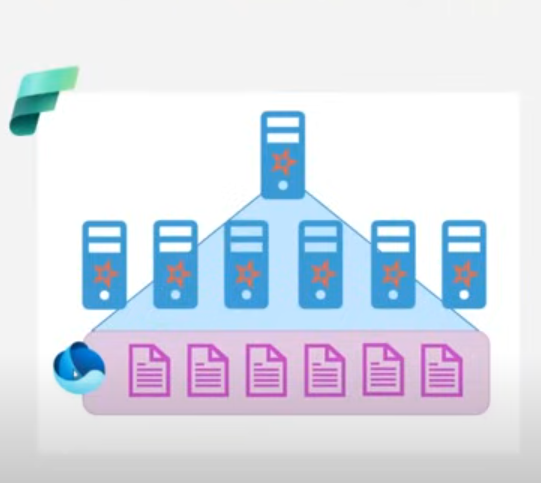
The below image shows how Apache Spark functions in Microsoft Fabric, enabling efficient, large-scale data processing and the purple tier at the bottom represents the data processed from spark is stored under single source of storage in fabric i.e. One Lake.
Configuring Apache spark in Microsoft fabric
Prerequisites
- Obtain a Microsoft Fabric tenant account with an active subscription. Refer Lesson 3 – Getting started with Microsoft Fabric
- Verify that you have a Microsoft Fabric-enabled Workspace set up and ready for use. Refer Lesson 4 – Fabric Workspaces and how to create one?
Let’s explore how to set up our Spark environment and clusters within Microsoft Fabric.
Each Workspace is assigned a spark cluster. Workspace admins can manage settings for the spark cluster in the workspace settings
Below are the specific configuration settings
- Node family
- Runtime version
- Spark Properties

Spark Pools
A Spark pool is made up of compute nodes that collaborate to distribute and execute data processing tasks.
Microsoft Fabric offers a starter pool in every workspace, allowing Spark jobs to start and run quickly with minimal setup and configuration. The starter pool can be adjusted to optimize the nodes it contains based on your workload requirements or budget constraints.
Furthermore, you can create custom Spark pools with tailored node configurations to meet your specific data processing needs.
Within the Data Engineering/Science section of the workspace settings, you can configure the starter pool’s settings and establish additional Spark pools.
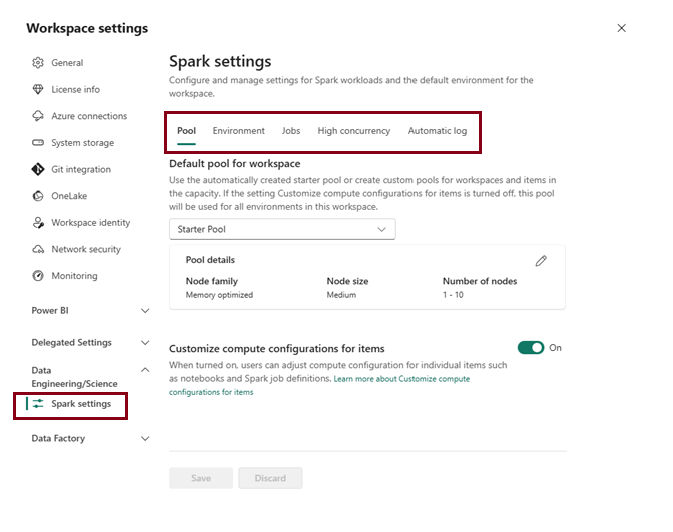
Specific configuration settings for Spark pools include:
- Node Family: This defines the type of virtual machines used for the Spark cluster nodes. Typically, memory-optimized nodes deliver the best performance for most workloads.
- Auto scale: This setting determines whether nodes should be automatically provisioned as needed. It also specifies the initial and maximum number of nodes that can be allocated to the pool.
- Dynamic Allocation: This option controls whether executor processes are dynamically allocated on worker nodes based on data volume, optimizing resource usage based on workload demands.
Spark Runtimes
Microsoft Fabric supports various Spark runtimes and will continue to incorporate new runtimes as they become available. Through the workspace settings interface, you can specify the default Spark runtime to be used when a Spark pool is launched.
In this below demo, we’ll focus on configuring Spark pools within Microsoft Fabric using the latest runtime version. It’s important to note that certain libraries are compatible only with specific Spark runtime versions. Therefore, when selecting a runtime, ensure it supports the libraries required for your projects. To benefit from ongoing updates and library compatibility, consider choosing newer runtime versions like Spark Runtime 1.3 (Spark 3.5, Delta Lake 3.2) or the newer Runtime 2.0 (Spark 4.1, Delta Lake 4.1), which is now the latest GA runtime.
Runtime 2.0 (Spark 4.1) brings SQL user-defined functions, session variables, pipe syntax, a native PySpark plotting API, Python UDTFs, and the Arbitrary State API v2 for Structured Streaming. Note also that libraries built for Runtime 1.3 need to be re-added and republished to work under Runtime 2.0.
Native Execution Engine
The Native Execution Engine helps improve the performance of Apache Spark workloads in Microsoft Fabric. It runs supported Spark operations using an optimized execution engine, which can make jobs run faster and reduce compute costs—without requiring any changes to your existing Spark code. If an operation isn’t supported, Fabric automatically uses the standard Spark execution engine.
How to enable the Native Execution Engine:
- Open your Environment item.
- Go to Spark compute.
- Select the Acceleration tab.
- Enable Native Execution Engine.
- Click Save and Publish.
You can also enable or disable it for a specific notebook or Spark Job Definition by setting the spark.native.enabled configuration.
High Concurrency
High concurrency settings in Microsoft Fabric’s Spark environment enable multiple notebooks or pipeline activities to share the same Spark session, enhancing performance and resource utilization.
When high concurrency mode is enabled for Notebooks, multiple users can run code in notebooks that use the same Spark session, while ensuring isolation of code to avoid variables in one notebook being affected by code in another notebook.
Automatic Log
In Microsoft Fabric, automatic logging simplifies the tracking of machine learning experiments by automatically capturing metrics, parameters, and models, eliminating the need for explicit coding in your notebooks. This feature improves reproducibility and makes monitoring model performance easier.
You can enable this option while configuring Spark to track ML experiments. Once you import Mlflow into your notebook, auto logging is automatically activated, capturing key metrics and parameters during model training.
The following demo below illustrates how to configure Spark settings. In this example, I am creating a new Spark pool.
How to Run a Spark code?
In Microsoft Fabric, you can run Spark code using two primary methods:
- Notebooks
- Spark Job definitions
Notebooks
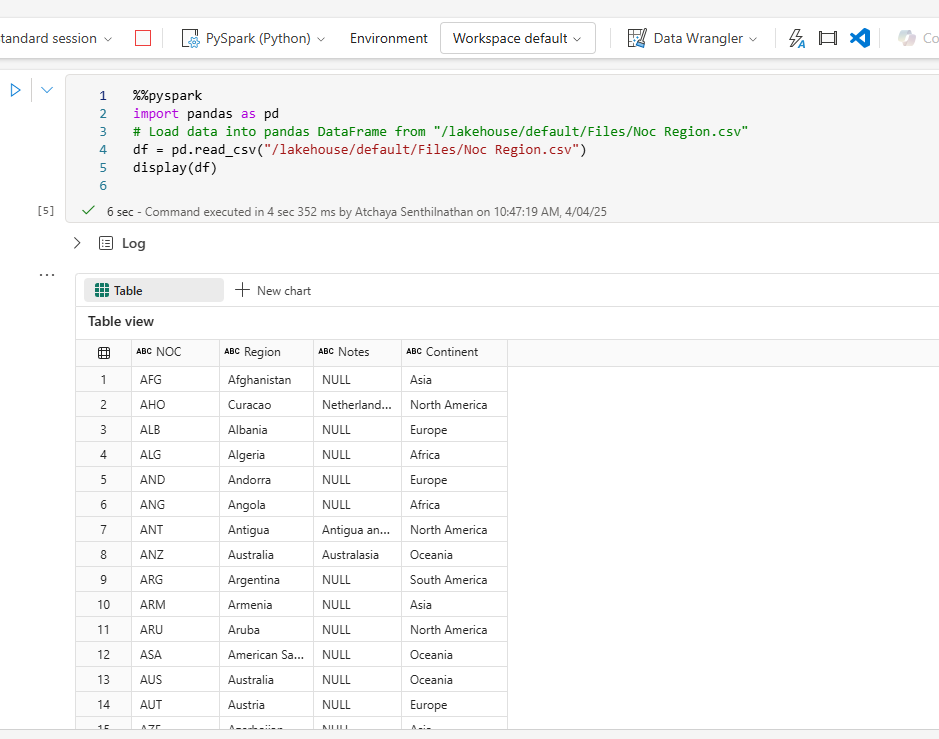
Interactive, web-based environments where data scientists and engineers can write and execute Spark code in a flexible, cell-based format. You can run the code interactively in the notebook and see the results immediately. you can run the code in separate cells for better modularity and organization. This allows you to split your tasks into smaller, manageable steps.
Spark Job definitions
In Microsoft Fabric, you can automate data ingestion and transformation by defining Spark job definitions. These definitions allow you to submit batch or streaming jobs to Spark clusters, either on-demand or on a scheduled basis.
Non interactive script run in spark at a scheduled time.
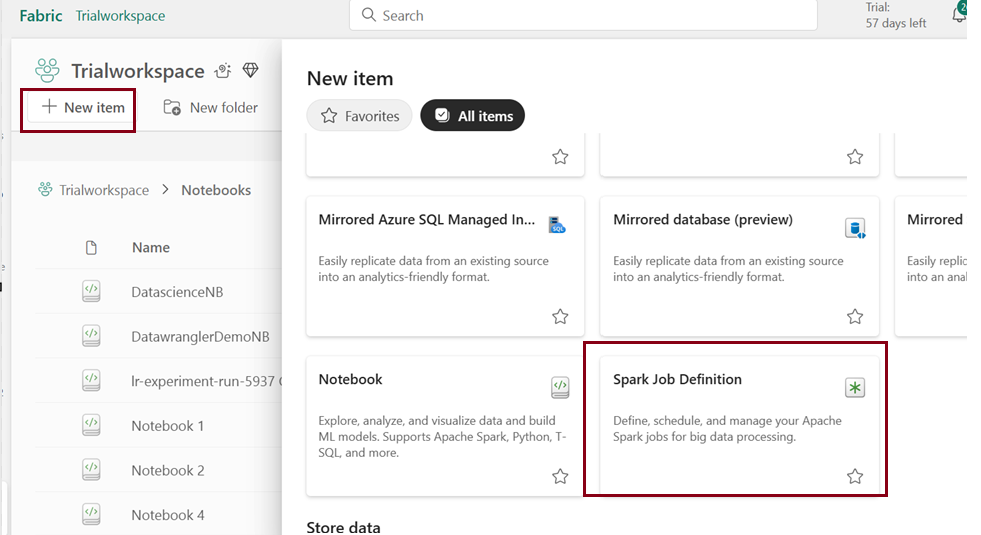
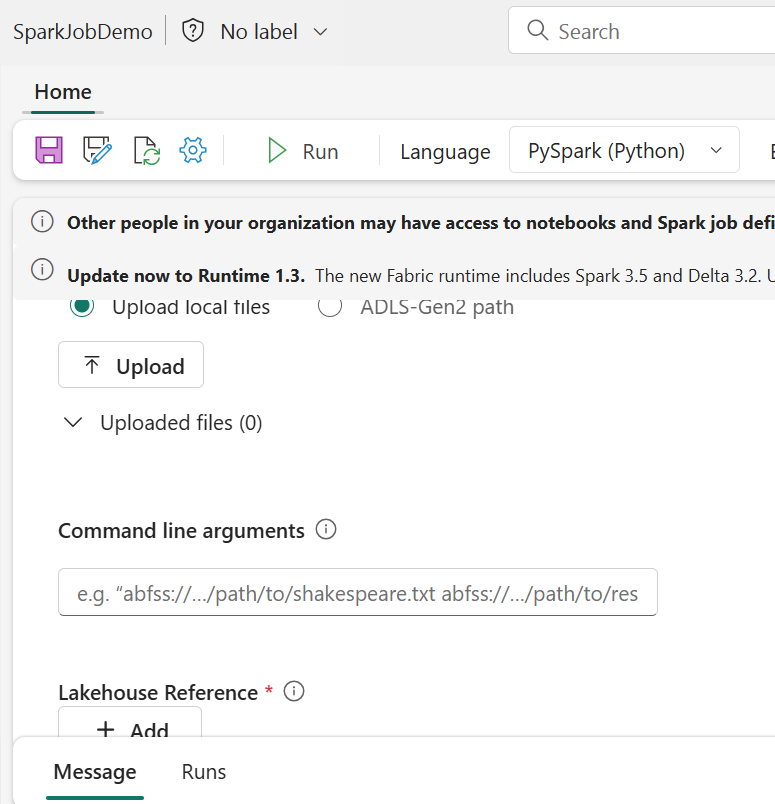
To configure a Spark job, create a Spark Job Definition within your workspace and define the script it will execute. Additionally, you can specify a reference file (such as a Python script with function definitions used in your job) and a reference to a specific Lakehouse that contains the data the script will process.
Conclusion:
In the above blog post we’ve walked through the steps to configure Apache Spark within Microsoft Fabric, enabling us to leverage its powerful distributed computing capabilities. By setting up Spark pools, adjusting cluster configurations, and enabling essential features like high concurrency and automatic logging, we’ve created an environment ready for large-scale data processing and analytics.
Now that we have our Spark cluster set up, we can easily work with data using popular tools such as PySpark for Python-based data processing and Spark SQL for querying large datasets. Microsoft Fabric’s integrated Spark experience makes it easy to scale and manage big data workloads, enabling seamless collaboration across teams. Additionally, with the Native Execution Engine, many Spark workloads can run faster and more efficiently without requiring any changes to your existing code.
| Tags | Microsoft Fabric |
| Useful Links & MS Learn Modules | |
Test Your Knowledge |
Quiz |