
This blog introduces the “semantic link,” a feature in Microsoft Fabric designed to connect semantic models with Data Science. This functionality aims to streamline data connectivity, propagate semantic information, and integrate smoothly with data science tools, fostering efficient collaboration between Power BI and Synapse Data Science.
For example, a data scientist might use Data Science tools to train a model using data that has been preprocessed and analyzed in Power BI. Semantic Link ensures that the model can be deployed and understood using the same semantic definitions that business users rely on in Power BI.
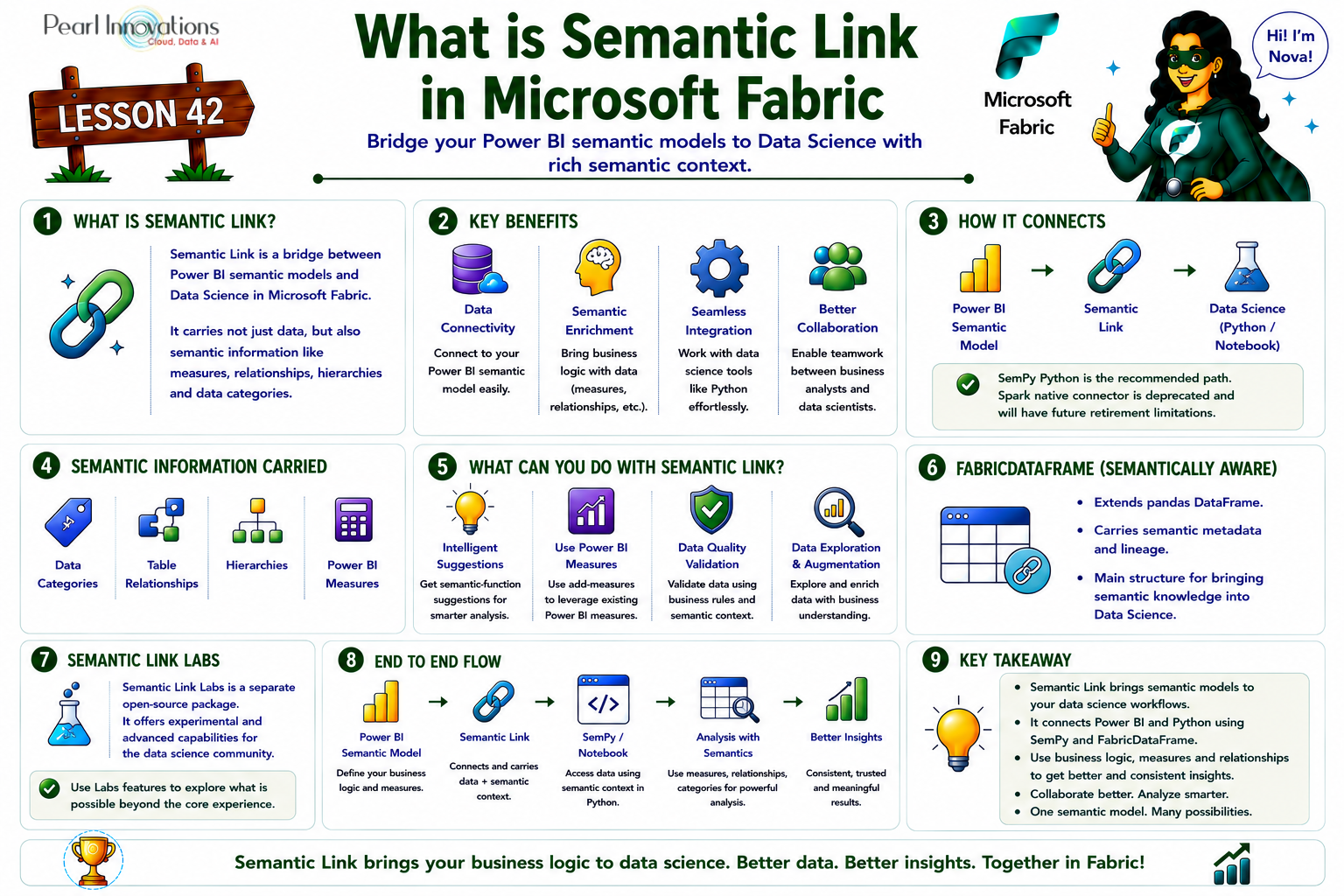
🚀 Learn It in 5 Minutes
Skip the long read.
See the key concepts in one easy-to-follow infographic.
Semantic link
Semantic Link is a feature within Microsoft Fabric that acts as a bridge between Power BI datasets and the Data Science environment. It provides access to both data and crucial semantic information stored in Power BI datasets, including data categories, relationships, hierarchies, and defined measures.
Benefits of Semantic Link
Semantic Link offers a range of benefits for data scientists and business analysts working with semantic models in Power BI. Here are some key benefits
- Data Connectivity
- Easy and Fast Access – Semantic Link provides quick and straightforward access to semantic models from Power BI without the need to copy or move the data.
- Versatile Access Options – SemPy Python library and Spark native connector enable data access using pandas, Spark SQL, PySpark, R, or Scala, enhancing flexibility for data scientists.
- Semantic Enrichment
- Enhanced Data Context – Semantic Link enriches data with crucial semantic information from Power BI, including data categories, relationships, hierarchies, and measures.
- Facilitates Data Tasks – This enriched information aids in tasks such as data validation, augmentation, visualization, and exploration, contributing to more comprehensive data analysis.
- Seamless Integration
- Integration with Established Tools – Semantic Link seamlessly integrates with established data science tools and frameworks, including notebooks, Spark, MLflow, and AutoML.
- Consistency with Existing Code – Data scientists can use familiar code and libraries while leveraging Fabric features such as distributed computing, data lineage, and security for an efficient and integrated workflow.
- Collaboration
- Elimination of Redundancy – Semantic Link eliminates the need to reimplement business logic embedded in Power BI measures, promoting consistency.
- Shared Semantic Models – Collaboration between data scientists and business analysts is facilitated by using the same semantic models and measures, ensuring consistent and reliable data-driven insights.
Power BI Connectivity
Semantic models within Power BI act as a unified tabular object model for semantic definitions, with Semantic Link facilitating connectivity through:
- Python Pandas Ecosystem
Leverages the SemPy Python library to seamlessly connect to the Python pandas ecosystem, ensuring easy handling of data for data scientists.
- Spark Native Connector
The Spark native connector has been deprecated by Microsoft and will be retired in the future. It is supported only up to Spark Runtime 3.5 and does not support Spark Runtime 4.0 (Fabric Runtime 2.0) or later. Microsoft recommends using the SemPy Python library for continued support and access to new features when working with Power BI semantic models in Microsoft Fabric.
Applications of Semantic Information
Semantic Link makes use of crucial semantic information within the data, encompassing Power BI data categories, relationships between tables, and hierarchical structures. Notable applications include:
- Intelligent Suggestions
Provides intelligent suggestions for built-in semantic functions, enhancing the efficiency of data science tasks.
- Innovative Integration
Facilitates the augmentation of data with Power BI measures through the use of “add-measures,” enabling innovative data integration practices.
- Data Quality Validation
Employs tools for data quality validation based on relationships between tables and functional dependencies within tables, ensuring robust data integrity.
FabricDataFrame data structure
FabricDataFrame is a pivotal component within the semantic link framework, serving as the central data structure that enhances the capabilities of a standard pandas DataFrame.
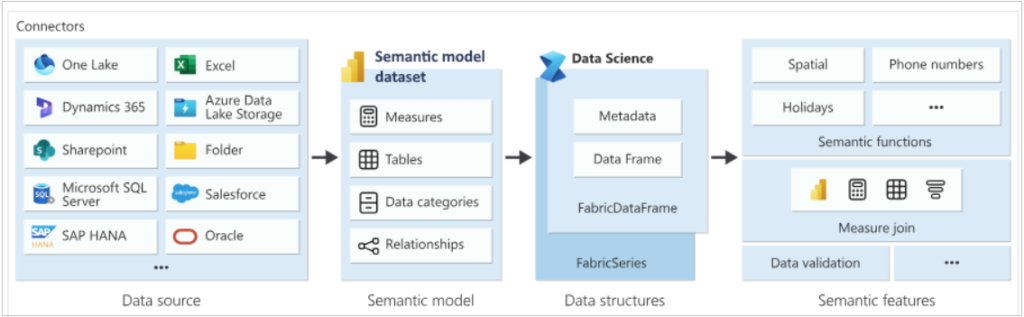
Source: Microsoft learn
Here’s a breakdown of its key features and functionality:
- Heart of Semantic Link
- FabricDataFrame is described as the heart of semantic link, indicating its central role in facilitating the seamless integration of semantic knowledge within the Data Science environment.
- Extension of Pandas DataFrame
- It extends the functionality of a regular pandas DataFrame, inheriting its core operations while adding additional features specific to the semantic link.
- Inclusion of Crucial Metadata
- FabricDataFrame enriches the basic data representation by including crucial metadata. This metadata encompasses semantic information and lineage, providing context and traceability to the data.
- Channel for Semantic Knowledge
- Think of FabricDataFrame as a channel through which semantic knowledge flows. It serves as a medium to carry both raw data and the associated semantic context, ensuring that the meaning and relationships within the data are preserved.
- Creation from Semantic Models or In-Memory Data
- FabricDataFrame can be created by reading data from semantic models, leveraging the structured information contained in these models.
- Alternatively, users can create FabricDataFrame instances using in-memory data, providing flexibility in data source options.
- Dynamic Exposure of Semantic Functions
- FabricDataFrame dynamically exposes semantic functions based on the logic defined by each function.
- Integration with Autocomplete Suggestions
Semantic link Labs
Microsoft also provides an open-source package called semantic-link-labs (sempy_labs). It includes experimental and advanced features such as semantic model editing, deployment pipeline utilities, migration tools, and other capabilities built on top of Semantic Link. It is installed separately from the core SemPy library and is recommended for users who want to explore advanced scenarios.
| Tags | Microsoft Fabric |
| MS Learn Modules | |
Test Your Knowledge |
Quiz |