
Microsoft Fabric is a powerful tool for handling and analyzing data. Whether you’re new or experienced, picking the right data store is crucial. This blog guides you through the intricate decision-making process of selecting the optimal data store in Microsoft Fabric.
Explore key considerations for each option – Data Warehouse, Lakehouse, SQL database, and Eventhouse (KQL Database) – and gain valuable insights from practical scenarios tailored to your data management needs
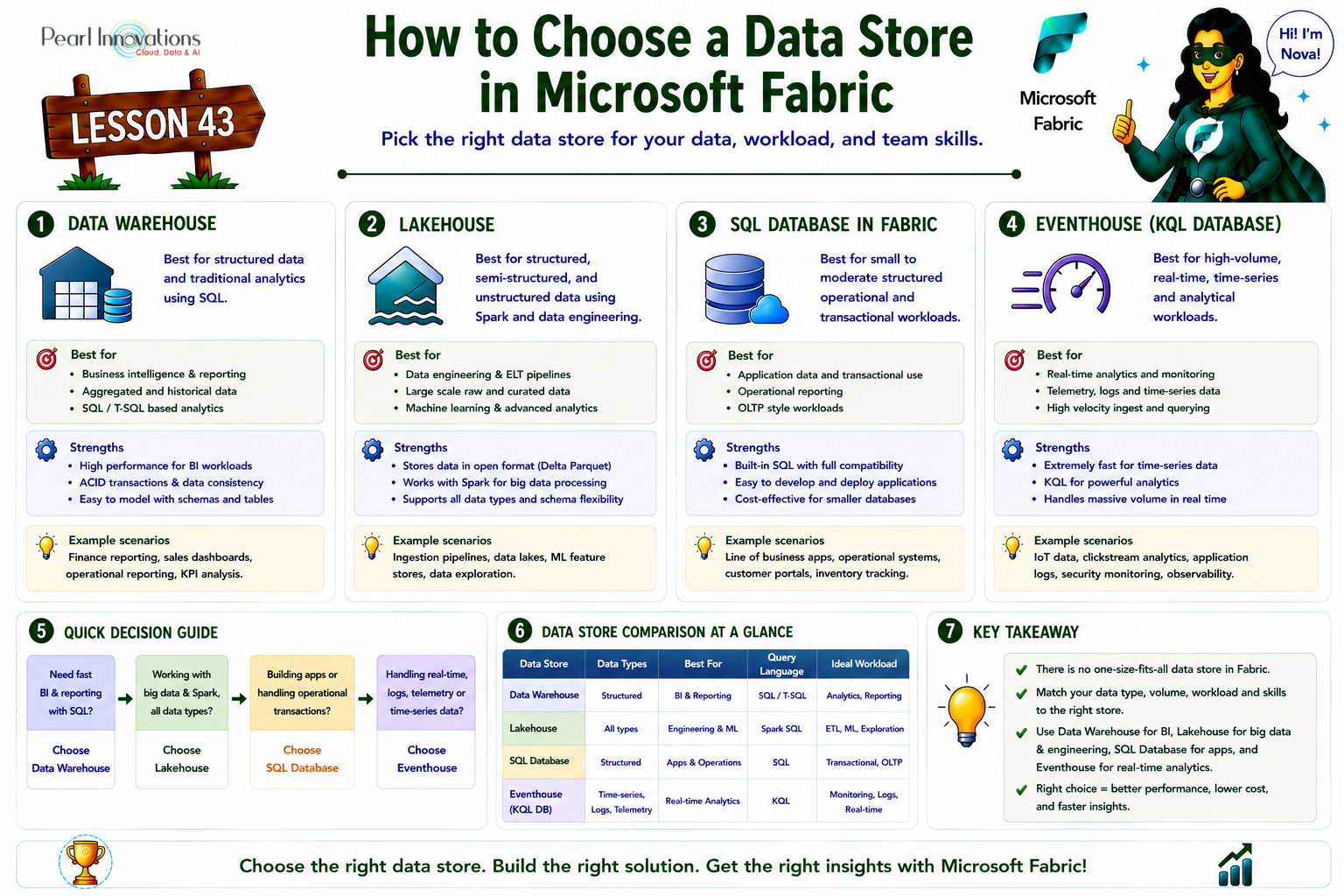
🚀 Learn It in 5 Minutes
Skip the long read.
See the key concepts in one easy-to-follow infographic.
Data Warehouse
- Aspects
- Data Volume: Unlimited
- Type of Data: Structured
- Primary Developer Persona: Data warehouse developer, SQL engineer
- Primary Developer Skill Set: SQL
- Data Organization: Databases, schemas, and tables
- Read Operations: T-SQL, Spark
- Write Operations: T-SQL, Spark
- Multi-Table Transactions: Yes
- Primary development interface: SQL scripts
- Security: Object-level (table, view, function, stored procedure), column-level, row-level
- Accessing Data Through Shortcuts: Yes, accessing data indirectly through the lakehouse.
- Ability to Serve as Shortcut Sources: Yes (tables)
- Cross-item Query Capability: Yes, you have the capability to query across both lakehouse and warehouse tables.
- Scenario
Ram, a proficient data analyst in a growing tech firm, is tasked with establishing a robust data infrastructure in Microsoft Fabric. Given the company’s historical reliance on SQL-based tools, Ram opts for a data warehouse to streamline data cleaning, modelling, and analysis.
This decision aligns seamlessly with the team’s strong background in SQL, fostering efficient T-SQL interactions. Ram consciously decides to utilize a data warehouse, ensuring a structured and familiar environment for the team. This choice not only facilitates proficient management and analysis of data but also accommodates Spark users within the organization.The data warehouse becomes the cornerstone for scalable insights in the ever-evolving tech landscape.
Fabric Data Warehouse is now the direct successor to Power BI Datamart too (see the Datamart note below), so it also covers many of the low-code, SQL-based scenarios Datamart used to serve, not just traditional enterprise warehousing.
Lakehouse
- Aspects
- Data Volume: Unlimited
- Type of Data: Structured, Semi-structured and Unstructured
- Primary Developer Persona: Data engineer, Data scientist
- Primary Developer Skill Set: Support for Spark using Scala, PySpark, Spark SQL, and R.
- Data Organization: Based on folders and files, databases, and tables.
- Read Operations: T-SQL, Spark
- Write Operations: Spark (Scala, PySpark, Spark SQL, R)
- Multi-Table Transactions: No
- Primary development interface: Spark notebooks, Spark job definitions
- Security: Security measures include row-level and table-level (when utilizing T-SQL), with no specific measures for Spark.
- Accessing Data Through Shortcuts: Yes
- Ability to Serve as Shortcut Sources: Yes (files and tables)
- Cross-item Query Capability: Yes, you can seamlessly query across both lakehouse and warehouse tables. Moreover, you have the capability to extend your queries across multiple lakehouses, utilizing Spark, and incorporating shortcuts for efficient access.
- Scenario
Sita, a skilled data engineer, faces the challenge of managing terabytes of data in Microsoft Fabric. With a team skilled in both PySpark and T-SQL, Sita chooses a lakehouse.
This decision allows for effective utilization of diverse skills, accommodating T-SQL experts for consumption and enabling seamless interaction with data for PySpark users. The lakehouse architecture proves to be the ideal solution, fostering collaboration and maximizing the team’s capabilities in Fabric’s dynamic data environment. Sita’s thoughtful choice aligns with the team’s skills, ensuring efficient data handling and insightful analysis.
SQL database in Fabric
Aspects:
- Data Volume: Small to moderate (typically GBs up to a few TB).
- Type of Data: Structured (also handles JSON, XML, geometry, geography).
- Primary Developer Persona: App developer, citizen developer.
- Primary Developer Skill Set: SQL, no-code.
- Data Organization: Databases, schemas, tables.
- Read/Write Operations: T-SQL (full OLTP support — high-frequency updates, transactional consistency, referential integrity), plus a SQL analytics endpoint for read access from Spark or Power BI (Direct Lake).
- Multi-Table Transactions: Yes.
- Primary development interface: SQL scripts, no-code tools.
- Security: Standard SQL security model.
- Accessing Data Through Shortcuts: Yes (via SQL analytics endpoint).
- Cross-item Query Capability: Yes.
Scenario: Kirby needs an operational database for an application, where data must also be joined with Spark data, warehouse data, and real-time events from an Eventhouse. Every Fabric SQL database automatically includes a SQL analytics endpoint, so the data can be queried in real time from Spark or Power BI (Direct Lake) without extra ETL, sparing the operational database from analytical query overhead. This is the scenario Power BI Datamart used to partially cover for no-code/citizen developers SQL database is now the closest equivalent for small-to-moderate structured, transactional workloads.
Eventhouse (KQL database)
- Aspects
- Data Volume: Unlimited
- Type of Data: Structured, Semi-structured, Unstructured
- Primary Developer Persona: Citizen Data scientist, Data engineer, Data scientist, SQL engineer
- Primary Developer Skill Set: No code, KQL, SQL
- Data Organization: Based on databases, schemas, and tables.
- Read Operations: KQL, T-SQL, Spark, Power BI
- Write Operations: KQL, Spark, connector ecosystem
- Multi-Table Transactions: Yes, available for multi-table ingestion.
- Primary development interface: KQL Query set, KQL Database
- Security: Row-level Security.
- Accessing Data Through Shortcuts: Yes
- Ability to Serve as Shortcut Sources: Yes
- Cross-item Query Capability: Yes, the capability to query across KQL Databases, lakehouses, and warehouses utilizing shortcuts.
- Advanced analytics: Incorporates native elements for Time Series analysis and comprehensive geospatial storing and query capabilities.
- Advanced formatting support: Complete indexing support for free text and semi-structured data such as JSON.
- Ingestion latency: Utilizes both queued ingestion and streaming ingestion, with the latter experiencing only a few seconds of latency.
- Scenario
Aruna, a seasoned data architect, is entrusted with designing a scalable solution for a multinational company dealing with vast, diverse data. Evaluating advanced analytics needs, Aruna strategically opts for a KQL Database in Microsoft Fabric, chosen for its quick response times and proficiency in handling billions of rows of structured, semi-structured, and unstructured data.
Collaborating with a cross-functional team comprising data scientists, analysts, and developers, Aruna leverages the KQL Database’s scalability and native elements for time series analysis and geospatial functions. This decision facilitates the rapid execution of complex queries, enabling the team to compare current and previous periods, identify emerging issues, and perform detailed geospatial analytics.
The choice of a KQL Database proves instrumental in building a robust and high-performance data solution, showcasing its capabilities in handling diverse data formats and providing insights critical for the company’s strategic decision-making processes.
Conclusion
In conclusion, selecting the right data store in Microsoft Fabric is a strategic decision that hinges on factors such as data type, volume, and developer skills. Whether opting for a Data Warehouse, Lakehouse, SQL database, or Eventhouse (KQL Database), organizations can tailor their choices to meet specific needs, ensuring efficient data management and insightful analytics in the dynamic realm of Microsoft Fabric
| Tags | Microsoft Fabric |
| MS Learn Modules | |
Test Your Knowledge |
Quiz |