
In Lesson 1, we introduced Azure Databricks as a cloud-based analytics platform built on Apache Spark, used for data engineering, analytics, AI, and machine learning. We also saw that organizations today collect data from many different sources websites, mobile apps, IoT devices, and more -and that traditional databases struggle to keep up.
In this lesson, we’ll answer a question every beginner eventually asks: Why do organizations choose Azure Databricks instead of sticking with their existing tools? To answer that, we need to look at the real challenges modern data teams face both in data engineering and in AI and see exactly how Azure Databricks addresses each one.
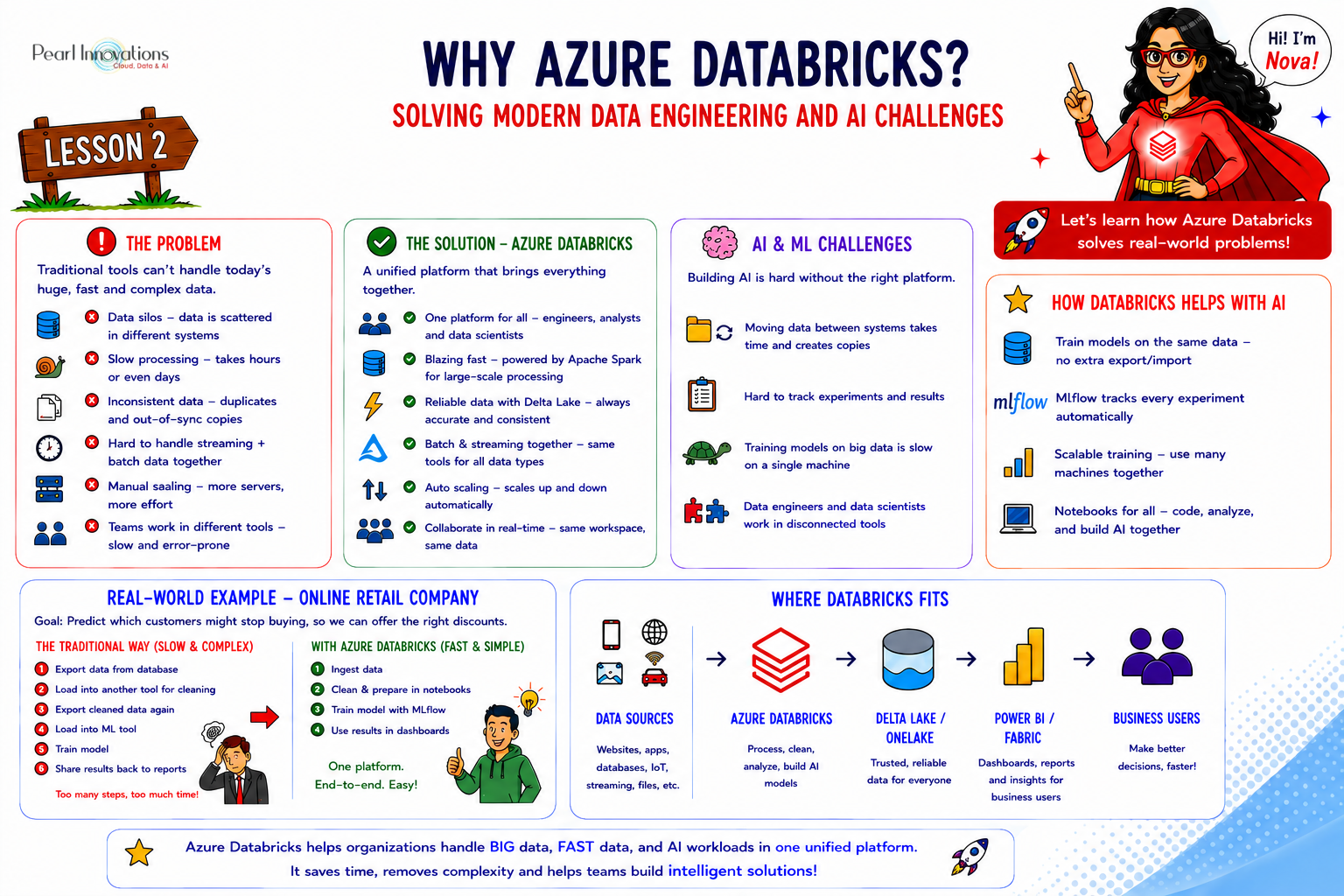
🚀 Learn It in 5 Minutes
Skip the long read.
See the key concepts in one easy-to-follow infographic.
The Traditional Way of Doing Data Engineering
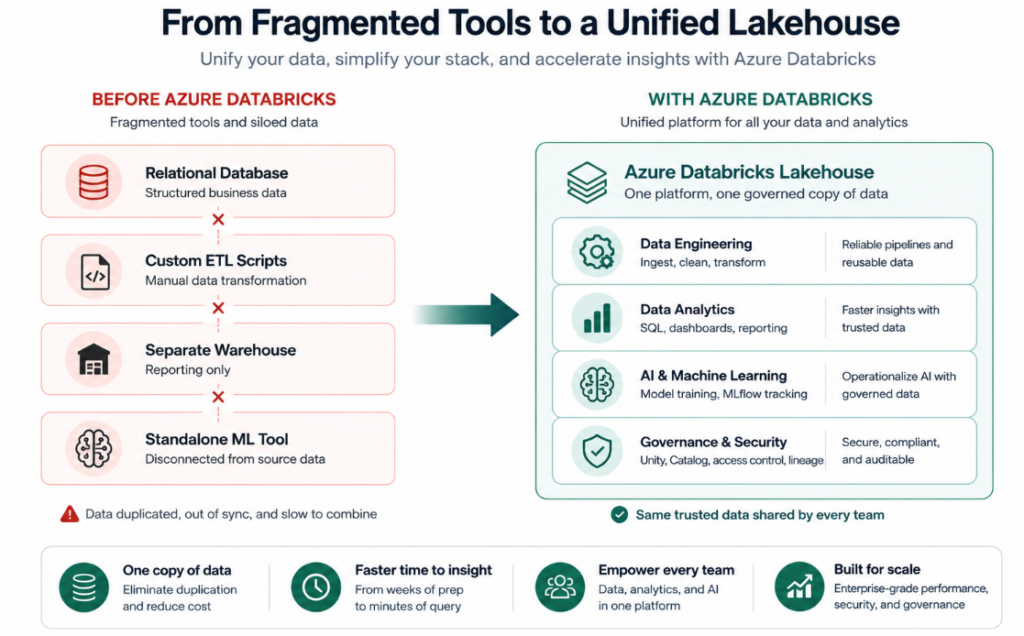
Before platforms like Azure Databricks existed, most organizations relied on a mix of separate tools stitched together: a relational database for storage, custom scripts or on-premises ETL tools for transforming data, a separate warehouse for reporting, and yet another system for machine learning.
This approach worked reasonably well when data was small and mostly structured. But as data volume, speed, and variety increased, this patchwork of tools started to break down.
Common Data Engineering Challenges
Most organizations run into the same set of problems as their data grows:
- Data silos – customer data, transaction data, and website data often live in separate systems that don’t talk to each other.
- Slow processing – traditional databases and single-server tools take too long to process millions or billions of rows.
- Inconsistent data – the same dataset can end up duplicated and out of sync across multiple tools.
- Difficulty combining batch and real-time data — most older tools are built for one or the other, not both.
- Limited collaboration – engineers, analysts, and data scientists often work in separate tools, making handoffs slow and error-prone.
- Manual scaling – adding more processing power usually means manually provisioning and managing more servers.
How Azure Databricks Solves These Data Engineering Challenges
Azure Databricks was designed specifically to remove these bottlenecks:
Unified platform – data engineers, analysts, and data scientists work in the same workspace, on the same data, instead of separate disconnected tools.
Distributed processing – built on Apache Spark, Azure Databricks spreads work across many machines, so large datasets process in minutes instead of hours.
Reliable data with Delta Lake – Delta Lake adds consistency and reliability on top of a data lake, so different teams are never working from out-of-sync copies.
Batch and streaming together – the same platform can process data that arrives all at once (batch) or continuously (streaming), using the same tools.
Automatic scaling – clusters can scale up automatically for heavy workloads and scale back down when idle, without manual server management.
The Growing Challenge of AI and Machine Learning
Data engineering is only half the story. Once data is clean and organized, many organizations want to go further using it to train machine learning models and build AI-powered applications. This introduces a fresh set of challenges.
Moving data between systems – data scientists often need to export data from one system into another just to start training a model, which is slow and creates duplicate copies.
Lack of reproducibility – without proper tracking, it can be hard to know exactly which data and settings produced a given model result.
Difficulty scaling training – training a model on a laptop or single machine becomes impractical once datasets grow large.
Disconnected teams – data engineers who prepare the data and data scientists who build models often work in separate environments, slowing everything down.
How Azure Databricks Solves AI and Machine Learning Challenges
Shared data foundation – data scientists train models directly on the same governed data that data engineers prepare, with no separate export step.
Built-in experiment tracking – Mlflow, included with Azure Databricks, tracks every experiment’s data, parameters, and results automatically.
Scalable training – the same distributed compute used for data engineering can be used to train models on large datasets.
Collaborative notebooks – data engineers and data scientists can work in the same notebook environment, reducing handoff delays.
A Real-World Example
Let’s go back to the online retail company from Lesson 1. Imagine this company wants to predict which customers are likely to stop buying, so they can offer timely discounts.
Using a traditional setup, this might look like:
- Export customer and order data from the database into a separate file.
- Load that file into a different tool for data cleaning.
- Export the cleaned data again into a machine learning environment.
- Train a model, with no easy way to trace exactly which data version was used.
- Manually move the finished model somewhere it can be used.
With Azure Databricks, the same company can clean, combine, and store the data once in the Lakehouse, then train the model directly on that same data — with MLflow automatically tracking what was used. There’s no repeated exporting, and both the data engineering team and the data science team are working from the same trusted source.
Traditional Approach vs Azure Databricks
| Challenge | Azure Databricks Approach |
| Data spread across separate tools | One workspace shared by engineering, analytics, and AI teams |
| Slow processing on large datasets | Distributed processing with Apache Spark |
| Inconsistent or duplicated data | Reliable, consistent tables with Delta Lake |
| Separate systems for batch and streaming | Both handled in the same platform |
| Manual server scaling | Clusters scale automatically |
| Hard-to-reproduce ML experiments | Automatic tracking with MLflow |
Key Reasons Organizations Choose Azure Databricks
- It replaces multiple disconnected tools with a single collaborative platform.
- It processes very large datasets quickly using distributed computing.
- It keeps data reliable and consistent across every team using it.
- It supports both traditional data engineering and modern AI/ML workloads.
- It scales automatically, reducing the need for manual infrastructure management.
What’s Next
Now that we understand why organizations choose Azure Databricks, the next lesson will open up the platform itself. In Lesson 3, we’ll explore Azure Databricks architecture — workspaces, compute, storage, and Unity Catalog — to understand how all these pieces fit together behind the scenes.
Conclusion
Azure Databricks exists because traditional data tools were never designed for the scale, speed, and variety of data that modern organizations deal with today. By bringing data engineering, analytics, and AI together on one platform, it removes the slow handoffs, duplicated data, and scaling headaches that come from stitching together separate tools.
For beginners, the key takeaway from this lesson is simple: Azure Databricks isn’t just faster it changes how teams work together, by giving data engineers and data scientists a shared, reliable foundation to build on.
Useful Links
| Tags | Azure Databricks |
| Databricks Blog | |
| Microsoft Docs | |
|
Test Your Knowledge |
Quiz |