
When you open a notebook, you may notice a language name at the top, such as Python or SQL. This tells Databricks which language your notebook uses by default.
The good news is that you are not limited to one language. Databricks notebooks support four main languages:
- Python
- SQL
- Scala
- R
You can also use more than one language in the same notebook.
This lesson will help you understand what each language is used for and which one you should start with as a beginner.
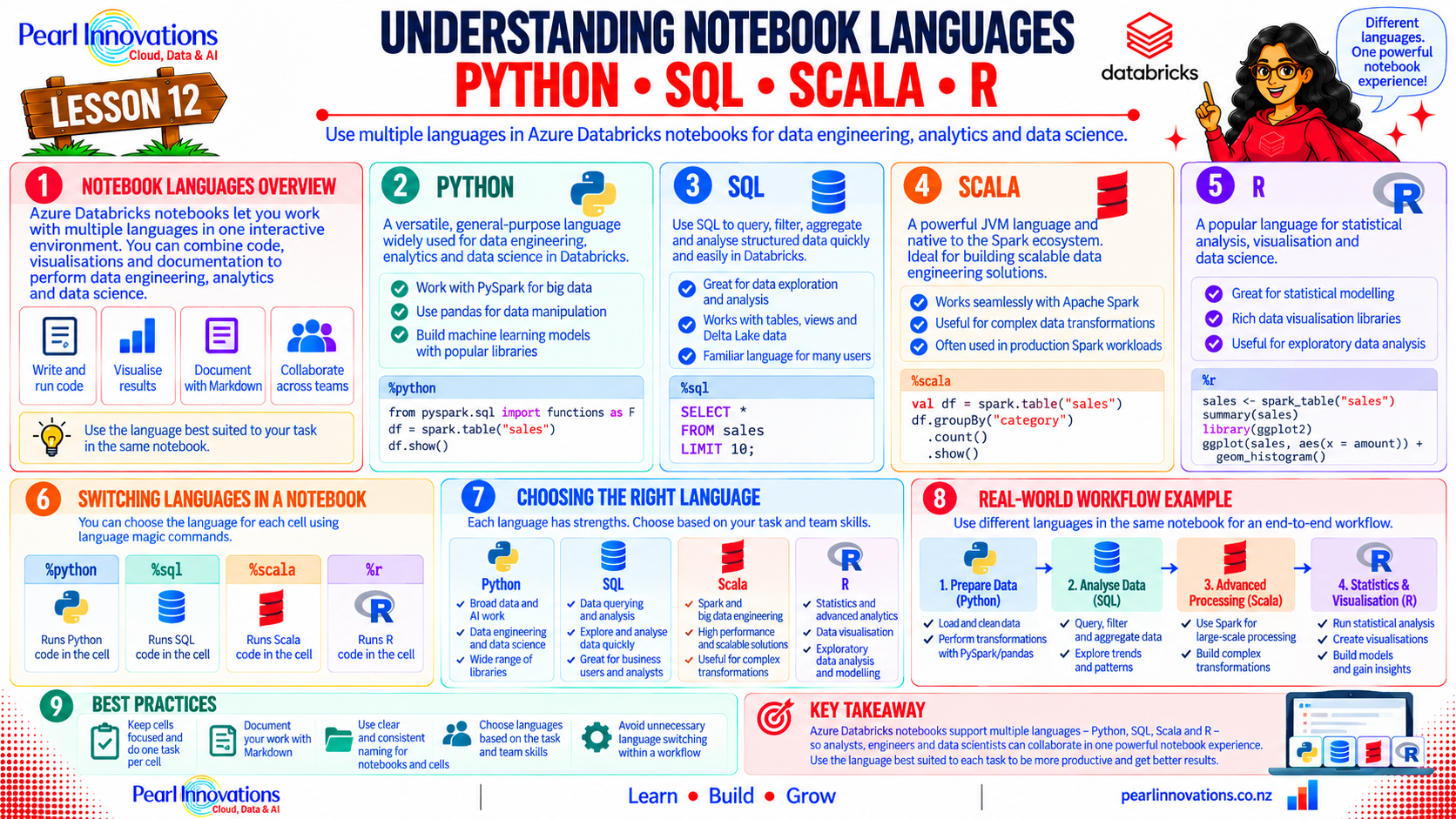
🚀 Learn It in 5 Minutes
Skip the long read.
See the key concepts in one easy-to-follow infographic.
Why Does Databricks Support Different Languages?
Different people work with data in different ways.
For example:
- A data engineer may use Python to clean and process data.
- A data analyst may use SQL to query tables and calculate totals.
- A data scientist may use Python or R for analysis and machine learning.
- An experienced Spark developer may use Scala for advanced Spark development.
Instead of making everyone use the same language, Databricks allows you to choose the language that best fits your task.
One notebook can use multiple languages
For example: When you create a notebook, you select a default language.
Default language: Python
This means a normal cell will run Python code unless you specifically tell Databricks to use another language.
Note: You will learn how to change the language for an individual cell in Lesson 13.
Python
Python is the most common language used in Databricks, and it is a good starting point for beginners.
Python is popular because its syntax is relatively easy to read and it can be used for many different data tasks.
In Databricks, Python is commonly used with PySpark, which allows you to process large amounts of data using Spark.
Example
df = spark.read.table(“sales_data”)
df_filtered = df.filter(df.region == “West”)
display(df_filtered)
You don’t need to understand every line yet.
The important idea is:
Python can be used to read, clean, transform and analyze data in Databricks.
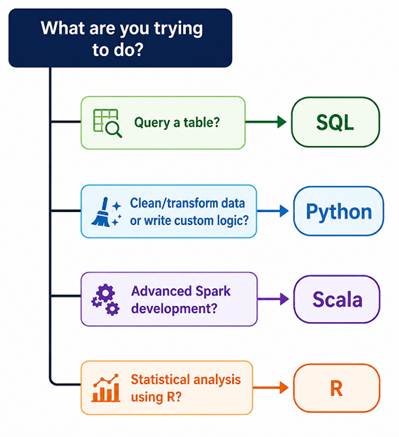
Use Python when you want to:
- Clean data
- Transform data
- Write custom logic
- Work with PySpark
- Build reusable functions
- Perform machine learning
SQL
SQL (Structured Query Language) is mainly used to work with data stored in tables.
In Azure Databricks, you can use SQL to:
- Select data
- Filter data
- Join tables
- Group data
- Calculate totals
- Sort results
Use SQL when:
Your task is mainly about working with existing tables and getting information from them.
Scala
Scala is another programming language supported by Databricks.
Apache Spark itself is built using Scala, so Scala can provide direct access to Spark functionality.
For example:
val df = spark.read.table(“sales_data”)
val filtered = df.filter($”region” === “West”)
display(filtered)
You don’t need to learn Scala when you are just starting with Databricks.
Scala becomes more relevant when you:
- Work on advanced Spark applications
- Need more control over Spark
- Work with existing Scala-based projects
- Perform advanced Spark development
For now, it is enough to:
Know that Scala exists and recognize Scala code when you see it.
R
R is a programming language commonly used for:
- Statistics
- Data analysis
- Data visualization
- Statistical modelling
Databricks supports R so that teams that already use R can continue using their existing skills.
For example:
df <- sql(“SELECT * FROM sales_data”)
summary(df)
Use R when:
You or your team already use R for statistics, analysis or visualization.
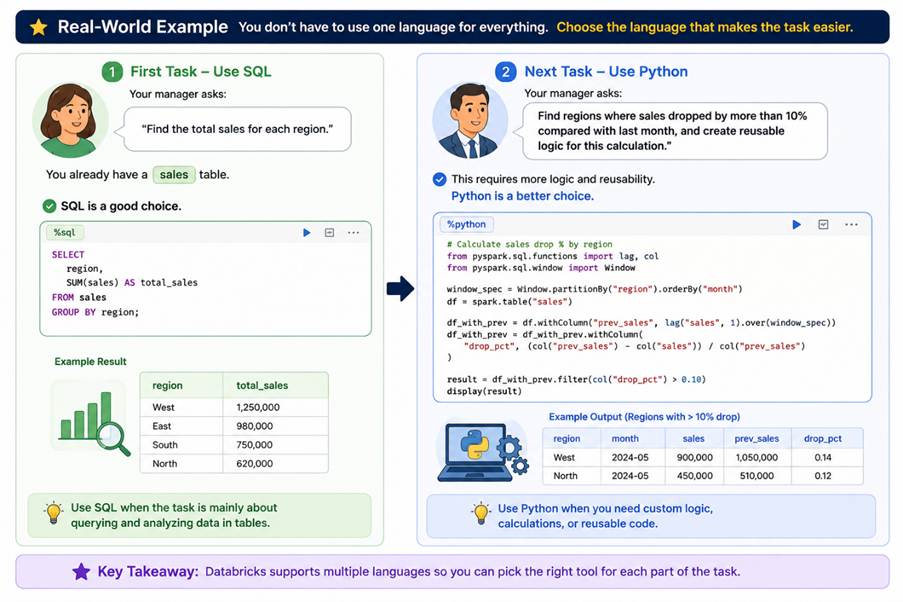
Look at below real time example
Conclusion
Databricks notebooks support Python, SQL, Scala, and R, giving you the flexibility to choose the right language for the task.
As a beginner, you don’t need to learn all four languages at once. Python and SQL are the best languages to start with because they cover most common data engineering and data analysis tasks.
| Tags | Creating Your First Notebook in Azure Databricks |
| Useful Links | |
| MS Learn Modules | |
|
Test Your Knowledge |
Quiz |