
Introduction
In the previous lesson, we explored why organisations use Azure Databricks for modern data engineering, analytics, machine learning and AI. In this lesson, we will look at how Azure Databricks is structured behind the scenes.
Azure Databricks brings together workspaces, compute, storage and governance to provide a secure, scalable and collaborative platform for working with data and AI.
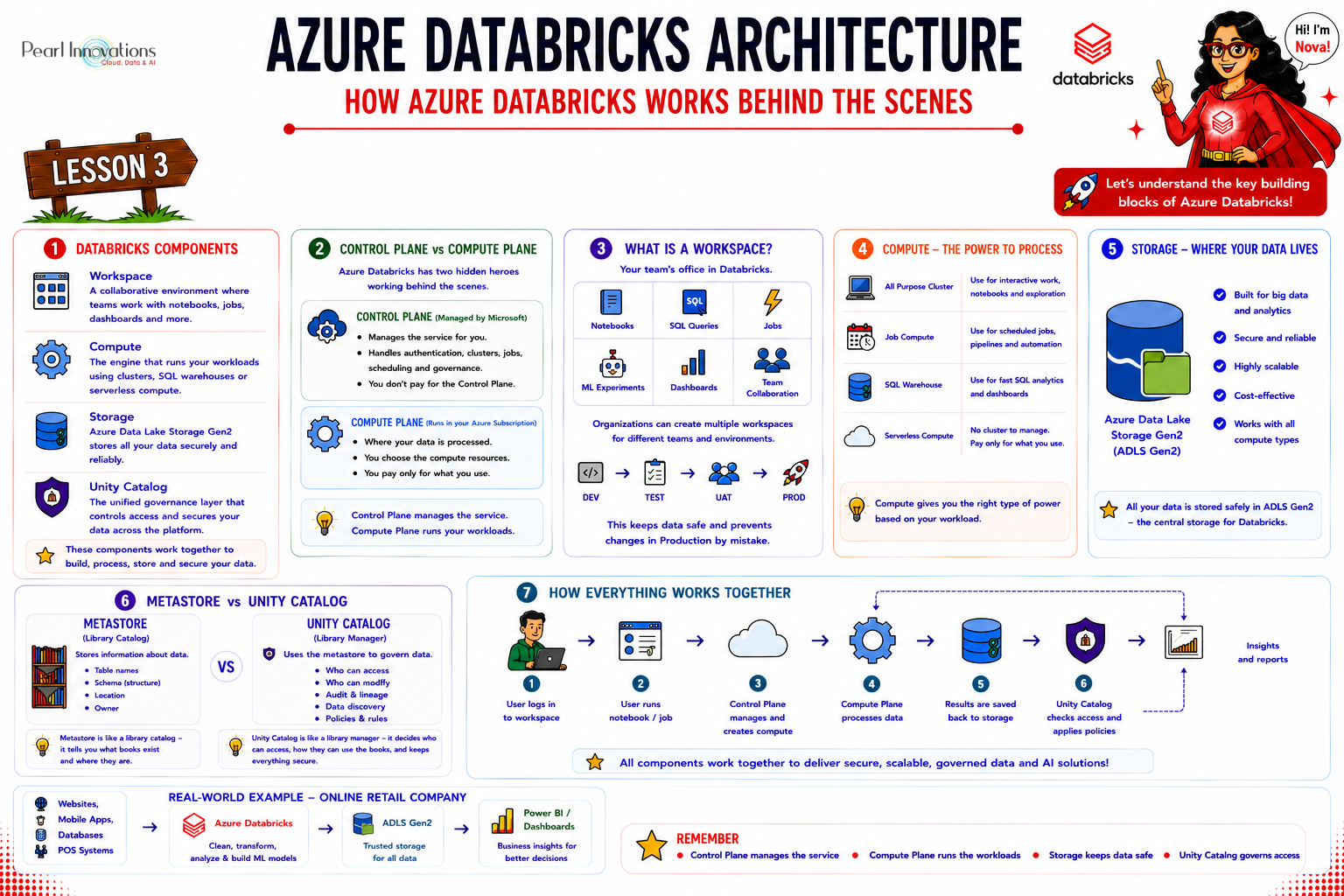
🚀 Learn It in 5 Minutes
Skip the long read.
See the key concepts in one easy-to-follow infographic.
Azure Databricks Architecture at a Glance
At a high level, Azure Databricks includes four key building blocks:
- Workspace – where teams collaborate and develop solutions.
- Compute – provides the processing power to run workloads.
- Storage – stores business data independently from compute.
- Unity Catalog – provides centralised governance, security and data discovery.
Behind the scenes, Azure Databricks also separates platform management from workload processing using the Control Plane and Compute Plane.
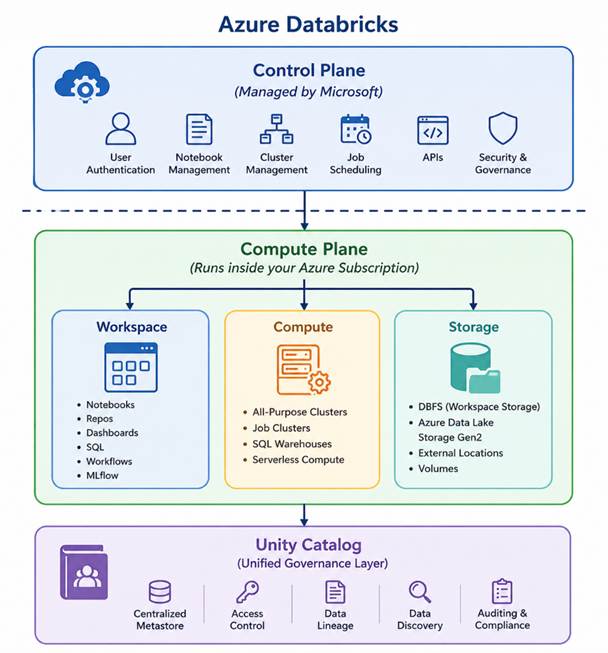
1. Control Plane vs Compute Plane
The Control Plane contains the services Azure Databricks uses to manage the platform. It includes workspace services, authentication, compute orchestration, jobs, administration and the Databricks web application.
The Compute Plane is where workloads execute and data processing occurs. The exact infrastructure model depends on whether you use classic compute or serverless compute.
| Control Plane | Compute Plane |
|---|---|
| Manages the Databricks platform | Processes workloads and data |
| Hosts workspace and platform services | Runs notebooks, jobs and SQL queries |
| Coordinates workload execution | Provides processing resources |
💡 Easy way to remember
Control Plane manages. Compute Plane processes.
2. What is an Azure Databricks Workspace?
An Azure Databricks Workspace is the collaborative environment where data engineers, data scientists, analysts and AI engineers build and manage solutions.
Inside a workspace you can:
- Create and run notebooks
- Develop data engineering pipelines
- Run SQL queries
- Create jobs and workflows
- Manage compute
- Build dashboards
- Track machine learning experiments
- Integrate with Git repositories
Organisations commonly use separate environments for Development, Testing/UAT and Production to improve isolation, governance and deployment management.
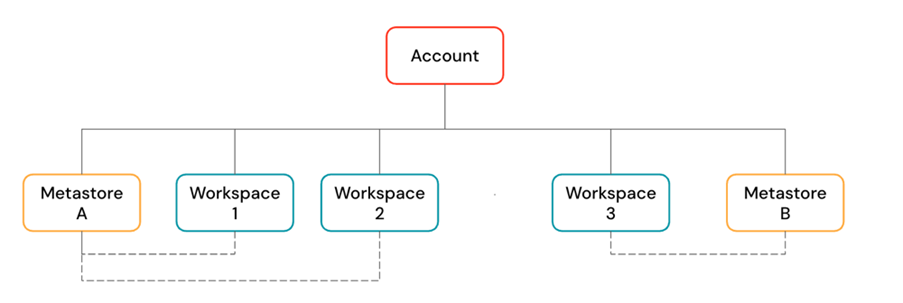
💡 Important
A workspace is not stored inside a Metastore. A Unity Catalog Metastore is a governance resource that can be assigned to one or more workspaces.
3. Serverless and Classic Compute Architecture
Azure Databricks supports different compute deployment models. Understanding the difference is especially important when looking at Control Plane and Compute Plane architecture.
Serverless Compute
With serverless compute, Azure Databricks manages the compute infrastructure for you. This reduces infrastructure administration and provides features such as rapid startup, automatic scaling and managed platform operations.
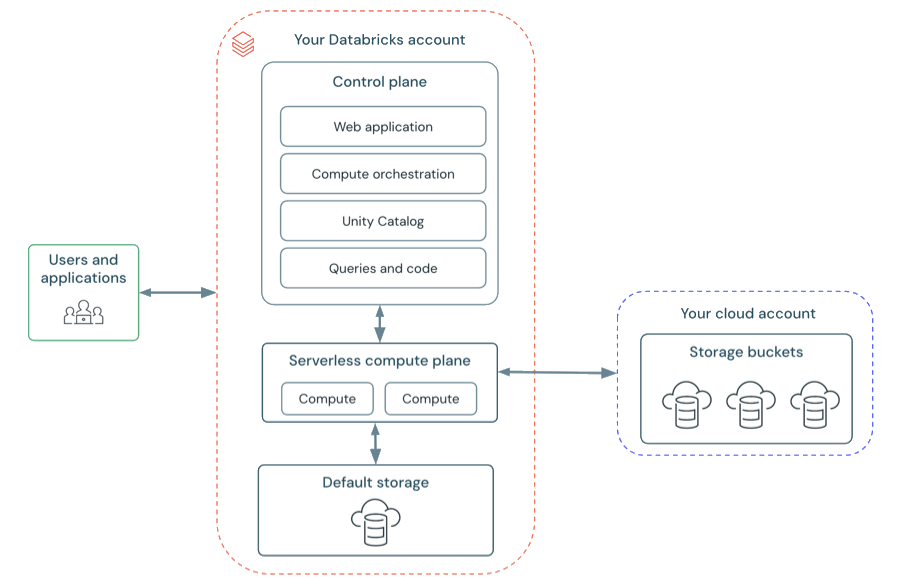
Source: Microsoft Learn
Hybrid Workspace (Classic Workspace)
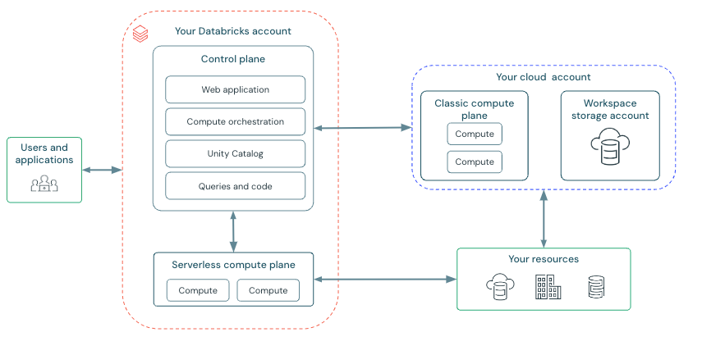
Source: Microsoft Learn
| Serverless Compute | Classic Compute |
|---|---|
| Infrastructure managed by Azure Databricks | Greater customer control over infrastructure configuration |
| Reduced infrastructure management | Useful when specific networking or infrastructure controls are required |
| Fast startup and automatic scaling | More infrastructure configuration options |
4. Understanding Azure Databricks Compute
Compute provides the processing power required to execute Databricks workloads. Different compute options are available depending on the workload.
| Compute Type | Best Used For |
|---|---|
| All-Purpose Compute | Interactive notebooks, exploration and development |
| Job Compute | Automated and scheduled production workloads |
| SQL Warehouse | SQL analytics, dashboards and BI workloads |
| Serverless Compute | Fully managed workloads without managing cluster infrastructure |
Choosing the right compute type helps improve both performance and cost efficiency.
5. Understanding Storage
One of the most important architectural principles in Azure Databricks is the separation of compute and storage.
Enterprise data is commonly stored in cloud object storage such as Azure Data Lake Storage Gen2 (ADLS Gen2), while Databricks compute processes the data when required.
This provides:
- Independent scaling of storage and compute
- High scalability
- Cost-efficient storage
- Flexible processing
- Secure access to enterprise data
⚠️ Legacy Storage Patterns
Older Azure Databricks environments may use DBFS root and DBFS mounts. You may still encounter these in existing notebooks and production systems, but they are legacy/deprecated approaches and should not be the preferred design for new solutions.
6. Legacy Azure Databricks Concepts You May Still Encounter
Existing Azure Databricks environments may contain older storage, security and governance patterns.
It is important to understand these technologies because you may need to support, migrate or modernise existing Databricks solutions. For new implementations, modern Unity Catalog-based approaches should be preferred.
⚠️ Legacy Concepts
The following concepts are included for learning and migration awareness. They should be considered legacy or deprecated patterns, rather than recommended starting points for new architectures.
6.1 DBFS Root – Legacy / Deprecated
Historically, Azure Databricks used the DBFS root as a workspace-level storage location for various files and artifacts.
You may still encounter paths such as:
dbfs:/FileStore/
dbfs:/user/hive/warehouse/
dbfs:/tmp/
⚠️ Legacy / Deprecated
DBFS root should not be used as the primary storage location for new production data architectures.
Modern solutions typically use Unity Catalog managed storage, Unity Catalog Volumes, External Locations or Workspace Files, depending on the requirement.
6.2 DBFS Mounts – Legacy / Deprecated
Older Databricks implementations frequently mounted Azure Data Lake Storage into DBFS.
For example:
/mnt/raw
/mnt/processed
/mnt/curated
An older notebook might contain:
dbutils.fs.ls("/mnt/raw")
⚠️ Legacy / Deprecated
DBFS mounts may still exist in older environments, but should not be the preferred storage access pattern for new implementations.
Modern implementations should use Unity Catalog External Locations, Storage Credentials and Volumes for governed access to cloud storage.
💡 Important distinction
The term DBFS itself may still appear in Azure Databricks. The important distinction is that DBFS root and DBFS mounts are legacy/deprecated patterns.
6.3 Hive Metastore – Legacy Governance Model
Before Unity Catalog, Azure Databricks commonly used a workspace-level Hive metastore to store metadata about databases, tables and views.
You may still encounter objects such as:
hive_metastore.default.customers
⚠️ Legacy
The workspace-level Hive metastore represents the older Databricks governance model. New solutions should use Unity Catalog for centralised governance.
6.4 Hive Metastore Table ACLs – Legacy
Older environments may use Table Access Control or Table ACLs to control access to objects registered in the Hive metastore.
⚠️ Legacy
Hive Metastore Table ACLs belong to the older governance model. Modern implementations should use Unity Catalog privileges.
6.5 Credential Passthrough – Legacy / Deprecated
Some older Azure Databricks environments use Azure Data Lake Storage credential passthrough so compute accesses storage using the identity of the signed-in user.
⚠️ Legacy / Deprecated
Credential passthrough is associated with older Hive Metastore-based access patterns. Modern architectures should use Unity Catalog governance instead.
Legacy vs Modern Approach
| Legacy Approach | Modern Recommended Approach |
|---|---|
| DBFS Root | Unity Catalog managed storage / Volumes |
| DBFS Mounts | External Locations and Volumes |
| Hive Metastore | Unity Catalog |
| Hive Metastore Table ACLs | Unity Catalog Privileges |
| Credential Passthrough | Unity Catalog Storage Credentials |
✅ Key Learning
Understand legacy technologies because you may encounter them when supporting or migrating existing Databricks platforms. For new solutions, use Unity Catalog and modern governed storage patterns.
7. Metadata and the Metastore
Before understanding Unity Catalog, it helps to understand metadata.
Metadata simply means data about data. It describes a data asset rather than containing the actual business records.
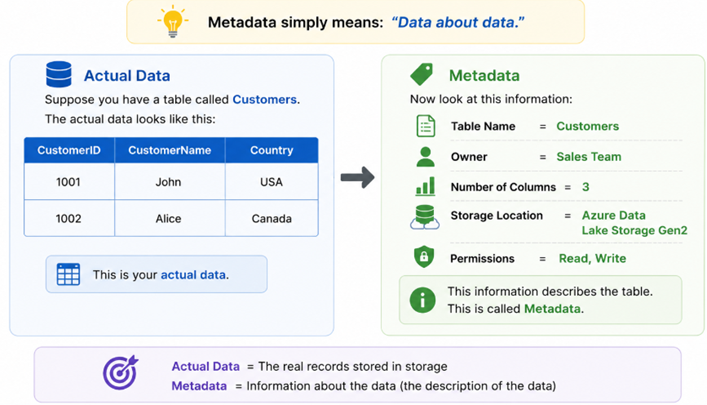
What is a Metastore?
A Metastore stores metadata about your data, rather than the actual business data itself.
Metadata can include:
- Catalog names
- Schema names
- Tables
- Columns
- Data types
- Storage locations
- Owners
- Permissions
💡 Easy way to remember
Data = the actual information.
Metadata = information describing the data.
Metastore = repository containing that metadata.
8. What is Unity Catalog?
As organisations add more users, datasets, workloads and workspaces, managing security separately across environments becomes difficult.
Unity Catalog provides a centralised governance layer for Azure Databricks.
It helps organisations manage:
- Data access and permissions
- Metadata
- Data discovery
- Data lineage
- Auditing
- Storage access
- Governance across multiple workspaces
Metastore vs Unity Catalog
A common misconception is that a Metastore and Unity Catalog are the same thing. They are related, but they serve different purposes.
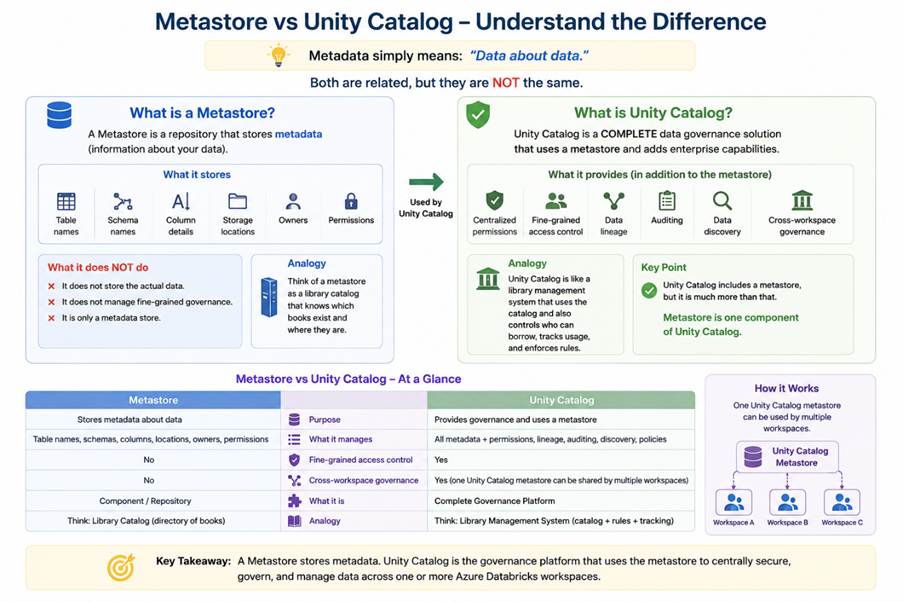
💡 Easy way to remember
Metastore = metadata repository
Unity Catalog = centralised governance solution that uses the Metastore
Multiple Azure Databricks workspaces can be assigned to the same Unity Catalog Metastore, allowing organisations to apply consistent governance across environments.
9. Unity Catalog Object Hierarchy
Unity Catalog organises governed data objects using a three-level namespace:
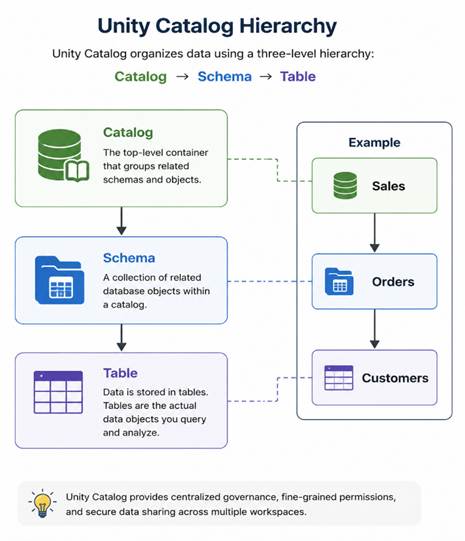
For example:
sales.production.customers
- sales – Catalog
- production – Schema
- customers – Table
This hierarchy makes it easier to organise data and apply permissions consistently across business domains and environments.
10. Unity Catalog Storage Concepts
Modern Azure Databricks architectures use several Unity Catalog concepts to securely connect Databricks to cloud storage.
Storage Credential
A Storage Credential represents the authentication mechanism used to access cloud storage.
External Location
An External Location combines a cloud storage path with a Storage Credential and allows access to that location to be governed through Unity Catalog.
Storage Credential → External Location → ADLS Gen2
Managed Tables
With a Managed Table, Unity Catalog manages the table together with its storage lifecycle.
External Tables
With an External Table, Unity Catalog governs the table metadata and permissions, while the underlying data remains in an externally managed cloud storage location.
Volumes
Unity Catalog Volumes provide governed access to non-tabular files such as:
- CSV files
- JSON files
- Images
- PDF documents
- Machine learning files
- Other unstructured and semi-structured data
11. How Everything Works Together
- A user signs in to an Azure Databricks workspace.
- The Control Plane manages workspace and platform services.
- The user runs a notebook, SQL query, pipeline or job.
- Databricks compute processes the workload.
- Data is read from cloud storage such as ADLS Gen2.
- Unity Catalog checks access and provides centralised governance.
- Results can be consumed by BI, analytics, machine learning and AI applications.
Azure Databricks architecture in one line:
Workspace → Compute → Storage → Unity Catalog → Analytics & AI
12. Real-World Example
Imagine a retail organisation that receives sales data from multiple systems.
- Sales data lands in ADLS Gen2.
- Azure Databricks compute reads and transforms the data.
- Processed data is stored as governed Delta tables.
- Unity Catalog manages permissions, ownership and lineage.
- Power BI consumes curated data for reporting.
- Data scientists use the same governed datasets for machine learning and AI.
The same governed data can therefore support data engineering, analytics, BI, machine learning and Generative AI.
13. Recommended Practices
- Use separate Development, Testing/UAT and Production environments where appropriate.
- Use Unity Catalog for centralised governance.
- Prefer modern governed storage patterns instead of legacy DBFS root and DBFS mounts.
- Use Unity Catalog Volumes for governed file access.
- Use Job Compute for automated production workloads.
- Use SQL Warehouses for SQL analytics and BI workloads.
- Use serverless compute where it meets workload and security requirements.
- Configure automatic termination and compute policies to control costs.
- Apply least-privilege access through Unity Catalog.
14. Key Takeaways
- Control Plane manages Azure Databricks platform services.
- Compute Plane runs workloads and processes data.
- Workspace is where teams collaborate and develop solutions.
- Compute provides processing power.
- Cloud storage stores enterprise data independently from compute.
- Unity Catalog provides centralised governance and security.
- Storage Credentials and External Locations provide governed access to cloud storage.
- Volumes provide governed access to non-tabular files.
- DBFS root, DBFS mounts, Hive Metastore governance, Table ACLs and Credential Passthrough are legacy concepts you may still encounter.
✅ Modern Azure Databricks Architecture
For new solutions, think Unity Catalog + governed cloud storage + appropriate compute + centralised security . Understand legacy patterns so you can recognise, support and migrate existing environments.
Conclusion
Azure Databricks is more than just a platform for running Spark code. It is a well-designed architecture that separates management, processing, storage, and governance into distinct components. This separation makes the platform secure, scalable, and suitable for enterprise workloads.
Understanding these architectural building blocks is essential before moving on to Spark programming, because every notebook you create, every job you run, and every dataset you process relies on these components working together.
In the next lesson, we’ll explore the Databricks Lakehouse Architecture and understand how it combines the best features of Data Lakes and Data Warehouses to create a unified platform for modern data engineering, analytics, and AI.
| Tags | Azure Databricks |
| Official Databricks Blog | |
| Microsoft Docs | |
|
Test Your Knowledge |
Quiz |