
In the previous lessons, we explored what Databricks is and why organizations use it for data engineering, analytics, and artificial intelligence. Before we begin working with notebooks, Delta tables, or data pipelines, it is important to understand the architecture that powers Databricks.
One of the most common questions beginners ask is:
- What is a Data Warehouse?
- What is a Data Lake?
- What is a Lakehouse?
- Why did Databricks introduce the Lakehouse Architecture?
In this lesson, we’ll answer these questions step by step and then walk through how the Databricks Lakehouse Architecture works using the reference diagram below.
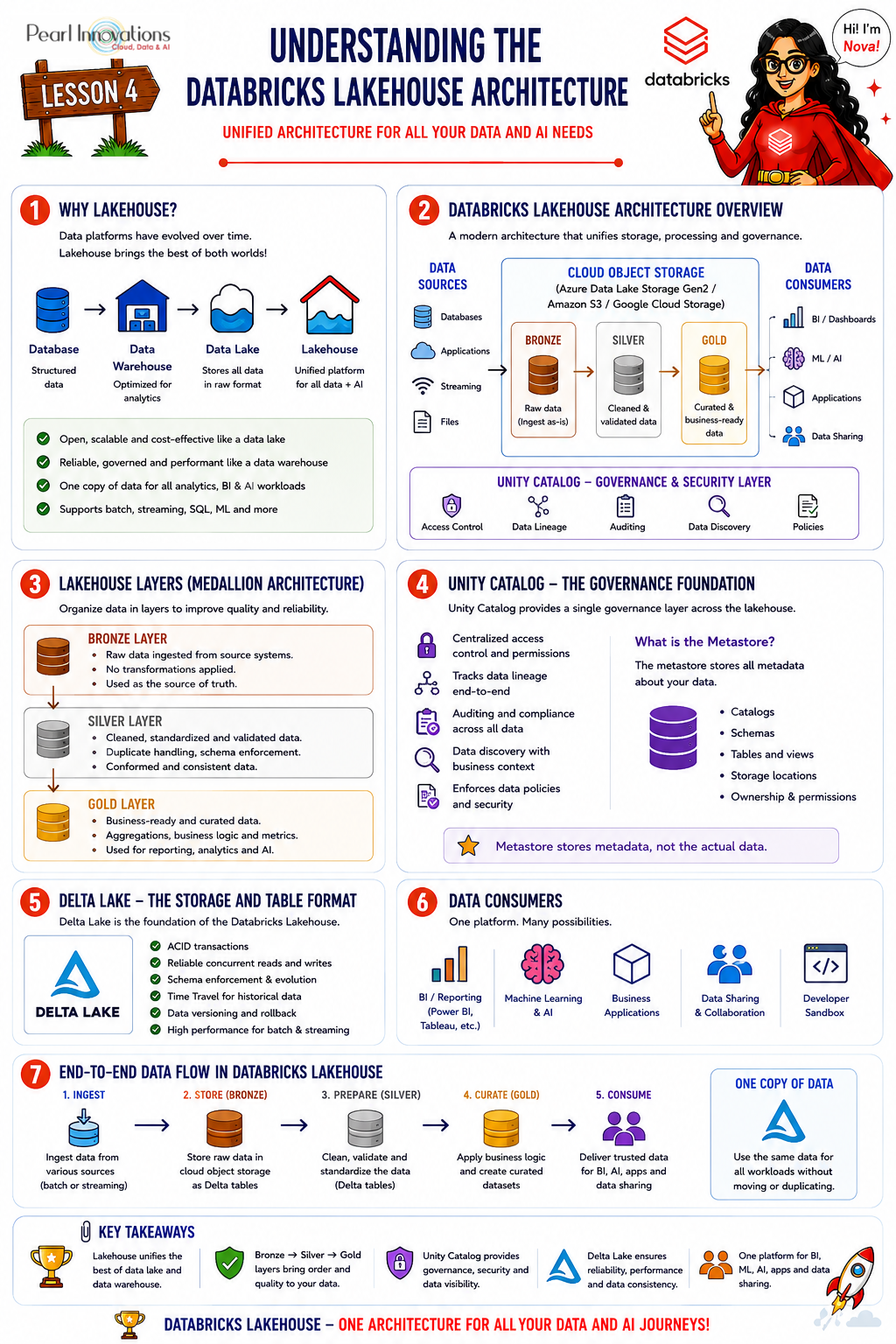
🚀 Learn It in 5 Minutes
Skip the long read.
See the key concepts in one easy-to-follow infographic.
Evolution of Data Platforms
As organizations generated more data over time, the way they stored and analysed data also evolved. Each technology below solved the limitations of the one before it.
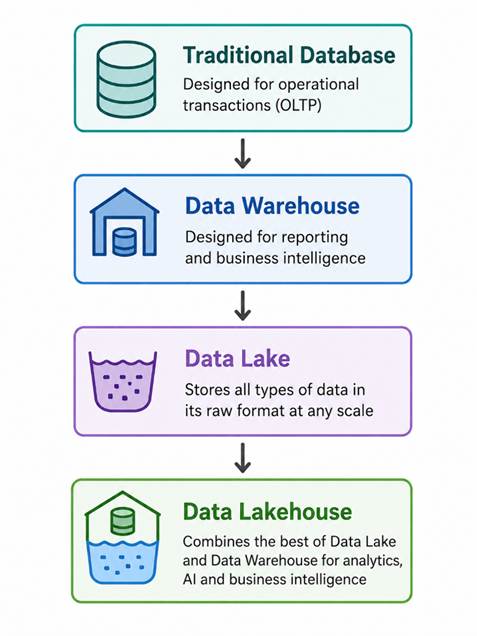
What is a Database?
A database is designed to store and manage operational or transactional data. It organizes information into tables with rows and columns, making it easy for applications to insert, update, delete, and retrieve records.
Example: An online shopping application stores customer details, product information, and orders in a relational database such as SQL Server, MySQL, or PostgreSQL.
Databases are excellent for day-to-day business operations, but they are not optimized for analyzing years of historical data.
| Advantages | Limitations |
| Fast transaction processing Supports updates and deletes Ensures data consistency Ideal for business applications | Not built for analyzing large volumes of historical data Running analytical queries slows down application performance |
What is a Data Warehouse?
As businesses grew, managers wanted to analyse historical trends, compare yearly sales, and generate reports. Running these analytical queries directly on operational databases reduced application performance this led to the introduction of Data Warehouses.
A Data Warehouse is a centralized repository designed specifically for reporting and analytics. Instead of storing only operational data, it combines data from multiple systems, cleans it, transforms it, and stores it in a structured format optimized for business intelligence.
Example: A Data Warehouse helps answer questions like “Which products sold the most last year?”, “Which region generated the highest revenue?”, or “What are the monthly sales trends?”
| Advantages | Limitations |
| Optimized for analytical queries Stores historical data High performance for reporting Supports Business Intelligence tools | Designed mainly for structured data Expensive to scale Limited support for images, videos, and log files Data must be transformed before loading |
What is a Data Lake?
As organizations began collecting massive volumes of structured and unstructured data, a more flexible storage solution became necessary. A Data Lake is a centralized storage repository that allows organizations to store all types of data in their original format the data does not need to be transformed before it is stored.
Example: A Data Lake can store CSV files, JSON files, XML files, images, videos, documents, IoT sensor data, and application logs, side by side.
| Advantages | Limitations |
| Stores all data types Highly scalable Cost-effective storage Ideal for big data and machine learning | No built-in ACID transactions Weak governance Data quality issues Difficult to manage permissions Slower analytical performance if not properly organized |
Why Was the Lakehouse Introduced?
Organizations often ended up maintaining both a Data Warehouse and a Data Lake side by side. This resulted in duplicate copies of data, multiple ETL pipelines, higher storage costs, complex architectures, and synchronization issues between the two systems.
A single architecture that combined the strengths of both platforms was needed — this led to the Data Lakehouse.
What is a Data Lakehouse?
A Data Lakehouse combines the flexibility and scalability of a Data Lake with the reliability, governance, and performance of a Data Warehouse. Instead of maintaining separate systems for reporting, analytics, data engineering, and machine learning, organizations can perform all these workloads on a single platform.
A Lakehouse provides:
- Low-cost storage
- ACID transactions
- High-performance analytics
- Strong governance
- Support for structured and unstructured data
- AI and Machine Learning capabilities
Understanding the Databricks Lakehouse Architecture
Now that we understand why the Lakehouse was introduced, let’s look at how Databricks implements this architecture in practice. The diagram below shows the complete flow of data through the Databricks Lakehouse — from raw data sources on the left, through the Bronze, Silver, and Gold Delta tables, to the business consumers on the right, all governed by Unity Catalog.
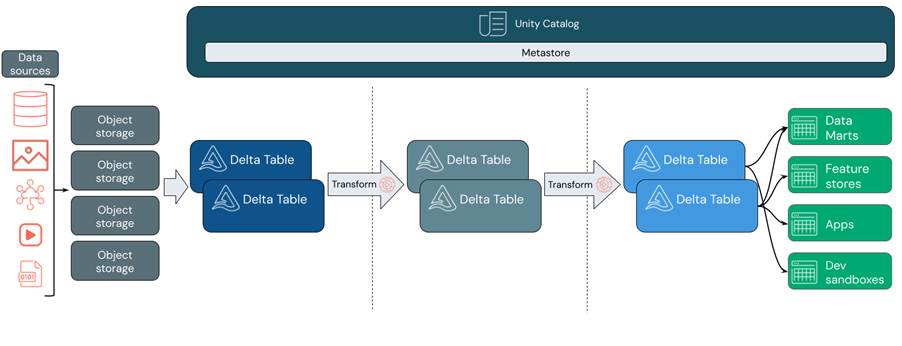
Databricks Lakehouse reference architecture: data sources, object storage, the Bronze / Silver / Gold Delta table layers, and the consumers that sit on top all governed by Unity Catalog and its Metastore.
Step 1 – Data Sources
Every analytics project begins with data. Organizations collect data from multiple sources, such as relational databases, images, IoT devices, videos, CSV and JSON files, and application logs. The Databricks Lakehouse is designed to ingest data from all of these different systems.
Step 2 – Object Storage
Once data is collected, it is stored in cloud object storage. Depending on the cloud provider, this could be Azure Data Lake Storage Gen2, Amazon S3, or Google Cloud Storage. Object storage provides low-cost storage, high scalability, support for all file formats, and durability and reliability. At this stage, the data remains in its original format.
Step 3 – Bronze Layer (Raw Data)
The first Delta Tables in the diagram represent the Bronze Layer. The Bronze layer stores raw data exactly as it is received from the source systems. Typical activities include data ingestion, preserving source data, recording ingestion timestamps, and maintaining historical records. This layer acts as the landing zone for all incoming data.
Step 4 – Data Transformation
The raw data is then processed and cleaned. Common transformations include removing duplicates, handling missing values, standardizing column names, converting data types, and applying validation rules. The cleaned data is written to the silver layer.
Step 5 – Silver Layer (Cleaned Data)
The Silver layer contains cleaned, validated, and standardized data. This is where most data engineering work takes place joining datasets, correcting inconsistencies, standardizing business data, and improving data quality. The Silver layer provides reliable data for downstream processing.
Step 6 – Business Transformations
Additional transformations are applied to prepare the data for reporting and analytics aggregations, business KPIs, star schema modelling, fact and dimension tables, and calculated metrics. The results are stored in the gold layer.
Step 7 – Gold Layer (Business-Ready Data)
The Gold layer contains curated datasets optimized for business consumption. This is the layer accessed by dashboards, reports, business analysts, machine learning models, and executive reporting.
Example: Monthly Sales Summary, Customer Performance Dashboard, Product Revenue Analysis.
Step 8 – Data Consumers
The business-ready data is consumed by different applications, such as Data Marts for departmental reporting, Feature Stores for machine learning features, business applications, and developer sandboxes for testing and experimentation. All users access the same trusted data, ensuring consistency across the organization.
Note: A Feature Store is a centralized repository for storing, managing, and serving machine learning features.Its purpose is to allow multiple ML models and teams to reuse the same features instead of creating them repeatedly.
Unity Catalog – The Governance Layer
At the top of the architecture is Unity Catalog, which governs every layer of the Lakehouse. Unity Catalog provides centralized security, fine-grained access control, data lineage, auditing, and data discovery. Because every table is registered in Unity Catalog, organizations can enforce consistent governance across all data assets.
What is a Metastore?
Within Unity Catalog is the Metastore. A Metastore stores metadata, not the actual data. Metadata includes information such as catalog names, schemas, table definitions, storage locations, ownership, and user permissions.
Why Does Every Layer Use Delta Tables?
Every stage of the Lakehouse uses Delta Tables because they provide enterprise-grade capabilities, including ACID transactions, Time Travel, schema enforcement, schema evolution, and reliable concurrent reads and writes. These features make data processing more reliable and suitable for large-scale production workloads.
Time Travel is a powerful feature of Delta Lake that allows you to query previous versions of a Delta table using either a version number or a timestamp. This enables you to view historical data, audit changes, troubleshoot issues, and even restore earlier versions of a table without relying on separate backup systems. Unlike a traditional Data Lake, where recovering older data often requires external backups, Delta Lake stores transaction history internally, making Time Travel an integral feature of the Lakehouse architecture.
By default, Delta Lake retains transaction history (_delta_log) for 30 days and deleted data files for 7 days. As long as both the transaction logs and the required data files are retained, you can perform Time Travel. Once the data files are removed (typically after the retention period and a VACUUM operation), the history may still be visible using DESCRIBE HISTORY, but querying older versions of the table is no longer possible.
Deleted data files are older Parquet files that have been replaced by newer versions during updates, deletes, or merge operations. Although they are no longer part of the current Delta table, Delta Lake retains them for a configurable retention period (7 days by default) to support Time Travel. After the retention period, they can be permanently removed using the VACUUM command.
Key Takeaways
- A Database is designed for transactional processing.
- A Data Warehouse is optimized for reporting and analytics on structured data.
- A Data Lake stores structured, semi-structured, and unstructured data in its raw format.
- A Data Lakehouse combines the strengths of Data Warehouses and Data Lakes into a single architecture.
- The Databricks Lakehouse Architecture organizes data into bronze, silver, and gold layers using Delta Tables, while Unity Catalog provides centralized governance and the Metastore manages metadata.
Conclusion
The Databricks Lakehouse Architecture provides a unified platform for storing, processing, governing, and analyzing data. By combining the scalability of a Data Lake with the reliability of a Data Warehouse, it enables data engineers, analysts, data scientists, and business users to work from a single, trusted source of data. Understanding this architecture lays the foundation for learning core Databricks concepts such as Delta Lake, Unity Catalog, notebooks, and data pipelines in the upcoming lessons.
| Tags | Azure Databricks |
| Official Databricks Blog | |
| Microsoft Docs | |
|
Test Your Knowledge |
Quiz |