
Welcome to the Azure Databricks Beginner to Expert learning series!
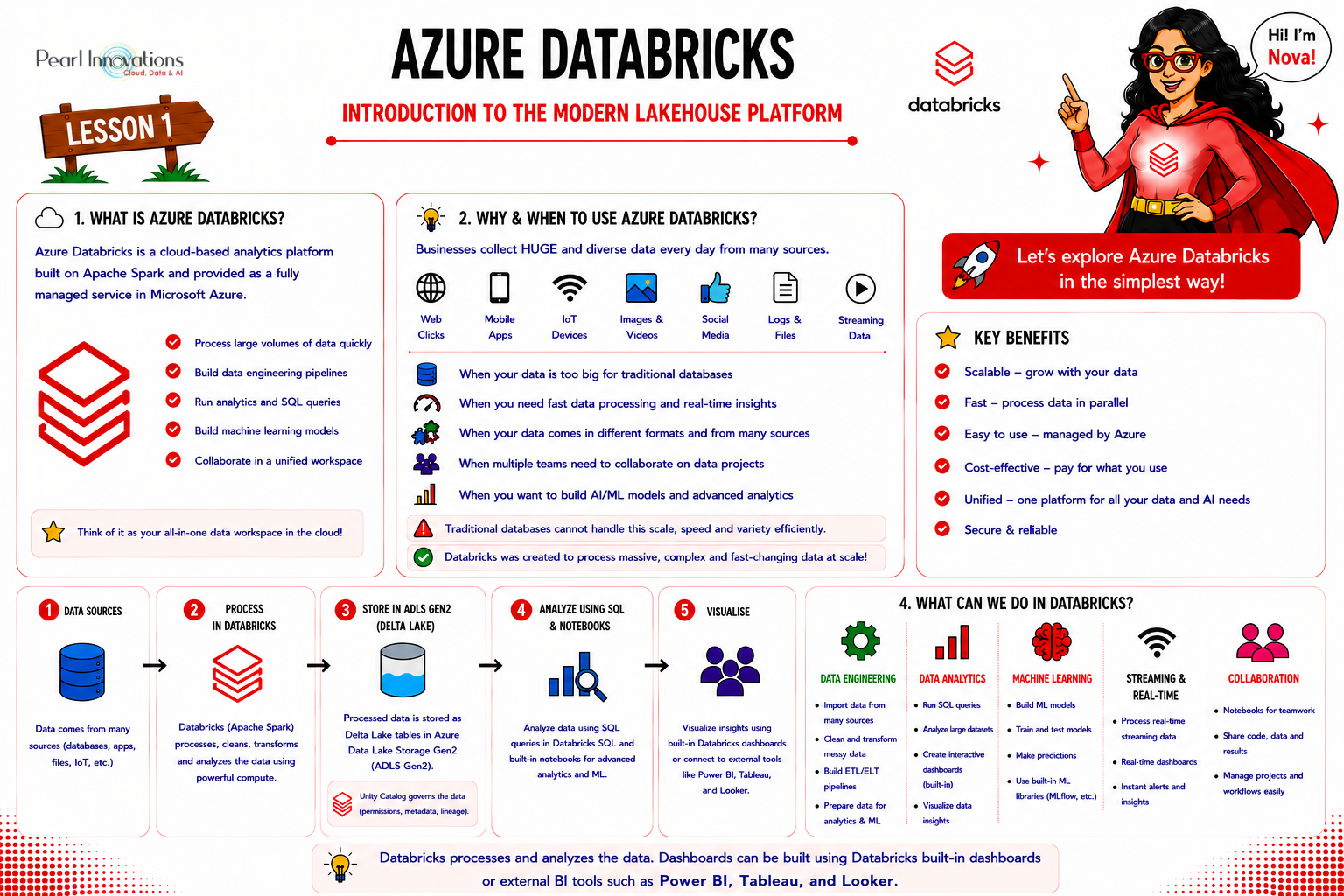
🚀 Learn It in 5 Minutes
Skip the long read.
See the key concepts in one easy-to-follow infographic.
Data is growing faster than ever before. Every day, organizations collect information from websites, mobile applications, business systems, IoT devices, social media, and many other sources. The challenge is no longer collecting data it is storing, processing, and analyzing it efficiently to make better business decisions.
Traditional databases work well for structured business data, but they struggle to handle the massive volumes and variety of modern data. This is where Azure Databricks comes in.
Azure Databricks is one of the most popular cloud-based analytics platforms used by organizations worldwide for data engineering, data analytics, artificial intelligence (AI), and machine learning (ML). It enables teams to process large amounts of data quickly while providing a collaborative environment where data engineers, data scientists, and analysts can work together.
In this first lesson, we’ll build a basic understanding of Azure Databricks, why it exists, and how it fits into today’s modern data architecture.
What is Azure Databricks?
Azure Databricks is a cloud-based analytics platform built on Apache Spark and offered as a fully managed service in Microsoft Azure.
Apache Spark is an open-source distributed data processing engine. Its job is to process large amounts of data very quickly by using multiple computers together. It doesn’t have its own programming language. Instead, it lets you write code using different languages.
Languages supported in Azure Databricks
Azure Databricks supports multiple programming languages in the same workspace. In fact, one of its biggest advantages is that different users (data engineers, analysts, and data scientists) can use the language they are most comfortable with.
| Language | Common Use |
| Python (PySpark) | Data engineering, machine learning, data analysis (most popular) |
| SQL (Spark SQL) | Querying and analyzing data, creating tables, reporting |
| Scala | High-performance Spark applications (Spark is written in Scala) |
| R | Statistical analysis and data visualization |
| Java | Spark application development (less commonly used in notebooks) |
Rather than installing and managing Spark clusters yourself, Azure Databricks provides everything you need in a ready-to-use environment. This allows you to focus on writing code, transforming data, and building analytics solutions instead of managing infrastructure.
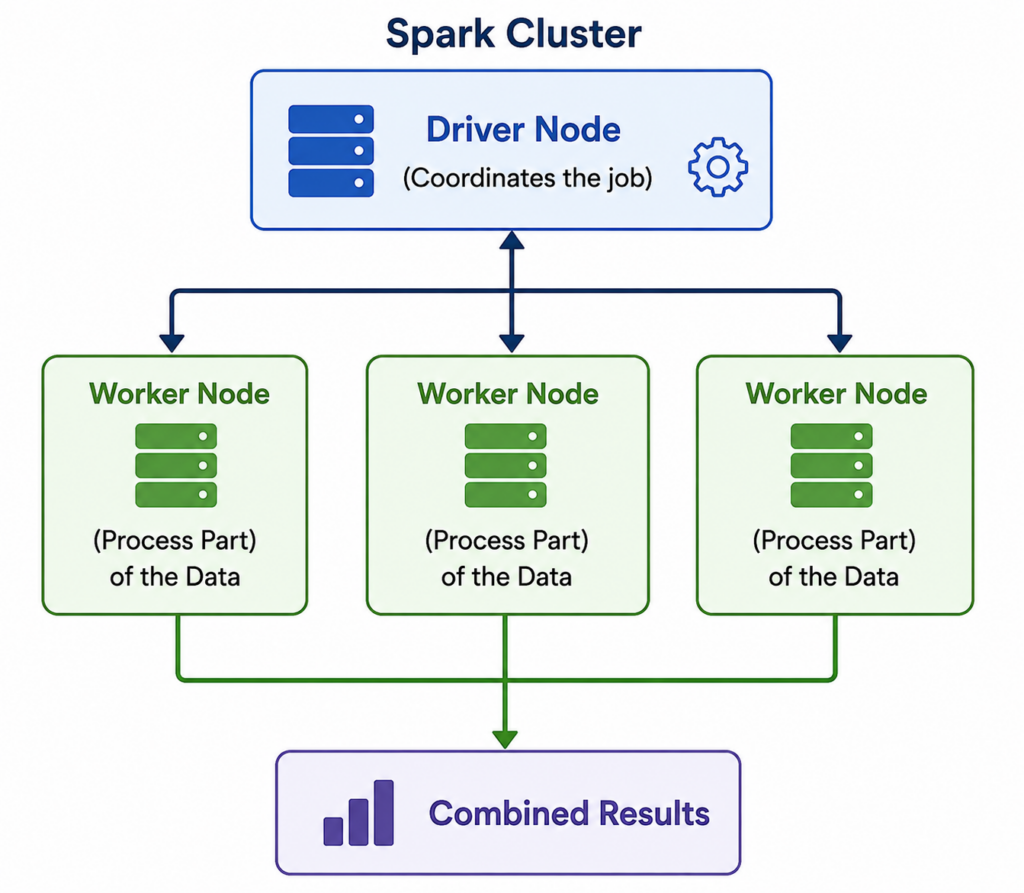
A Spark cluster is a group of virtual machines that work together to process large amounts of data. when we start working on azure databricks we need to create a cluster and start running notebooks on top of that based on the requirement.
It consists of:
Worker Nodes – Execute the tasks in parallel
Driver Node – Coordinates the job and distributes work.
Instead of one computer doing all the work, Spark divides the work among multiple computers so that data is processed much faster.
Think of Azure Databricks as a powerful workspace where you can:
- Read data from different sources
- Clean and transform data
- Process millions of records quickly
- Build machine learning models
- Analyze large datasets
- Share work with your team
Everything happens within a single collaborative platform.
Why Was Azure Databricks Created?
To understand Azure Databricks, let’s first look at how organizations managed data in the past. Years ago, companies mostly worked with structured data stored in relational databases. Reporting tools connected directly to these databases to generate reports.
As businesses grew, they started collecting:
- Website click data
- Mobile app data
- IoT sensor data
- Images and videos
- Social media data
- Log files
- Streaming data
Traditional databases were not designed to efficiently process such large and diverse datasets. Organizations needed a platform that could handle big data, process it faster, and scale as data volumes increased.
Azure Databricks was created to solve these challenges by providing a scalable platform for modern data processing.
Understanding Big Data
You may often hear the term Big Data when learning about Azure Databricks.
Big Data simply refers to data that is too large, too fast, or too complex for traditional systems to process efficiently.
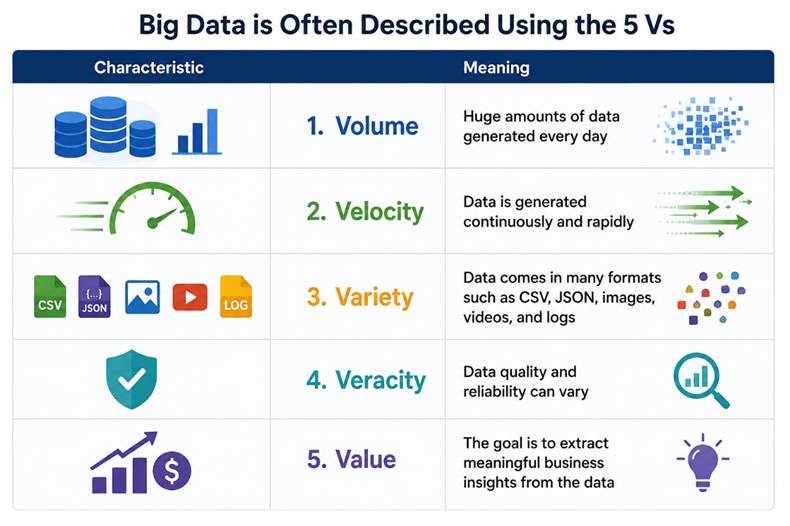
Azure Databricks is designed to process this type of data efficiently.
What Problems Does Azure Databricks Solve?
Imagine an online shopping company.
Every day it collects data from:
- Customer orders
- Website clicks
- Product searches
- Payment transactions
- Inventory systems
- Delivery tracking
- Customer reviews
This data arrives in different formats and from different systems.
Before analysts can build reports or data scientists can create machine learning models, the data must first be cleaned, combined, and organized.
Azure Databricks helps perform these tasks quickly by processing data in parallel across multiple computers instead of relying on a single machine.
What Can You Do with Azure Databricks?
Azure Databricks supports many types of workloads.
Some common uses include:
Data Engineering
- Import data from different sources
- Clean, messy data
- Remove duplicates
- Transform raw data
- Build ETL/ELT pipelines
Data Analytics
- Analyze large datasets
- Perform SQL queries
- Generate business insights
- Prepare data for reporting tools
Machine Learning
- Prepare training datasets
- Train machine learning models
- Evaluate model performance
- Generate predictions
Streaming Analytics
- Process live events
- Analyze IoT sensor data
- Monitor application logs
- Detect fraud in real time
Who Uses Azure Databricks?
Azure Databricks is used by different roles within an organization.
| Role | How They Use Azure Databricks |
| Data Engineer | Builds data pipelines and transforms raw data |
| Data Scientist | Creates machine learning models |
| Data Analyst | Explores data and prepares datasets for reporting |
| BI Developer | Creates dashboards using processed data |
| Data Architect | Designs scalable data solutions |
Since everyone works within the same platform, collaboration becomes much easier.
How Does Azure Databricks Fit into a Modern Data Platform?
A typical modern data platform follows a simple flow:
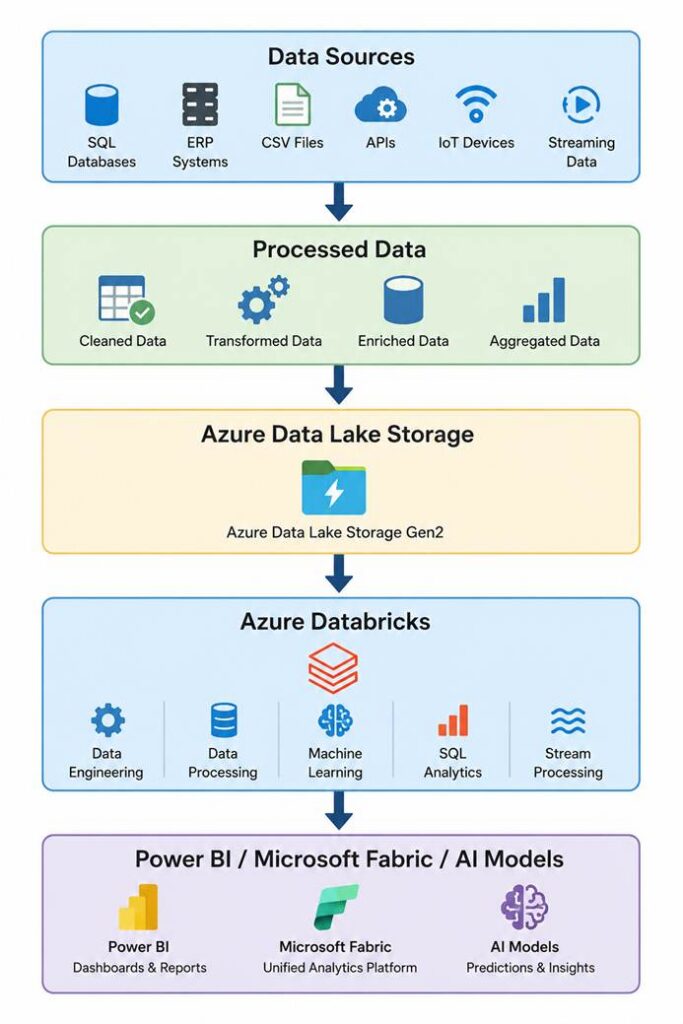
Here’s what happens:
- Data is collected from different business systems.
- The raw data is stored in a data lake.
- Azure Databricks cleans and transforms the data.
- The processed data is stored in optimized tables.
- Business users consume the data through reports, dashboards, or AI applications.
This approach ensures that everyone works with reliable and consistent data.
What Makes Azure Databricks Different?
Azure Databricks is more than just a tool for processing data. It combines several capabilities in one platform:
- Fast distributed data processing with Apache Spark
- Interactive notebooks for writing code and documentation
- Support for multiple languages such as Python, SQL, Scala, and R
- Built-in collaboration for teams
- Easy integration with Azure services
- Support for artificial intelligence and machine learning
- Enterprise-grade security and governance
Instead of using separate tools for data engineering, analytics, and AI, Azure Databricks brings everything together.
Where is Azure Databricks Used?
Many industries use Azure Databricks to solve real-world problems.
- Retail: Analyze customer purchases and recommend products.
- Healthcare: Process patient and medical data for research.
- Banking: Detect fraudulent transactions in real time.
- Manufacturing: Monitor equipment using IoT sensor data.
- Telecommunications: Analyze network performance and customer usage.
- E-commerce: Track user behavior and improve customer experience.
The same platform can support reporting, predictive analytics, and AI applications across these industries.
Key Benefits of Azure Databricks
Organizations choose Azure Databricks because it offers several advantages:
- Processes very large datasets quickly.
- Scales automatically as data grows.
- Supports structured, semi-structured, and unstructured data.
- Enables collaboration between different teams.
- Integrates with Microsoft Azure services.
- Supports both batch and real-time data processing.
- Provides a strong foundation for AI and machine learning projects.
A Simple Real-World Example
Imagine you work for an online retail company.
Every day, customers place thousands of orders through the company’s website and mobile app. The company also collects product information, customer reviews, payment details, and delivery updates.
If this data remains scattered across different systems, it becomes difficult to answer questions like:
- Which products are selling the most?
- Which customers are likely to stop buying?
- Which regions generate the highest revenue?
- Which products should be recommended to customers?
Using Azure Databricks, the company can:
- Collect data from all source systems.
- Store the raw data in a data lake.
- Clean and transform the data.
- Combine related datasets.
- Create trusted datasets for reporting.
- Build machine learning models to predict customer behavior.
- Display insights in Power BI or Microsoft Fabric.
This is a common workflow followed by many organizations today.
Now that you have a basic understanding of Azure Databricks, the next lesson will answer an important question:
Why do organizations choose Azure Databricks instead of traditional data platforms?
We’ll explore the challenges of modern data engineering and AI, and see how Azure Databricks addresses them with scalable processing, collaboration, and advanced analytics capabilities.
Conclusion
Azure Databricks is a modern cloud platform that helps organizations process, analyse, and manage large volumes of data efficiently. Built on Apache Spark and fully managed in Microsoft Azure, it simplifies big data processing while bringing together data engineering, analytics, AI, and machine learning in one collaborative environment.
For beginners, the most important takeaway is that Azure Databricks is not just another database or reporting tool. It is a complete analytics platform that helps transform raw data into meaningful insights. As you progress through this series, you’ll learn how its core components work together to build scalable, secure, and enterprise-ready data solutions.
| Tags | Azure Databricks |
| Useful Links | |
| Microsoft Docs | |
|
Test Your Knowledge |
Quiz |