
In the ever-evolving landscape of technology, Microsoft Fabric stands out as a powerful platform that seamlessly integrates with Azure AI services, bringing forth a new era of intelligent and cutting-edge applications. This blog explores the exciting features of Microsoft Fabric, with a specific focus on the game-changing “Pre-Built AI Models” currently in preview.
Azure AI services
Azure AI service is a cloud-based tool empowering developers to build intelligent applications with AI capabilities. It offers APIs and models for vision, speech, language, document intelligence, and more. The goal is to empower developers to create applications that can see, hear, speak, understand, and reason. With features like security and scalability, Azure AI service facilitates automated document processing, improved customer service, and insightful data extraction.
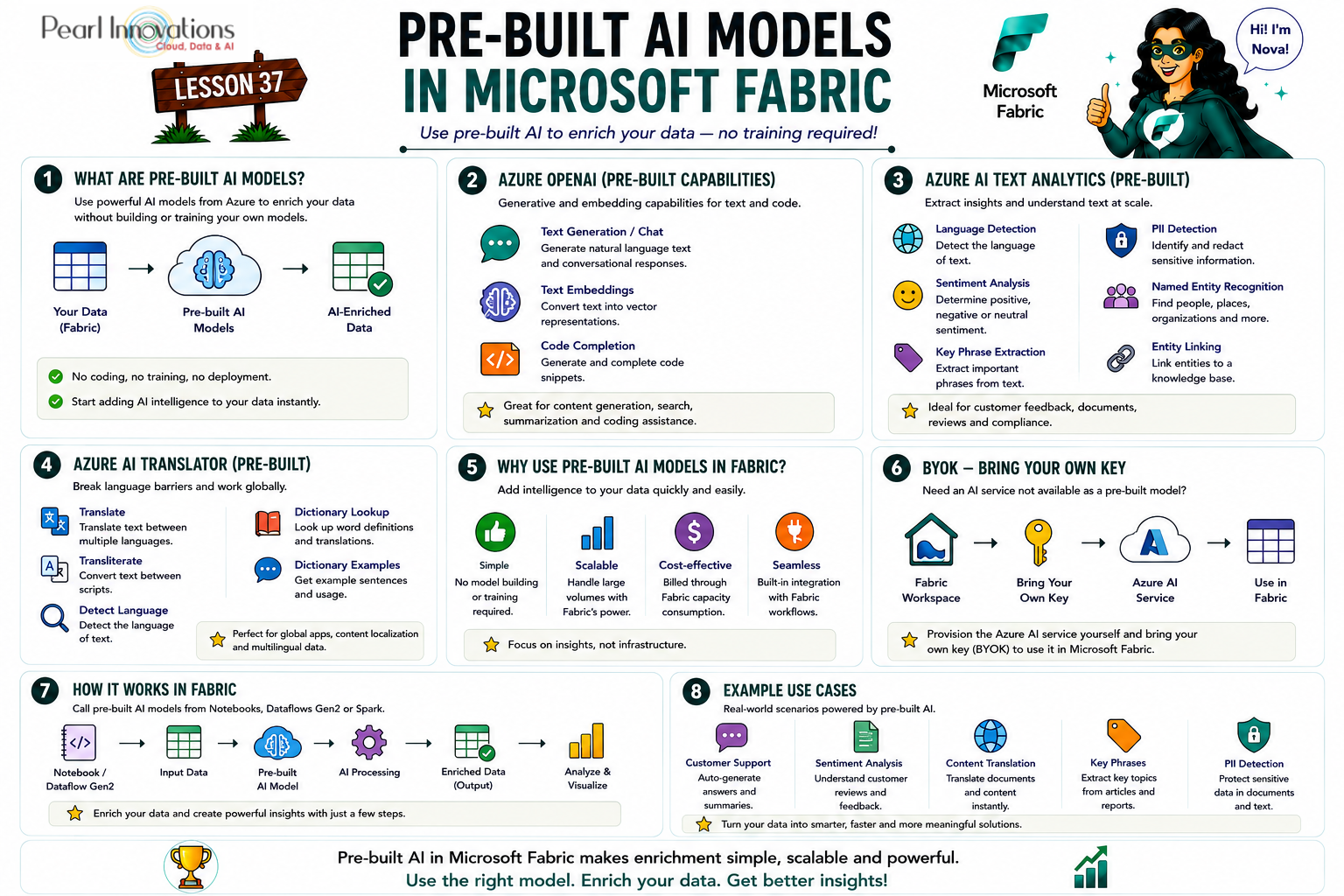
🚀 Learn It in 5 Minutes
Skip the long read.
See the key concepts in one easy-to-follow infographic.
Fabric offers two options for leveraging Azure AI services:
1.Pre-built AI models in Fabric (preview)
Fabric, a cloud-based platform empowering data and AI solutions, introduces the capability to seamlessly integrate with Azure AI services. This includes the utilization of pre-built AI models, allowing users to enhance their data without any prerequisites. The following key points emphasize the ease and benefits of incorporating these pre-built AI models into Fabric’s framework.
Key Highlights of Pre-built AI Models Integration in Fabric:
- Seamless Fusion with AzureAI Services – Effortless integration allows users to seamlessly combine Fabric with Azure AI services, leveraging prebuilt models to enhance data effortlessly.
- Data enhancement without any prerequisites – Users can enrich their data with prebuilt AI models without the need for specific prerequisites, such as coding, training, or deploying AI models.
- Public Preview Status and Evaluation – In the public preview stage, Fabric may provide access to a limited set of AI services. Users are advised to be aware of potential constraints regarding the diversity of available services.
- Limited AI Service Availability – During the public preview phase, a subset of AI services may be accessible within Fabric. Users should note the potential limitations in the variety of available services.
- Streamlined Access via Fabric Authentication – Access to prebuilt AI models in Fabric is facilitated through Fabric authentication, simplifying the authentication process and ensuring secure access to AI services.
- Billing Integration with Fabric Capacity – All usage of prebuilt AI models in Fabric is billed against the Fabric capacity, providing a straightforward and unified cost structure for users.
Available Pre-built AI models
Fabric’s prebuilt AI models, currently in preview, offer a diverse set of capabilities seamlessly integrated with Azure AI services. Here’s an overview of the key models and their functionalities:
Azure OpenAI Service
- GPT-35-turbo: An optimized model for chat and traditional completions tasks. Supports 4096 max input tokens, while the gpt-35-turbo-16k model extends this to 16,384 tokens.
- text-embedding-ada-002 (version 2): An embedding model for embedding API requests, with a maximum accepted request token of 8,191 and a returned vector with dimensions of 1,536.
- text-davinci-003: A legacy model proficient in various language tasks, providing better quality, longer output, and consistent instruction.
- code-cushman-002: A legacy model tailored for code-completion tasks.
Text Analytics
- Language detection: Identifies the language of the input text.
- Sentiment analysis: Returns a score between 0 and 1 indicating the sentiment in the input text.
- Key phrase extraction: Identifies the key talking points in the input text.
- (Personally Identifiable Information )PII entity recognition: Identifies, categorizes, and redacts sensitive information in the input text.
- Named entity recognition: Identifies known entities and general named entities in the input text.
- Added custom sentiment models and summarization API
- Entity linking: Identifies and disambiguates the identity of entities found in text.
Azure AI Translator
- Translate: Translates text from one language to another.
- Transliterate: Converts text in one language from one script to another script.
- Detect: Identifies the language of a piece of text.
- Break Sentence: Identifies the positioning of sentence boundaries in a piece of text.
- Dictionary Lookup: Provides alternative translations for a word and a few idiomatic phrases.
- Dictionary Examples: Offers examples illustrating how terms in the dictionary are used in context.
Benefits of Using Prebuilt AI Models in Fabric
- Simplicity
- No coding, training, or deploying AI models required.
- Link AI services to Fabric workspace and use in data flows with a few clicks.
- Scalability
- Enrich large volumes of data with high performance and reliability.
- Utilize Fabric’s distributed processing engine (Spark) for optimization.
- Cost-effectiveness
- Billed against AI workload capacity units with Fabric authentication.
- No separate payment for each Azure AI service used in Fabric.
2. Bring Your Own Key (BYOK)
For scenarios where the desired AI services are not yet supported in the prebuilt AI models, developers have the flexibility to provision AI services on Azure and bring their own key to seamlessly integrate and use them from Fabric.
Available regions for Azure OpenAI service
To access the prebuilt Azure OpenAI Service, including the innovative Copilot in Fabric, a paid SKU (F64 or higher, or P1 or higher) with capacity is required. Currently deployed to US datacenters (East US, East US2, South Central US, and West US) and France datacenter (France Central), the feature can be enabled for regions outside these through tenant settings.
Available regions for Text Analytics and Azure AI Translator
Text Analytics and Azure AI Translator, currently in public preview across various Azure regions, offer a wide range of capabilities. From detecting languages and analyzing sentiments to translating content and looking up words in a dictionary, developers can enhance their applications by integrating these powerful tools.
- Azure OpenAI now available in India Central, UK South, Japan East.
- Text Analytics and Translator GA in all major regions
Note: If the region you prefer for your Microsoft Fabric isn’t in the provided list, you still have the option to create a Microsoft Fabric capacity in a supported region.
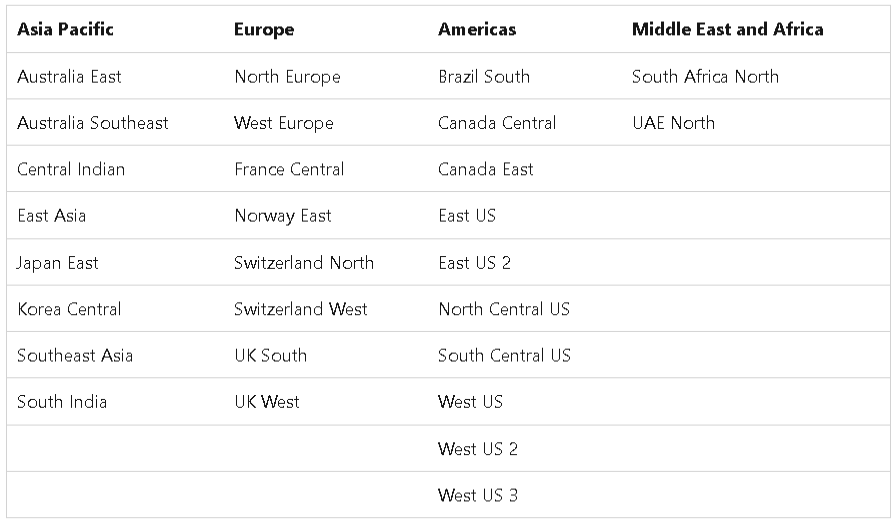
Source: Microsoft learn
| Tags | Microsoft Fabric |
| Useful Links | |
| MS Learn Modules | |
Test Your Knowledge |
Quiz |