This blog offers a comprehensive insight into Microsoft Fabric Lakehouse, a powerful data architecture platform created to store, manage, and analyze structured and unstructured data. Utilizing Delta Lake as the universal table format ensures effortless data accessibility across all computing engines within the Microsoft Fabric ecosystem.
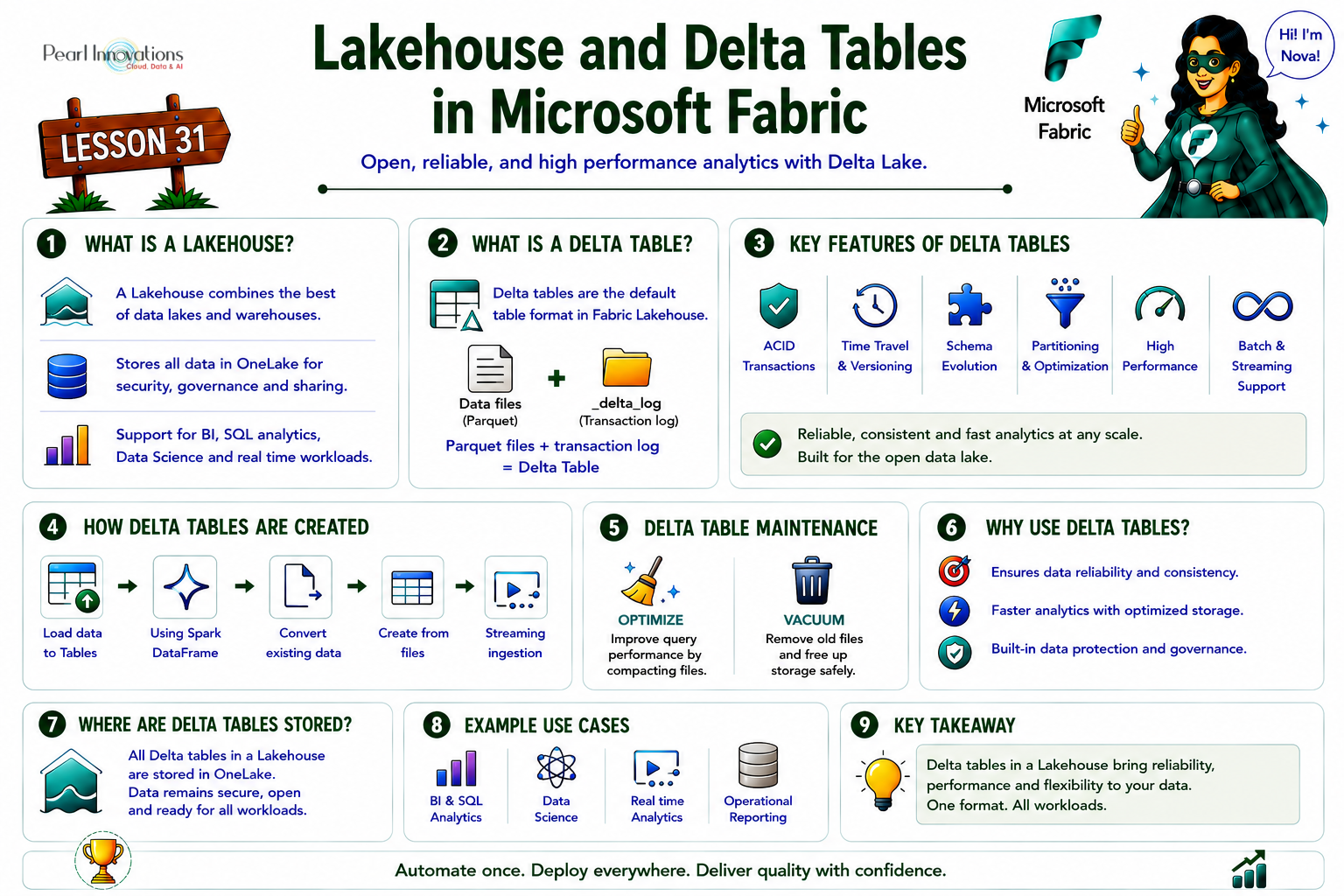
🚀 Learn It in 5 Minutes
Skip the long read.
See the key concepts in one easy-to-follow infographic.
Microsoft Fabric Lakehouse and Delta Tables
Microsoft Fabric Lakehouse is a data architecture platform that leverages Delta Lake as the unified table format for all data stored in the lakehouse. A Delta table is a unified table format that enables efficient and consistent data access across different compute engines in a lakehouse. By using Delta Lake, Microsoft Fabric Lakehouse ensures scalable, reliable, and high-performance access and analysis for both structured and unstructured data.
The flexibility of data management within Microsoft Fabric Lakehouse is evident through various methods provided for saving data into the lakehouse. These include features like
- Load to Tables
- Copy tool in pipelines.
- Dataflows
- Notebook code
Each of these capabilities serves a unique purpose, enabling connections to diverse data sources, data transformation and processing, and the option to store data in its original format or convert it into a Delta table. Choosing the most suitable method depends on factors such as the data size, format, and complexity, allowing users to tailor their approach based on specific use cases.
Delta Lake
Delta Lake is an open-source storage layer that brings relational database features to the handling of data lakes powered by Spark. In Microsoft Fabric lakehouses, tables are known as Delta tables, easily recognized by the triangular Delta (▴) symbol displayed in the lakehouse user interface.
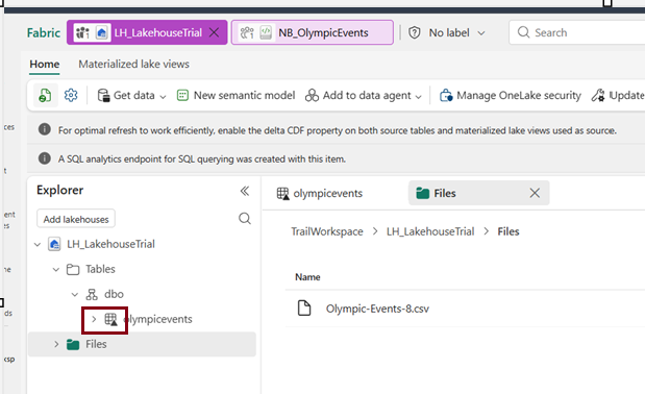
Delta tables act as structured representations of data files stored in the Delta format. In the lakehouse, each table is associated with a folder holding Parquet data files and a _delta_Log folder, where transaction details are recorded in JSON format.
If your Lakehouse has schemas enabled (a newer capability), table paths are schema-qualified – you’ll see paths like Tables/dbo/tablename rather than a flat Tables/tablename.
Delta table and its key features
Delta Lake stores data in a format called Delta tables. These tables are like regular tables, but they are more powerful and efficient due to extra features and metadata. Delta tables are stored in a data lake as Parquet files, that have a transaction log that keeps track of the data’s history and changes.
Some of the key features of Delta tables are
- ACID Transactions – Delta tables support ACID transactions, ensuring Atomicity, Consistency, Isolation, and Durability. This guarantees data integrity and consistency in the face of concurrent read and write operations.
- Versioning -The transaction log of Delta tables enables versioning, allowing users to access and query previous versions of the data. This feature is valuable for historical analysis and provides a safety net for data rollback.
- Schema Evolution – Delta tables facilitate schema evolution, allowing users to modify the schema by adding, removing, or modifying columns without disrupting existing queries or pipelines. This flexibility supports evolving data requirements.
- Time Travel – Time travel is a standout feature, enabling users to query data at specific points in time or versions. This supports temporal analysis, aiding in tasks such as comparing data across different time periods and debugging data changes.
- Partitioning – Delta tables support partitioning, a technique that divides data into smaller, manageable chunks based on specific columns. This enhances query performance and reduces storage costs by allowing users to scan and filter only relevant data.
- Bucketing – Delta tables employ bucketing, a technique that further divides data into smaller and evenly distributed chunks based on a hash function. Bucketing enhances join performance by minimizing data shuffling and sorting.
- Indexing – Delta tables support indexing, creating and maintaining additional data structures for efficient data access. Various indexing techniques, such as column statistics and bloom filters, contribute to improved query performance.
- Caching – Caching is a technique in Delta tables that stores frequently accessed data in memory. This accelerates data retrieval, contributing to overall query optimization.
- Optimization Strategies – Delta tables support optimization techniques like file compaction, rewriting data in sorted order, and removing duplicate records. These strategies reduce storage space and enhance query performance by minimizing the number of files and records to scan.
Benefits of Delta tables
- Ensure reliability and consistency in data lakes with support for ACID transactions, data versioning, and rollback capabilities.
- Enable high-performance data analysis through features like partitioning, bucketing, indexing, caching, and optimization techniques.
- Offer flexibility for data processing, supporting both batch and streaming data, and compatibility with various analytics and data processing tools such as Apache Spark, SQL, machine learning, data mining, and real-time streaming.
Creating Delta tables in Lakehouse
Creating Delta tables in Microsoft Fabric requires having both a lakehouse and a notebook equipped with Spark runtime. You can use SQL or programming languages like Python, Scala, or R to put your data in Delta format and make these delta tables.
There are various techniques are available for creating Delta tables, and the choice depends on your data source and personal preference. Some commonly used methods include:
1.Load to Tables
It supports loading from either a single file or a folder, into either a new table or an existing table, for CSV or Parquet input and it applies V-Order optimization by default.
V-Order is a Fabric write-time optimization that sorts, encodes, and compresses Delta/Parquet files for faster downstream reads across Power BI, SQL, and Spark. It costs extra time on write in exchange for faster reads later — best for tables read often, written rarely.
2.DataFrame Method
Use a Spark DataFrame to write data into Delta format, creating a Delta table effortlessly via SQL or programming languages like Python, Scala, or R.
Code used :
# Load a file into a dataframe
df=spark.read.load(‘Files/OlympicEvents.csv’,format=’csv’,header=True)
# Save the data frame as delta table
df.write(“delta”).saveAsTable(“Olympicdata”)
3.Convert Existing Tables
Convert an existing table in Parquet or CSV format into Delta format using SQL or programming languages like Python, Scala, or R.
SQL method
To transform a CSV file into a Delta table using the SQL method, it’s essential to have Apache Spark with Delta Lake installed and configured. Utilize the Using DELTA command to initiate the conversion, customizing the process with options like partitioning columns, schema specifications, and additional table properties.
We cant directly convert a csv file to a delta table using sql. If you want to create a Delta table, you would typically need to load the CSV data, convert it to Delta format, and then save it as a Delta table.
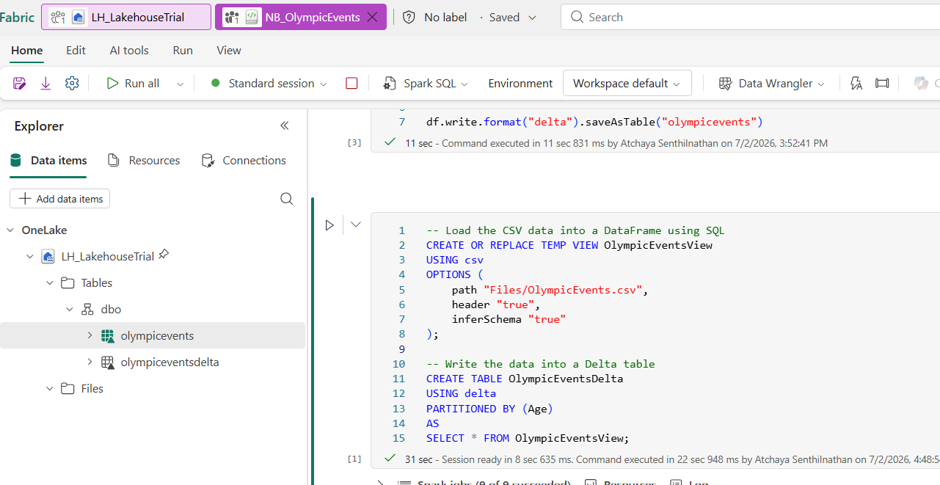
For example, converting a CSV file named “OlympicEvents” with a partition column named “Age” can be achieved with the following command:
Executing this command creates a Delta table named “olympiceventsdelta” in the default database, storing the data in Delta format.
4.File-Based Creation
Creating a Delta table from a file stored in cloud object storage, like Azure Blob Storage or Amazon S3, is a straightforward process. You can employ SQL or programming languages like Python, Scala, or R to bring your Delta table to life.
SQL method
Use the CREATE TABLE command to create a Delta table directly from a file. Specify file format, schema, partitioning columns, and table properties as needed.
Example: To create a Delta table named “Olympic” from a Parquet file in Azure Blob Storage, use the following SQL command:

This SQL method offers a straightforward way to migrate your data to a Delta table format.
5.Stream Integration
Stream Integration writes a continuous stream of data to a Delta table utilizing Spark -Structured Streaming or Delta Streaming APIs. This facilitates scalable and reliable real-time data ingestion, processing, and analysis.
- Spark-Structured Streaming, a robust engine, supports scalable and fault-tolerant operations. The
writeStreammethod in the Spark DataFrame API, with the format set to “delta”, facilitates continuous data writing to a Delta Table. TheforeachBatchmethod allows for custom micro-batch operations such as upserting or merging.
6. Table Maintenance
Once Delta tables are created, Fabric now documents a dedicated maintenance workflow that wasn’t part of this lesson originally:
- OPTIMIZE – compacts small Parquet files into larger ones for more efficient reads, with an optional Apply V-Order checkbox for further sorting/encoding/compression.
- VACUUM – removes files no longer referenced by the Delta transaction log, past a retention threshold (default: 7 days). Shortening this window can affect Delta time-travel history and concurrent readers/writers, so it’s not something to change casually.
| Tags | Microsoft Fabric |
| Useful links | |
| MS Learn Modules | |
Test Your Knowledge |
Quiz |