In the world of modern data platforms, businesses often rely on powerful tools to store, analyse, and visualize massive amounts of data. Two such Microsoft offerings are Azure Synapse Analytics and the Microsoft Fabric. Both platforms serve analytical needs but approach them differently and if you are planning to move from Synapse to Fabric, this blog will walk you through.
Azure Synapse Analytics
Azure Synapse Analytics is a unified analytics service that brings together big data and data warehousing. It allows users to query data using serverless or provisioned resources at scale.
Synapse Dedicated SQL Pool
Within Synapse, a Dedicated SQL Pool is a powerful, provisioned compute resource. It’s essentially a distributed MPP (Massively Parallel Processing) engine designed for enterprise-scale data warehousing. You define the performance level (DWU – Data Warehousing Unit), and the pool is always available, making it perfect for predictable and heavy workloads.
Microsoft Fabric
Microsoft Fabric is an end-to-end analytics platform that combines everything data movement, data lake, data engineering, real-time intelligence, and reporting under one unified SaaS experience. It’s built on OneLake, a single, logical data lake for your organization.
Fabric Warehouse
Fabric Warehouse is the cloud data warehouse experience in Microsoft Fabric. Like Synapse Dedicated SQL Pools, it uses a SQL-based interface but is deeply integrated with OneLake, Power BI, and other Fabric workloads.
It also supports auto-scaling, built-in governance, and easy collaboration across data engineering and BI teams without the complexity of managing dedicated compute infrastructure.
Synapse dedicated SQL pools have reached end-of-life for new feature development Microsoft will still support it with security updates, but the engine has run its course with no new features being added.
Why Migrate from Synapse Dedicated SQL Pools to Fabric Warehouse?
As Microsoft shifts focus on the Fabric ecosystem, migrating to Fabric can help you:
- Simplify your analytics stack.
- Reduce infrastructure overhead.
- Use modern features like Data Activator, Direct Lake, and Real-Time Intelligence.
- Unify data science, data engineering, and BI in one place with single one lake data storage.
What Does Migration Mean?
Migration means moving your workloads including data, schema, and sometimes stored procedures or pipelines from Synapse Dedicated SQL Pools to the Fabric Data Warehouse.
There are two main approaches to migration:
- Automated Migration using Microsoft’s Fabric Migration Assistant.
- Manual Migration, which involves custom planning, extraction, and refactoring.
Fabric Migration Assistant
This tool offers an automated migration experience, helping you:
- Convert schema (DDL)
- Migrate data
- Validate workloads
Ideal for quicker, lower-risk migrations. It works from a DACPAC file exported from the Synapse dedicated SQL pool, and provides AI-powered assistance through Copilot to fix compatibility issues during migration of tables, views, stored procedures, and functions.
Manual Migration Planning
If your workloads are complex, legacy-heavy, or need custom transformations, Microsoft’s detailed guidance helps you:
- Assess architecture
- Refactor code
- Migrate in phases
Migrating from Synapse to Fabric isn’t just about copying data it’s about strategic planning and execution. Here’s a step-by-step breakdown of Microsoft’s recommended migration lifecycle.
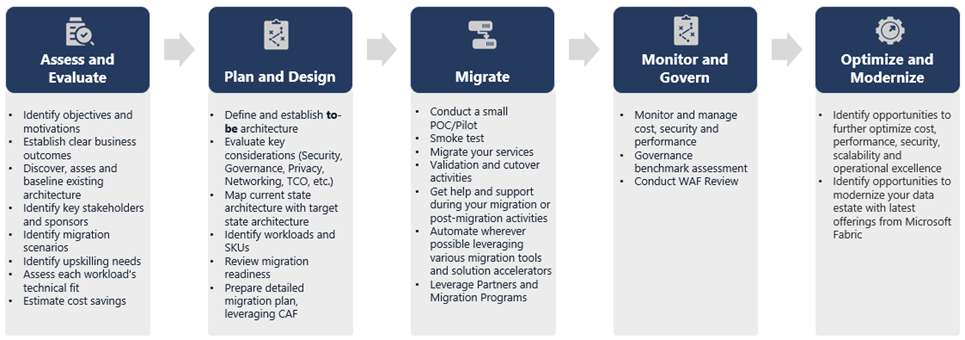
Source: Microsoft Learn
1. Assess and Evaluate
- Define goals and success criteria
- Make a complete list of everything you have in your Synapse environment.
- Identify stakeholders and build a migration team
- Understand what data, models, and processes need to move
- Start small pilot with simpler workloads
- Train staff early and identify skill gaps
2. Plan and Design
- Architect your target solution in Fabric
- Choose your migration method and tools
- Plan for Schema conversion (DDL)
- Data extraction and ingestion
- Code migration (DML, stored procedures)
- ETL/ELT process migration
- Document everything in a detailed migration plan
3. Migrate
- Move schema, data, and code in phases
- Scale up Synapse resources temporarily for faster migration
- Apply security and user permissions in Fabric
- Migrate and test ETL/ELT processes
- Continuously monitor progress and adapt as needed
4. Monitor and Govern
- Run parallel systems and compare performance
- Test dashboards and business apps
- Monitor cost, usage, and security
- Establish governance practices in Fabric
5. Optimize and Modernize
- Transition fully to Fabric when ready
- Scale resources up/down based on demand
- Use insights gained to build repeatable migration templates
- Explore opportunities for performance tuning and modernization
6 .Post-migration section: After migration identify all systems connected to the Synapse pool – Power BI reports, ETL pipelines, custom applications – and update each connection string to point to the new Fabric warehouse, testing before cutover.
There are two main migration approaches:
Lift and Shift
Move your data warehouse with minimal changes. This approach is:
Faster, less risk and Ideal if your Synapse setup is already optimized
Modernize with Architectural Changes
Modernize with architectural changes means not just copying its more of rebuilding smartly using the new platform’s strengths for better performance and cleaner design.
If your data warehouse is complex or if it is built up over many years with many tweaks (legacy-heavy), you might need to re-engineer it to:
- Optimise performance
- Leverage Fabric-specific features like DirectLake
- Redesign your ETL pipelines and schema
Design Differences: Synapse vs. Fabric Warehouse
When planning a migration, keep in mind some important differences:
Table Considerations
- Only raw data and metadata move between systems.
- Indexes and tuning strategies in Synapse may not be needed Fabric handles performance optimization automatically.
T-SQL Differences
- There are DML syntax variations between Synapse and Fabric.
- Some stored procedures or SQL code might need rewriting.
Data Type Mappings
Fabric uses slightly different data types. Here are a few examples:
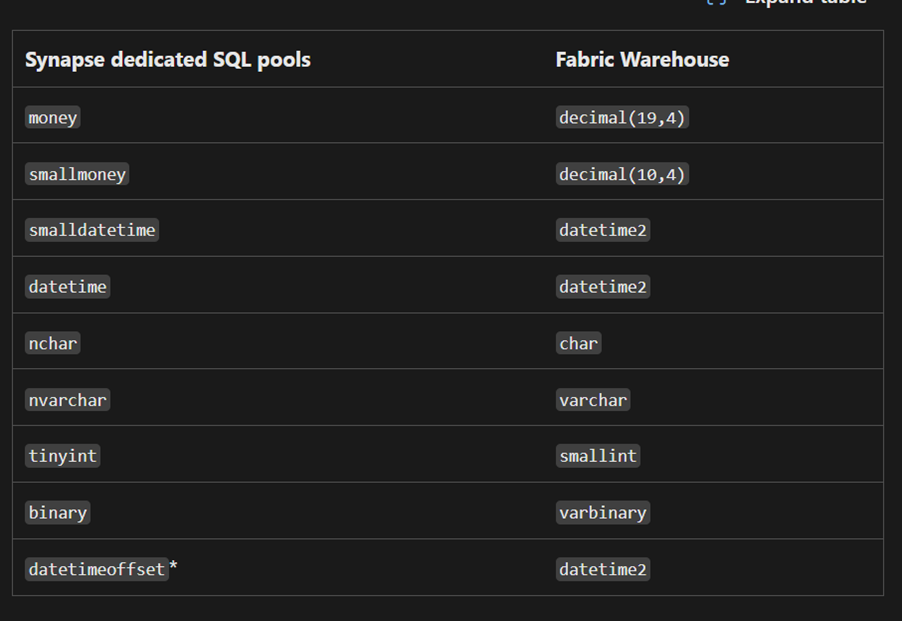
Source: Microsoft Learn
The datetimeoffset type (in Synapse) stores both date/time and time zone info.
But in Fabric Warehouse, we use datetime2, which doesn’t store time zone details.
So, if your data has time zone information, you’ll need to save that separately in a different column during migration.
Migration Methods – How to Move from Synapse SQL Pools to Fabric Warehouse
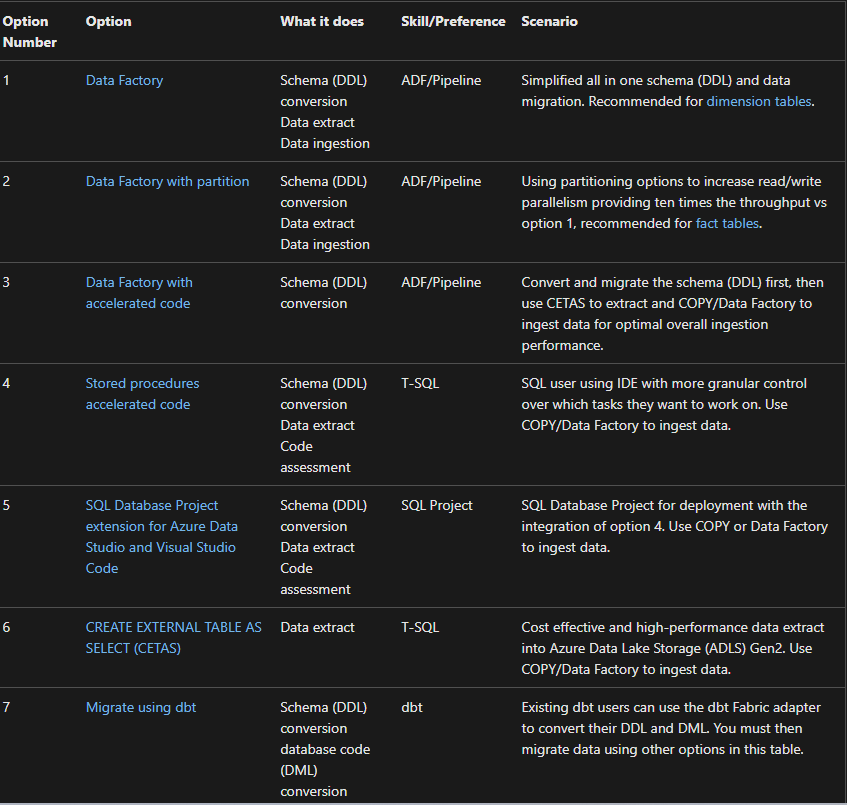
Once your planning is done, it’s time to move the data. Microsoft provides several ways to do this some are automated; others are more hands-on depending on your skillset and project size. Here’s a quick guide to the main methods available for migrating from Azure Synapse Dedicated SQL Pools to Microsoft Fabric Warehouse.
Source: Microsoft Learn
Let’s Look at Each Migration Method in a bit More Detail
1. Migration using Fabric Data Factory
Fabric Data Factory is the low-code/no-code way to migrate. Ideal for those familiar with Azure Data Factory or Synapse pipelines.
- Data Factory (Basic Migration – Good for Dimension Tables)
Good for dimension tables and smaller datasets. This method auto-generates DDL (schema) and moves data using a Copy data and ForEach loop in Data Factory. Simple UI-based flow.
- Data Factory with Partitioning (High Performance for Fact Tables)
Best for large fact tables. Adds partitioning logic to parallelize reads/writes gives up to 10x performance boost compared to the basic method.
- Data Factory with Accelerated Code (CETAS + COPY INTO)
Schema is migrated using DDL conversion, data is extracted using CETAS (Create External Table As Select) to ADLS first and finally, ingest data into Fabric using COPY INTO or Data Factory pipelines. This offers more control and speed.
2. Migration using Stored Procedures (T-SQL Approach)
For SQL Experts Microsoft provides stored procedures to:
- Convert schema (DDL)
- Extract data to ADLS
- Assess SQL code compatibility with Fabric You still need to use COPY or Data Factory to load data into Fabric after extraction.
3. SQL Database Projects (With Azure Data Studio or VS Code)
This is a good option for teams already using SQL projects for version control, CI/CD, and database deployments.
- Converts and deploys schema
- Extracts data
- Supports validation and scripting It also integrates the stored procedures method under the hood.
4. CETAS – CREATE EXTERNAL TABLE AS SELECT
This is the most cost-effective and lightweight method for extracting data.
- Runs one query per table to export to Parquet files in ADLS
- Doesn’t hog Synapse resources (DWU-friendly)
- Works well with COPY INTO for loading data into Fabric
5. Migration using dbt (Data Build Tool)
If you’re already using dbt for your Synapse workloads,
- dbt can convert both schema (DDL) and business logic (DML)
- Easy to adapt existing dbt projects by switching the adapter to Fabric
- Data still needs to be moved using CETAS, COPY, or Data Factory
Conclusion
Migrating from Azure Synapse Analytics to Microsoft Fabric offers a simplified, modernized approach to data management. By leveraging tools like the Fabric Migration Assistant and adopting the right migration strategy, businesses can move their data warehouses efficiently while taking full advantage of Fabric’s powerful, integrated ecosystem. Whether you choose a Lift and Shift, or a Modernization approach, planning and execution are key to ensuring a smooth transition.
| Tags | Microsoft Fabric |
| Useful Links | |
| MS Learn Modules | |
Test Your Knowledge |
Quiz |