In today’s world of cloud data platforms, Microsoft Fabric and Snowflake are two strong options for storing and analyzing data. While both help businesses manage large volumes of data, they are built differently and cater to different user needs.
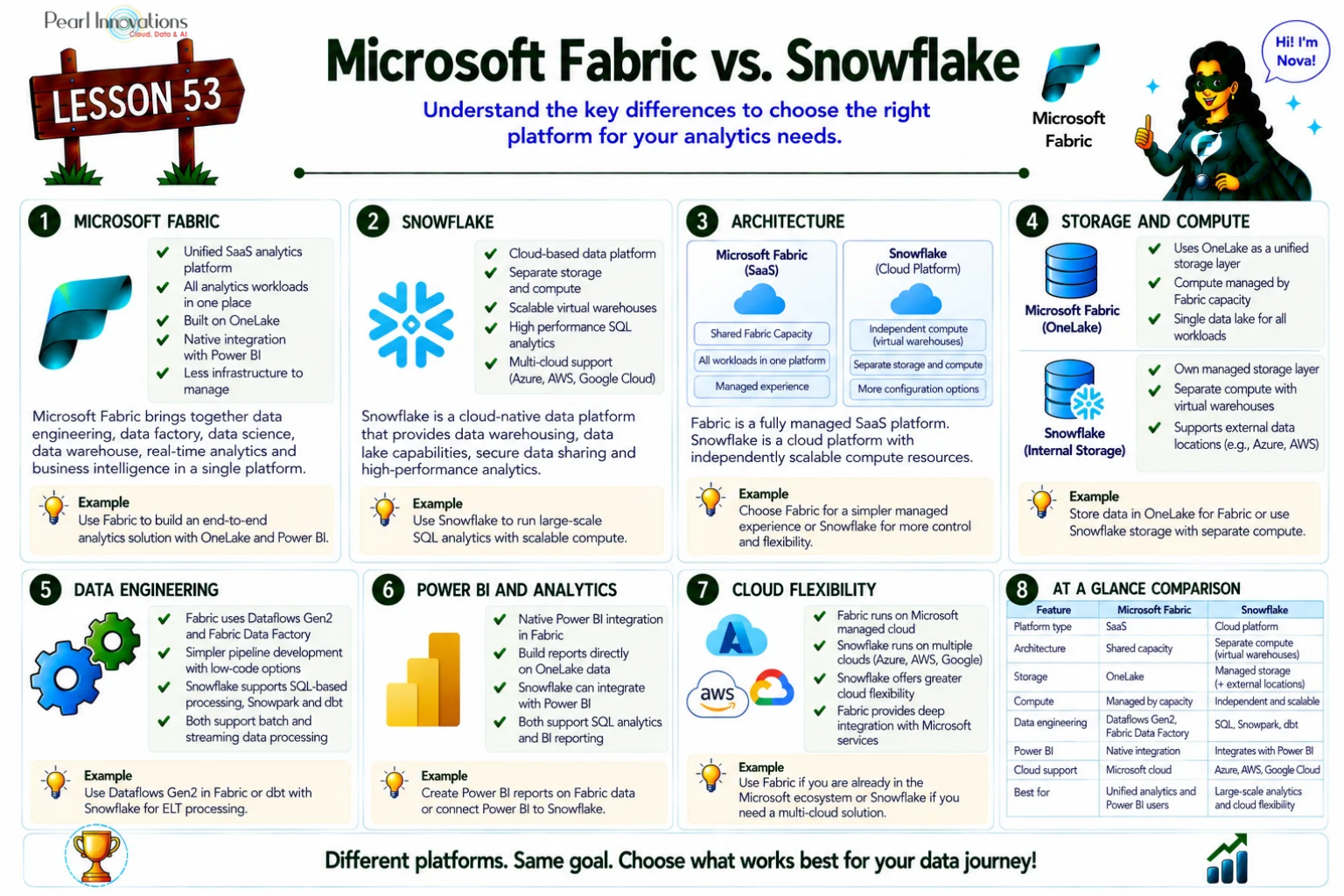
🚀 Learn It in 5 Minutes
Skip the long read.
See the key concepts in one easy-to-follow infographic.
In this blog, Let’s explore what each one does, their features, and how they compare.
Microsoft Fabric
Microsoft Fabric is an all-in-one platform from Microsoft. It combines tools for data movement, storage, reporting, and even AI, making it easy for data analysts, engineers, and business users to work together.
Microsoft Fabric has continued to evolve as Microsoft’s unified analytics platform, bringing together Data Engineering, Data Factory, Data Warehouse, Data Science, Real-Time Intelligence, Power BI, and AI experiences within a single Software-as-a-Service (SaaS) platform. Built on OneLake, Fabric enables organizations to manage, analyze, and govern data without deploying or managing separate infrastructure. Microsoft continues to position Fabric as the preferred analytics platform for organizations invested in the Microsoft ecosystem.
Key Features:
Unified Platform: Combines Power BI, Data Factory, and Synapse into one tool.
OneLake Storage: All your data is stored in a central data lake.
Direct Lake Mode: Power BI can read data directly from OneLake, reducing delay.
Copilot Integration: Use plain English to ask questions and create reports.
Fully Managed (SaaS): No setup or servers to manage.
ETL and Analytics: Built-in Dataflows Gen2 for data prep, plus strong Power BI integration for reporting.
OneLake Shortcuts – Access data stored in Azure Data Lake Storage Gen2, Amazon S3, Google Cloud Storage, and other supported storage systems without duplicating data.
Fabric IQ – AI-powered semantic understanding that enhances Copilot capabilities across Fabric workloads.
Real-Time Intelligence – Built-in support for Eventstreams, Eventhouse, KQL Databases, Activator, and Real-Time Dashboards.
Open Data Foundation – Native support for Delta Lake and Apache Iceberg interoperability.
Unified Governance – Centralized security, lineage, sensitivity labels, and governance through Microsoft Purview.
Snowflake
Snowflake is a cloud-native data platform focused mostly on data warehousing. It’s powerful, scalable, and works across multiple cloud providers like AWS, Azure, and Google Cloud.
Snowflake is recognized for its unique architecture that separates compute from storage. It is structured into three key layers:
Storage Layer: Handles the encrypted storage of data in formats such as JSON, Avro, and Parquet.
Compute Layer: Comprises virtual warehouses, which are clusters of compute resources.
Cloud Services Layer: Manages tasks like query execution, metadata handling, security, governance, and support for ACID transactions.
This architecture enables Snowflake to operate seamlessly as a cloud-native platform across single or multiple cloud environments, supporting major providers including Google Cloud, Microsoft Azure, and AWS.
Key Features:
Cloud-Agnostic: Works on AWS, Azure, and Google Cloud. You’re not tied to one.
Multi-Cloud Support: Choose the region you prefer (e.g., us-east-1, East US).
Independent Platform: Snowflake runs on cloud infrastructure but is not owned by any cloud provider.
Virtual Warehouses: Compute power is separated from storage, so you can scale each independently.
***** A Virtual Warehouse is the compute engine in Snowflake which means it gives you the CPU + RAM power to run SQL queries, load data, or transform data. It does NOT store data. It will help us to query the data on the fly without storing the data.
ETL Support: Snowflake supports ETL/ELT tools like dbt and others.
Secure Data Sharing: Easily share data across teams or even outside your company.
Snowpark: For data engineering and advanced analytics using Python, Java, or Scala.
Dynamic Tables – Automatically maintain transformed datasets for downstream analytics.
Snowflake Cortex AI – Built-in AI capabilities for document intelligence, vector search, and generative AI use cases.
Native Apps Framework – Build and distribute applications directly within the Snowflake ecosystem.
Snowflake Marketplace – Securely share and consume live datasets across organizations
| Aspect | Snowflake | Microsoft Fabric |
| Platform Type Storage Pricing | Cloud-native PaaS Internal storage with support for external stages capacity-based where compute resources are shared across all Fabric workloads | Software-as-a-Service (SaaS) OneLake (built-in) consumption-based model where storage, compute, and cloud services are billed independently. |
| Compute | Virtual Warehouses | Fabric Capacity Units |
| Interface | SQL-first, also supports code (Snowpark) *Snowpark -Programming interface for Snowflake | Low-code, user-friendly |
| Cloud Support | AWS, Azure, and Google Cloud | Azure only |
| Data Pipelines | External tools + Snowpark | Dataflows Gen2, Pipelines |
| Power BI Integration | Manual Integration | Built-in |
| Machine Learning | Supports advanced ML via Snowpark + external ML platforms | Basic Copilot features |
| AI Capabilities | Copilot, Fabric IQ | Cortex AI |
| Storage | OneLake | Cloud Storage (AWS, Azure, GCP) |
| Data Sharing | OneLake Shortcuts | Snowflake Marketplace |
| Governance | Microsoft Purview | Horizon Catalog |
| Real–Time Analytics | Native Real-Time Intelligence | Dynamic Tables & Snowpipe |
How Do They Differ?
Microsoft Fabric and Snowflake Can Work Together
Microsoft Fabric and Snowflake are increasingly used together rather than as direct replacements. Organizations often retain Snowflake as their enterprise cloud data platform while using Microsoft Fabric for Power BI, semantic models, AI-assisted analytics, and unified reporting. Fabric can connect to Snowflake through native connectors, allowing organizations to analyze Snowflake data without significant changes to existing data architectures.
Cloud Flexibility:
- Snowflake lets you choose your cloud (AWS, Azure, or GCP).
- Fabric works only on Microsoft Azure.
User Experience:
- Fabric is great for business users, with built-in Power BI and no-code options.
- Snowflake is designed for SQL users and data engineers comfortable with coding.
Analytics & Reporting:
- Fabric has native analytics with Power BI and real-time insights.
- Snowflake focuses more on storage and processing but needs third-party tools for dashboards.
Setup and Management:
- Fabric is a plug-and-play SaaS service.
- Snowflake requires some setup but offers fine-grained control over compute and cost.
Cloud Independence:
- Snowflake is cloud-agnostic — runs on all major clouds.
- Fabric is tightly integrated with Microsoft 365 and Azure.
Choosing Between Fabric and Snowflake
Choose Microsoft Fabric if:
- You use Power BI and Microsoft 365.
- You want an all-in-one platform with low-code tools.
- Your team is business-focused and prefers a managed experience.
Choose Snowflake if:
- You need multi-cloud flexibility.
- You focus on data warehousing and large-scale storage.
- Your team is technical, and you’re already using tools like dbt or Snowpark.
Fabric’s mirroring feature simplifies data integration by eliminating the need for complex ETL processes, allowing you to seamlessly replicate your existing Snowflake warehouse data into Microsoft Fabric’s OneLake on an ongoing basis.
Conclusion
Both Microsoft Fabric and Snowflake offer strong data solutions, but they suit different teams and needs. Microsoft Fabric delivers an integrated analytics experience by combining data engineering, warehousing, real-time analytics, business intelligence, and AI within a unified SaaS platform.
If your priority is simplicity, built-in analytics, and tight Power BI integration, Choose Microsoft Fabric. Snowflake remains a leading cloud-native data platform known for its multi-cloud flexibility, independent compute scaling, and secure data sharing capabilities.
If you want cloud flexibility, powerful warehousing, and advanced data engineering ,Choose Snowflake.
The best choice depends on your existing technology investments, governance requirements, cloud strategy, and long-term analytics objectives.
| Tags | Microsoft Fabric |
| Useful Links | |
| MS Learn Modules | |
Test Your Knowledge |
Quiz |