
In the world of cloud-based data and analytics, Microsoft provides two popular platforms: Microsoft Fabric and Azure Databricks.
Both platforms help businesses collect, clean, and analyse large amounts of data, but they are made for different users and needs.
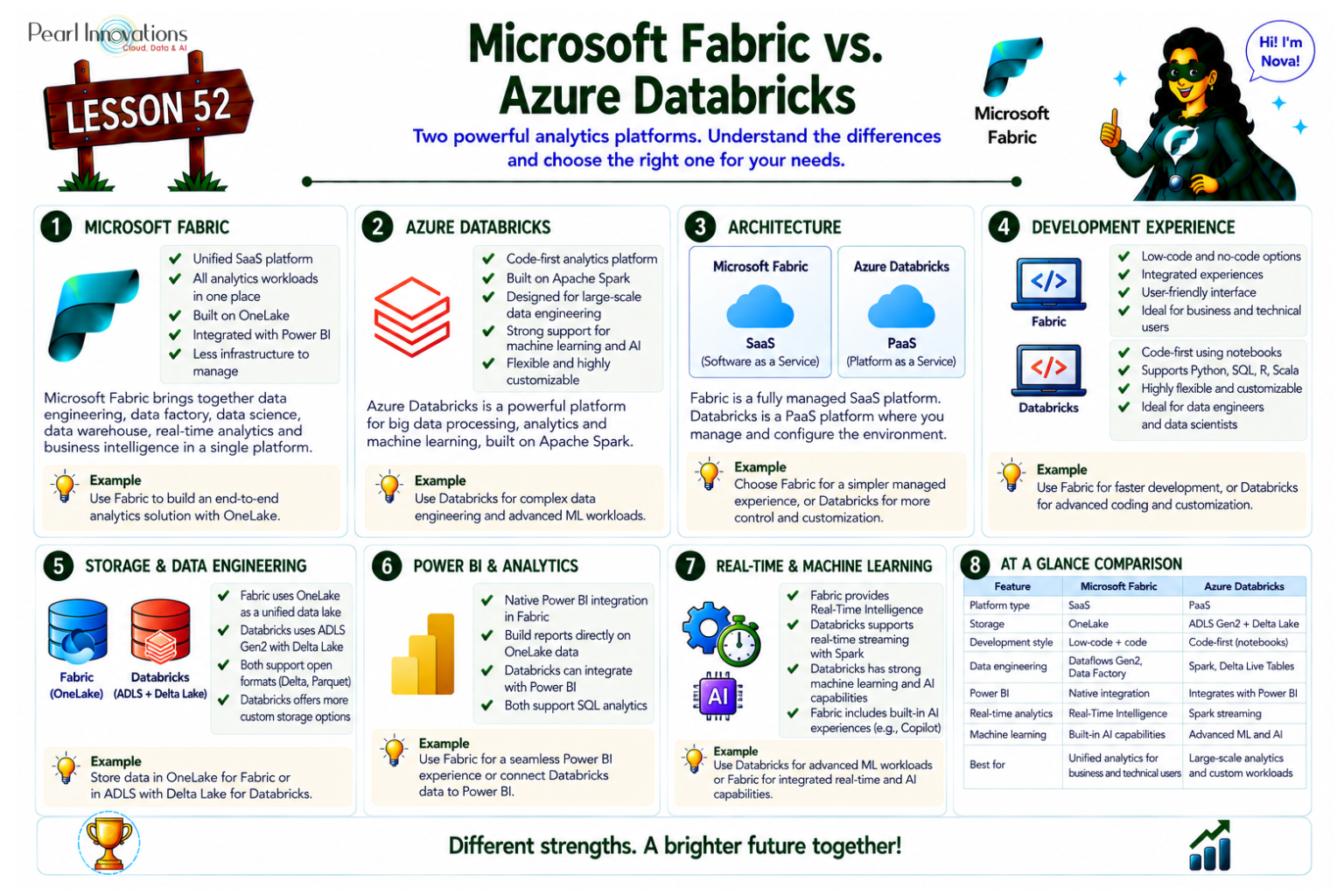
🚀 Learn It in 5 Minutes
Skip the long read.
See the key concepts in one easy-to-follow infographic.
In this blog, Let’s explore what each one does, their features, and how they compare.
Microsoft Fabric
Microsoft Fabric is an all-in-one platform that brings together different tools like Power BI, Data Factory, and a new version of Synapse. It’s built to make data work easier for everyone — whether you’re an analyst, data engineer, or business user.
Microsoft Fabric has evolved into Microsoft’s unified analytics platform that brings together Data Engineering, Data Factory, Data Science, Data Warehouse, Real-Time Intelligence, Power BI, and AI capabilities within a single Software-as-a-Service (SaaS) environment. Instead of managing multiple Azure services separately, organizations can perform data ingestion, transformation, analytics, reporting, and AI-driven insights from one integrated platform built on OneLake. As of 2026, Microsoft continues to position Fabric as the preferred analytics platform for new Microsoft-centric analytics initiatives while maintaining interoperability with Azure services, including Azure Databricks.
Key Features:
Unified Platform: Combines tools for data movement, storage, reporting, and AI into one place.
OneLake Storage: A single place to store all your data.
Direct Lake Mode: Lets Power BI read data directly from the lake — no need to copy it.
Copilot Integration: Use plain English to build reports and ask questions.
Fully Managed (SaaS): No setup needed – everything works out of the box.
OneLake Shortcuts – Access data stored in Azure Data Lake Storage Gen2, Amazon S3, Google Cloud Storage, and other supported sources without copying data.
Real-Time Intelligence – Native event streaming, KQL databases, Eventhouse, Activator, and Real-Time Dashboards for streaming analytics.
Fabric IQ – AI-powered semantic understanding that improves Copilot experiences across Fabric workloads.
Open Data Formats – Native Delta Lake support enables interoperability with Spark, Databricks, and other analytics engines.
Native Governance – Centralized governance through Microsoft Purview, sensitivity labels, lineage, and unified workspace management.
Azure Databricks
Azure Databricks is a platform built for big data and machine learning. It is based on Apache Spark and is mostly used by data engineers and data scientists who want to write code to work with large datasets.
Key Features:
Collaborative Notebooks: Write and run Python, SQL, R, or Scala code in shared notebooks.
Data Pipelines: Build and schedule pipelines using Jobs and Delta Live Tables.
Batch & Streaming: Works well with both historical and real-time data.
Delta Lake: Stores data in a reliable format with versioning and time travel.
Machine Learning: Advanced tools for training and deploying AI/ML models.
Code-First Platform: Best for technical users who are comfortable writing code.
Unity Catalog – Centralized governance for structured and unstructured data with fine-grained access control and lineage.
Delta Live Tables – Simplifies reliable ETL pipeline development and monitoring. MLflow Integration – End-to-end machine learning lifecycle management.
Lakeflow – Modern orchestration capabilities for data engineering workflows. Serverless Compute – Automatic compute provisioning for SQL and notebook workloads to reduce infrastructure management
| Aspect | Azure Databricks | Microsoft Fabric |
| Architecture | Platform-as-a-Service (PaaS) | Software-as-a-Service (SaaS) |
| Interface | Code-first, notebook-based | Low-code, user-friendly |
| Storage | Azure Data Lake + Delta Lake | Employs OneLake for unified data storage |
| Data Pipelines | Jobs, Delta Live Tables (DLT) | Dataflows Gen2 (Power Query) |
| Power BI Integration | Requires manual connection | Built-in |
| Real-Time Support | Streaming with Structured Streaming & DLT | Direct Lake + Mirroring |
| Pricing | Consumption based pricing based on the used resources. | Capacity units for a single SKU |
| AI Assistance | Copilot, Fabric IQ | Databricks Assistant |
| Governance | Microsoft Purview, OneLake | Unity Catalog |
| Storage | OneLake | Delta Lake |
| Data Sharing | OneLake Shortcuts | Delta Sharing |
| Best For | Unified Analytics Platform | Advanced Data Engineering & AI |
** Delta Live Table is a smart tool in Databricks that cleans and prepares your data automatically.
How Do They Differ?
User Experience:
- Fabric is built for simplicity. It’s easier for beginners and business users.
- Databricks is more technical, suited for teams with coding skills.
Analytics Approach:
- Fabric uses Power BI and low-code tools.
- Databricks gives full control through code for advanced processing and machine learning.
Pipeline Building:
- Fabric uses Dataflows Gen2, which are like drag-and-drop tools.
- Databricks uses Jobs and Delta Live Tables, where you write the steps in code.
Real-Time Analytics:
- Fabric supports real-time insights using Direct Lake Mode.
- Databricks handles real-time with streaming pipelines using Spark.
Machine Learning:
- Fabric has basic AI help (Copilot), mainly for reporting.
- Databricks is ideal for building and training real machine learning models.
Microsoft Fabric and Azure Databricks are no longer viewed as competing platforms in every scenario. Many enterprises use both together, with Azure Databricks handling advanced data engineering and machine learning workloads while Microsoft Fabric provides centralized business intelligence, semantic models, Real-Time Intelligence, and Power BI reporting.
The platforms interoperate through Delta Lake, OneLake Shortcuts, Unity Catalog, and mirrored data capabilities, allowing organizations to leverage the strengths of both without unnecessary data duplication.
Choosing Between Fabric and Databricks
Here is how to decide what works best for your team:
Choose Microsoft Fabric if:
- You need easy-to-use tools.
- You already use Power BI and Microsoft 365.
- You want a managed platform with everything in one place.
- Your team is more business-focused than technical.
Microsoft Fabric is a strong choice when organizations are already invested in Microsoft technologies such as Power BI, Microsoft 365, Azure, and OneLake. It provides a unified analytics experience with minimal infrastructure management, making it ideal for business intelligence, self-service analytics, enterprise reporting, and collaborative data engineering.
Choose Azure Databricks if:
- Your team works with large datasets.
- You do more of machine learning or big data analytics.
- You’re comfortable writing Python, SQL, or R code.
- You want full control over your data pipelines and models.
Azure Databricks is better suited for organizations building large-scale data engineering pipelines, advanced machine learning models, generative AI solutions, or multi-cloud analytics platforms. It provides greater flexibility for developers and data scientists who require extensive customization, Spark optimization, and open-source ecosystem support.
The most cost-effective platform depends on workload characteristics, team size, and operational requirements rather than pricing alone.
Conclusion
Both Microsoft Fabric and Azure Databricks are powerful platforms for data work. The right choice depends on your team’s skills, business needs, and the type of data projects you do.
If you want simplicity and Power BI integration, Choose Fabric. If you need advanced processing, machine learning, and big data support, Choose Databricks.
Selecting the right platform depends on your organization’s existing technology investments, workload complexity, governance requirements, and long-term data strategy.
| Tags | Microsoft Fabric |
| Useful Links | |
| MS Learn Modules | |
Test Your Knowledge |
Quiz |