As organizations increasingly depends on data-driven decisions, ensuring the security of sensitive information has become a top priority. Microsoft Fabric’s data warehousing platform offers several powerful features to safeguard data from unauthorized access, including
- Column-Level Security (CLS)
- Row-Level Security (RLS)
- Dynamic Data Masking (DDM)
These features provide comprehensive control over data access, allowing businesses to maintain compliance, protect customer information, and enhance data security.
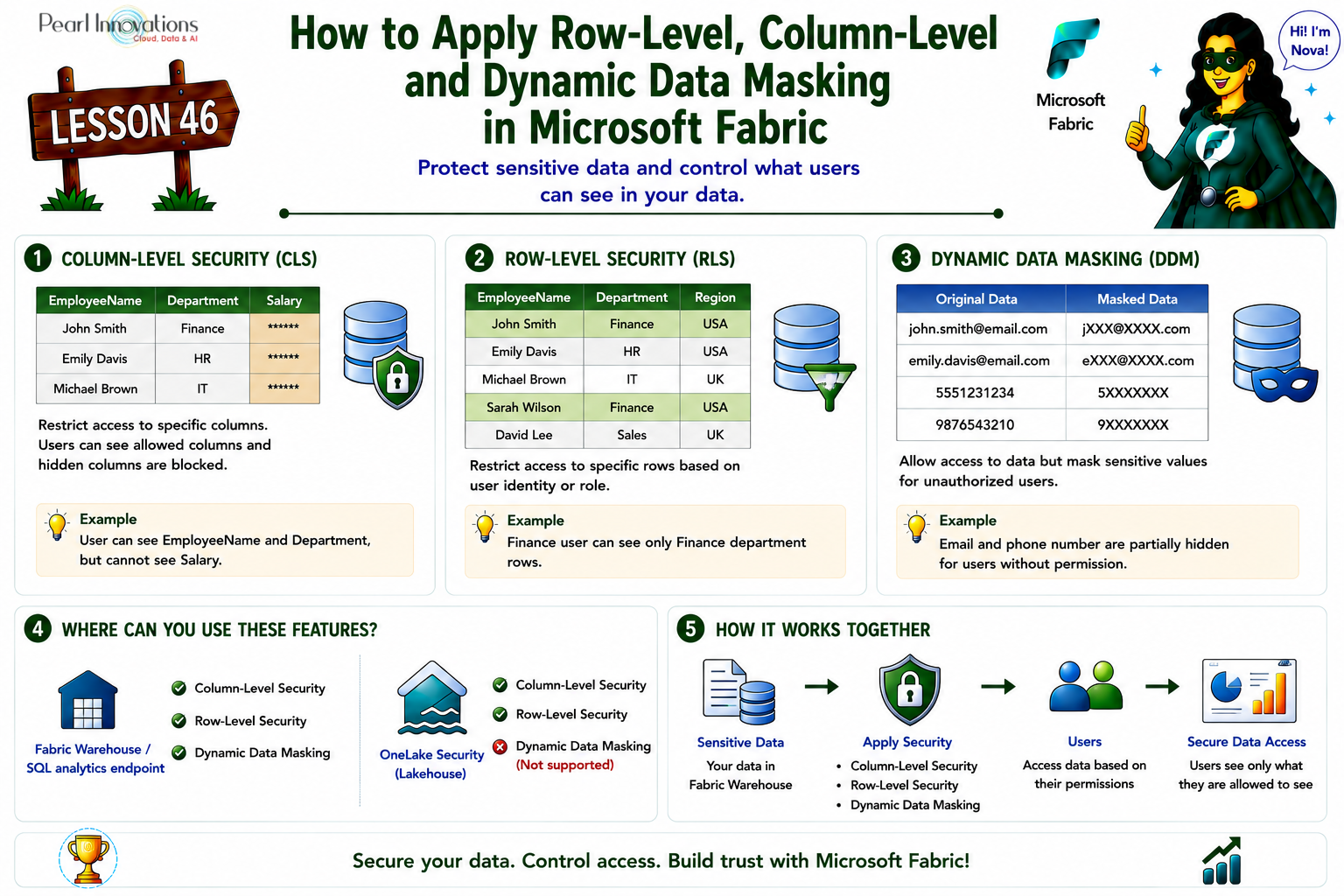
🚀 Learn It in 5 Minutes
Skip the long read.
See the key concepts in one easy-to-follow infographic.
In this blog, we will explore how these three techniques work and how they can be implemented in Microsoft Fabric warehouse to protect your sensitive data.
These features can be applied to queries on a Warehouse or SQL analytics endpoint in Fabric.
Refer to this lesson on how to use the SQL analytics endpoint with a Lakehouse Lesson 32 – Using SQL Analytics Endpoint with Lakehouse.
Refer to this lesson to load data into warehouse Lesson 44 – Load data into Warehouse in Microsoft Fabric (file upload, copy tool, copy activity, dataflow, Notebooks)
Prerequisites:
- A Fabric workspace with an active or trial capacity.
- A Fabric Warehouse or SQL analytics endpoint within a Lakehouse.
- Administrator, Member, or Contributor roles on the workspace, or elevated permissions on the Warehouse or SQL analytics endpoint.
Follow below step to create a warehouse:
- Launch fabric portal https://app.fabric.microsoft.com/
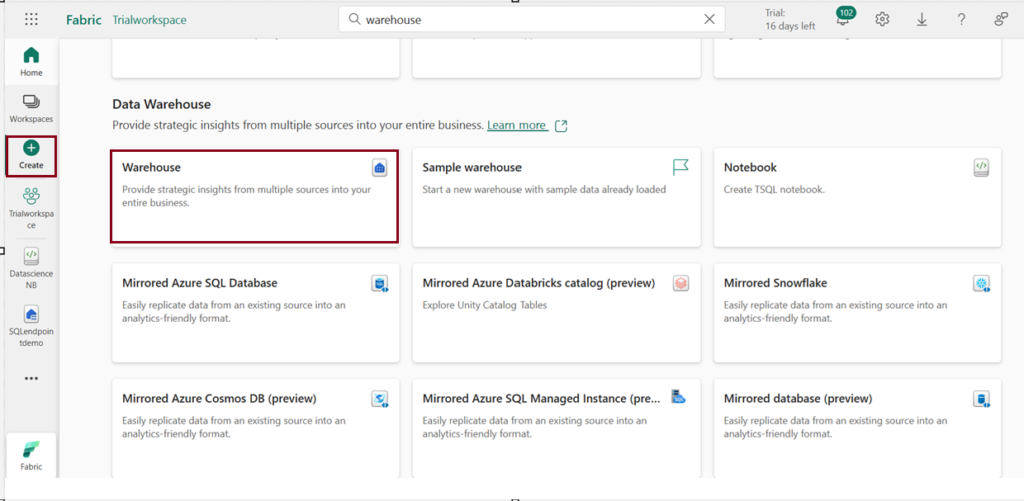
- Click on “Create” from navigation pane on the left and choose warehouse under “Data warehouse” to create a warehouse environment.
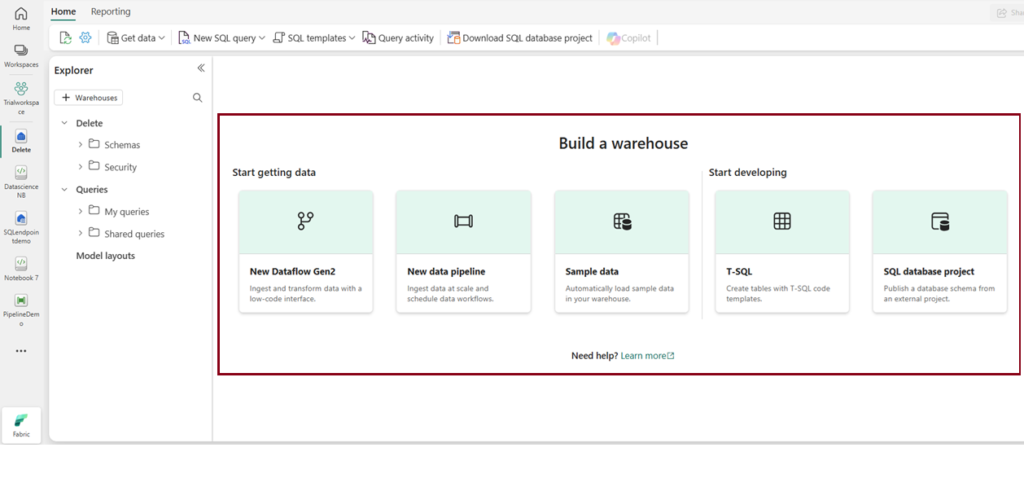
3. After creating a warehouse, the following page will appear, where you can explore various options to begin accessing the warehouse.
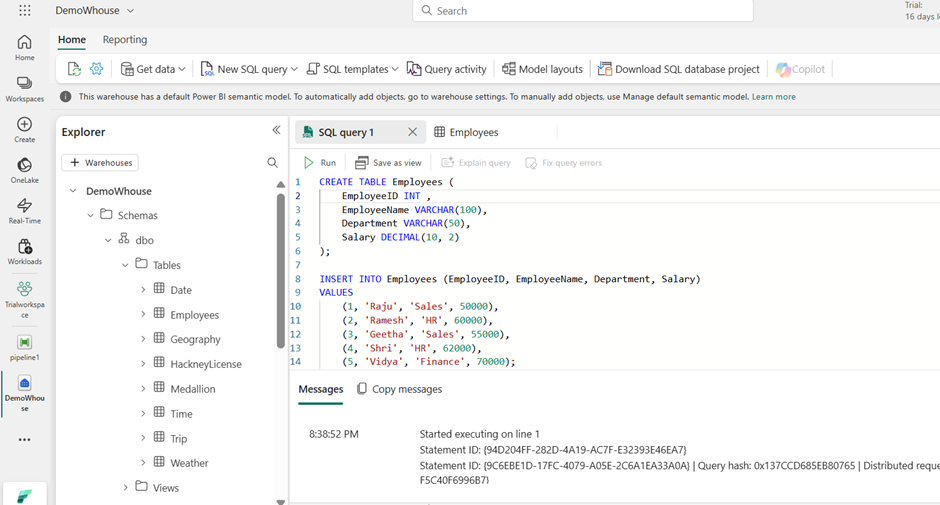
I created a sample Employee table using an SQL query in the warehouse and demonstrated the implementation of RLS, CLS, and Dynamic data Masking.
What is Column Level Security?
- Column-Level Security (CLS) is a powerful feature that restricts access to specific columns in a table. This feature is ideal when you need to protect certain types of data such as personal identification numbers, financial records, or credit card details while still allowing users to view non-sensitive data.
- CLS simplifies security management by enabling organizations to define who can see which parts of a table, preventing unauthorized access to critical fields without modifying applications or queries.
- Column-level security is simpler than designing additional views to filter columns when enforcing access restrictions for users.
- You can implement column level security with “GRANT” T-SQL statement and “DENY” to exclude specific columns.
- Column-level security only applies to queries on a Warehouse or SQL analytics endpoint. If a Power BI report on the warehouse is in Direct Lake mode, it automatically falls back to DirectQuery mode so column-level security is still enforced.
/*Grant access to specific columns of a table. */

GRANT SELECT ON Employees (EmployeeID,EmployeeName,Department) TO [username];

/*Exclude access to specific columns of a table. */

DENY SELECT ON Employees (Salary) TO [username];
What is Row level Security?
- Row-Level Security (RLS) in Microsoft Fabric enables you to control access to data at the row level, restricting access to specific rows based on user identity or execution context.
- For example, you can ensure that users access only data relevant to their department or restrict access to customer data in a multi-tenant setup. This is more like SQL Server’s row-level security.
- Predicate-based Security: A filter condition is applied when accessing data more like a “if” statement to check for condition. It is enforced by security policies, and unauthorized users cannot see the filtered rows.
- To implement RLS, you must create a security policy using the CREATE SECURITY POLICY statement. You define security logic in predicates, which are functions evaluated to restrict row access. To modify a row level security function, you must first drop the security policy
- If the security policy is created with SCHEMABINDING = ON (which is the default), the join or function can be accessed directly from the query and will function as intended without requiring any additional permission checks.
- When a security policy filters rows in a table, the application doesn’t know which rows are hidden during SELECT, UPDATE, and DELETE operations, even if all rows are hidden. However, the application can still add new rows, even if they will be hidden later.
- CLS, row-level security only applies to Warehouse/SQL analytics endpoint queries, and Power BI in Direct Lake mode falls back to DirectQuery to respect it. RLS also still applies correctly when the underlying warehouse or lakehouse is shared, since the underlying data source hasn’t changed.
Create the RLS Predicate Function:
Now let us create a function that will filter rows based on the Department of the logged-in user. We’ll assume that the Department for the user is stored in the SUSER_NAME () function
Note: SUSER_NAME () represents the logged-in user (the employee’s name). The function will only allow access to rows where the employee’s department matches the department in the Employees table.
/* creates a function that will filter rows based on the Department of the logged-in user*/
CREATE FUNCTION dbo.EmployeeRLSPredicate (@Department VARCHAR(50))

RETURNS TABLE

WITH SCHEMABINDING

AS

    RETURN

    SELECT 1 AS AccessResult

    WHERE @Department = (SELECT Department FROM dbo.Employees WHERE EmployeeName = USER_NAME());
Creating a Security Policy
/* creates the security policy that enforces the row-level security by using the predicate function we just created. */

CREATE SECURITY POLICY EmployeeRLSPolicy

    ADD FILTER PREDICATE dbo.EmployeeRLSPredicate(Department)

    ON dbo.Employees

WITH (STATE = ON);
Before Implementing Row level security
After Implementing Row level security
We can see users belongs to “Finance” department can only access the data respective to their department.
To drop the applied RLS, simply drop the created Security policy.
/* Drop the security policy enforcing RLS */

DROP SECURITY POLICY EmployeeRLSPolicy;
What is Dynamic Data Masking (DDM)?
- Dynamic Data Masking is used to mask sensitive data at the column level to ensure that users without the necessary permissions cannot view sensitive data.
- Dynamic data masking is an add-on to other Fabric security features like column-level security and row-level security. It’s highly recommended to use these data protection features together to protect the sensitive data in the database.
- Users who have specific roles or permissions can view the actual data, while others see a masked version of the data. For example, a system administrator or a manager may see the full data, but a regular employee or an external auditor may only see masked data.
- It applies a transformation to the column data, so it may appear in a “masked” format.
- The permission model behind who sees masked vs. unmasked data: users with the workspace Administrator, Member, or Contributor role, or elevated CONTROL permission on the Warehouse, see unmasked data by default.
- Anyone else sees masked values unless explicitly granted the UNMASK permission. No special permission is needed to create a table with a mask (just standard CREATE TABLE / ALTER on schema); adding, replacing, or removing a mask on an existing column requires ALTER ANY MASK plus ALTER on the table a permission it’s appropriate to grant to a security officer rather than every developer
A column in a table can have a masking rule applied to hide the data, and there are four available types of masks to choose from.
Default Masking: Full masking according to the data types of the designated fields.
E.g. For numeric data types use a zero value (Salary will be masked as 0 ), For string data types, use XXXX ,For date and time data types, use 1900-01-01 00:00:00.0000000
Email Masking: Specifically masks email addresses. E.g.: aXXX@XXXX.com
Random Masking: Generates random values for the original values of data. E.g. Account Number big int MASKED WITH (FUNCTION = ‘random ([start range], [end range])’)
Custom Masking: Masking method that exposes the first and last letters and adds a custom padding string in the middle. E.g. – phone number like 555.123.1234 into 5XXXXXXX.
Security considerations: Bypassing masking using brute-forcing techniques:
- It’s crucial to understand that users without sufficient privileges, but with query permissions, may use techniques to access the underlying data.
- If the masked data is consistently showing 0 or XXX.XX, the user could infer that the actual salary values are probably in a specific range. They might try other ranges until they narrow down the real values. This technique is called brute-forcing or guessing the actual values based on the available masked data.
- CLS, row-level security only applies to Warehouse/SQL analytics endpoint queries, and Power BI in Direct Lake mode falls back to DirectQuery to respect it. RLS also still applies correctly when the underlying warehouse or lakehouse is shared, since the underlying data source hasn’t changed
Applying Security in a Lakehouse (OneLake Security)
Microsoft Fabric now supports OneLake Security for Lakehouses, providing a centralized way to secure data stored in OneLake. Unlike Fabric Warehouse, which uses T-SQL commands to implement security, Lakehouse security is managed through the Manage OneLake Security interface in the Fabric portal.
With OneLake Security, administrators can create security roles and assign permissions to users or Microsoft Entra ID groups. These roles can control access to:
- Files
- Folders
- Tables
- Rows (Row-Level Security)
- Columns (Column-Level Security)
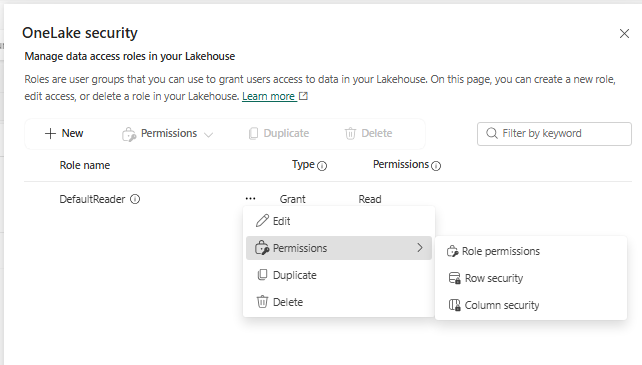
This allows organizations to secure sensitive data directly at the storage layer while using the same Lakehouse across multiple Fabric workloads.
| Feature | Fabric Warehouse | Fabric Lakehouse |
|---|---|---|
| Security Model | T-SQL Permissions | OneLake Security |
| Configure Using | SQL Statements | Manage OneLake Security |
| Row-Level Security | Yes | Yes |
| Column-Level Security | Yes | Yes |
| Dynamic Data Masking | Yes | No |
Conclusion:
In summary, Dynamic Data Masking (DDM) hides data for unauthorized users, Row-Level Security (RLS) restricts access to rows based on user context, and Column-Level Security (CLS) controls which columns can be accessed. Together, they provide a robust security framework to ensure data confidentiality and compliance.
| Tags | Microsoft Fabric |
| Useful Links | |
| MS Learn Modules | |
Test Your Knowledge |
Quiz |