
As data streaming, real-time dashboards, and event-driven triggers become central to digital transformation, Microsoft offers two powerful, yet distinct platforms: Azure Data Explorer (ADX) and Real-Time Intelligence in Microsoft Fabric. While both can handle data in motion, their design, purpose, and user experience differ significantly.
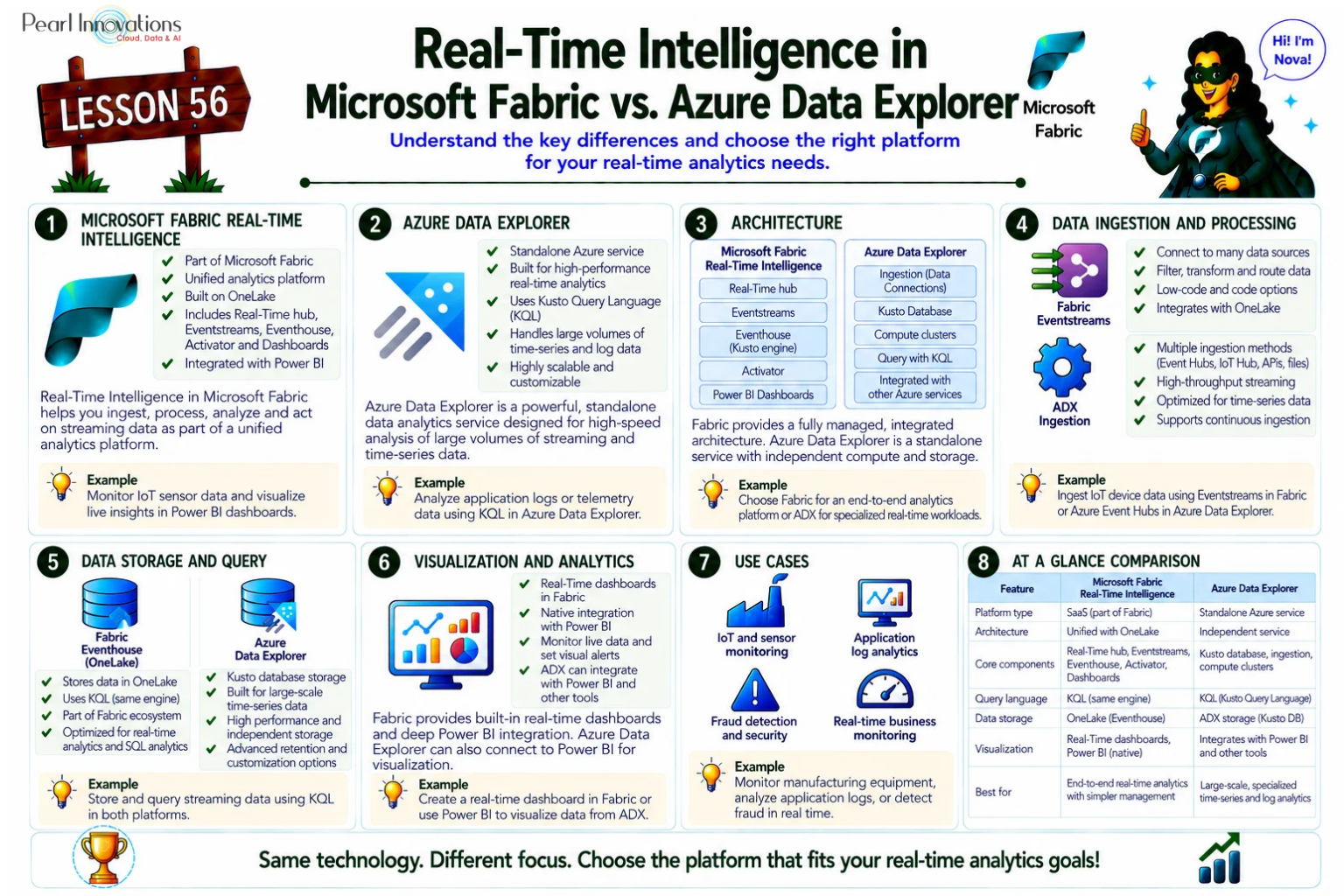
🚀 Learn It in 5 Minutes
Skip the long read.
See the key concepts in one easy-to-follow infographic.
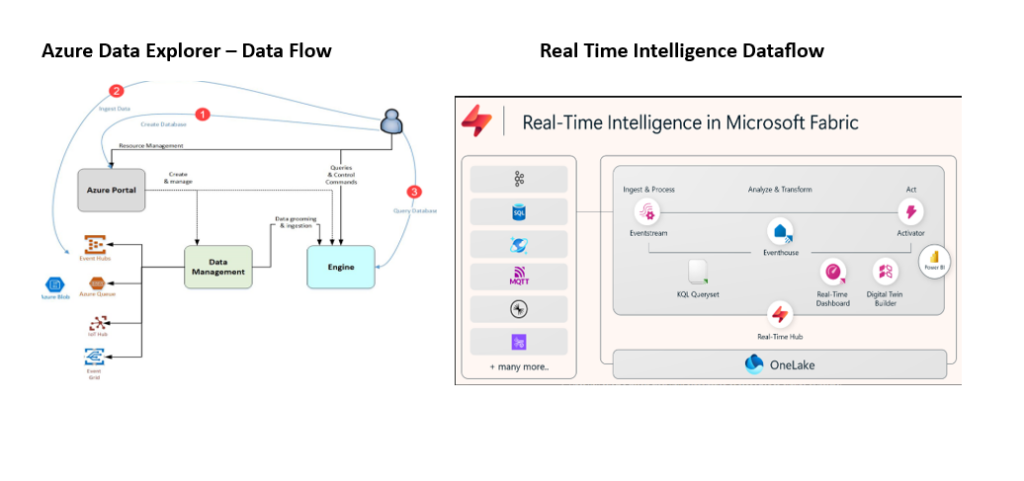
Source: Microsoft Learn
Azure Data Explorer (ADX)
Azure Data Explorer is a fully managed, high-performance analytics platform built for querying large volumes of raw data in near real-time in Azure. It is a go-to tool for telemetry, time-series analytics, and log data exploration, optimized for speed, scalability, and advanced querying.
You need to create a cluster in ADX, within that cluster you can create one or more databases. Each Azure Data Explorer cluster supports up to 10,000 databases, and each database can contain up to 10,000 tables. The data in each table is stored in chunks called ‘extents’ or data shards.
Key Features:
- High Velocity Ingestion: Handles millions of events per second with support for queued and streaming ingestion.
- Rich Querying with KQL: Uses Kusto Query Language (KQL) for interactive, ad-hoc querying across structured, semi-structured, and unstructured data.
- Advanced Time-Series and Machine Learning: Includes built-in functions for forecasting, anomaly detection, and geospatial analysis.
- Customizable Ingestion Pipeline: Flexible data ingestion methods including SDKs, tools, plugins, and direct APIs.
- Enterprise-Grade Architecture: Clusters and databases support massive scale with high concurrency and automatic indexing.
- Powerful Visualizations: Supports built-in dashboards and native integrations with Power BI, Grafana, Kibana, Tableau, and more.
Real-Time Intelligence in Microsoft Fabric
Real-Time Intelligence is a modern, SaaS-based, no-code-first solution inside Microsoft Fabric designed to democratize access to streaming data and real-time insights. It offers an intuitive experience for business users and analysts to monitor, visualize, and act on data as it flows.
Key Features:
- Real-Time Hub: A centralized catalog of organizational data in motion, connecting internal and external data streams via no-code connectors.
- No-Code Stream Processing: Eventstreams let you filter, transform, and route data without writing code.
- Eventhouse Storage: A time-optimized analytics engine with automatic indexing and partitioning for lightning-fast querying.
- Multi-Language Support: Use KQL, T-SQL, or even Copilot-assisted natural language to query data.
- Deep Fabric Integration: Seamlessly integrates with OneLake, Power BI, Data Factory, and Activator for automated actions.
- Alerts & Automation: Activator triggers actions based on real-time conditions using KQL patterns or thresholds, without needing external orchestration tools.
Comparative Analysis
| Aspect | Azure Data Explorer (ADX) | Real-Time Intelligence in Microsoft Fabric |
| Platform Type | PaaS | SaaS inside Microsoft Fabric |
| Audience | Developers, Data Engineers | Business Analysts, Citizen Developers |
| Query Language | KQL (with optional T-SQL) | KQL, T-SQL, Natural Language (Copilot) |
| Storage | The database data in each table is stored in data shards also called “extents” | Eventhouse: optimized for time-based streaming data |
| Visualization | Built-in visualisation, plus connectors to Power BI, Grafana | Power BI and custom dashboards using API’s |
| Automation & Alerts | Requires external tools like Azure Monitor, Logic Apps | Built-in automation via Data Activator |
| Learning Curve | Moderate to high (KQL, cluster management) | Low (no-code tools, visual workflows) |
Key Differences
Architectural Complexity:
- ADX gives you full control over clusters, ingestion, and storage.
- Fabric abstracts all that into a no-code interface and unified SaaS platform.
Target Users:
- ADX is optimized for technical teams building custom telemetry and log analytics platforms.
- Fabric is designed for business-centric real-time intelligence with minimal coding.
Automation:
- ADX supports automation but often relies on external tools.
- Fabric includes Data Activator for native event-driven automation.
Ease of Use:
Fabric’s Real-Time Intelligence provides a guided experience with Copilot support, dashboards, and intuitive workflows great for teams without deep data engineering expertise.
When to Use Azure Data Explorer (ADX):
Custom Log Analytics Platform with Full Control
- ADX gives you complete control over your log analytics, especially with Kusto Query Language (KQL) for deep custom querying.
Handling High-Frequency IoT Data with Tailored Ingestion Logic
- ADX can handle large-scale, high-frequency IoT data with custom ingestion pipelines and flexible data processing options.
Complex Time-Series Functions and ML in Queries
- ADX is perfect for working with time-series data, performing advanced analytics, and integrating machine learning models in queries.
When to Use Fabric Real-Time Intelligence:
Business Dashboarding and Triggering Actions on Streaming Data
- Fabric RTI is designed for creating real-time dashboards that visualize data streams and trigger automated actions based on changes in real time.
Making real-time data available to everyone across departments
- Fabric RTI provides easy access to real-time data for multiple departments, enabling collaboration and decision-making with integrated tools and low-code/no-code capabilities.
Connecting Streaming Data and Triggering Alerts with No-Code
- If you need to set up real-time alerts and trigger actions on streaming data without coding, Fabric Real-Time Intelligence is your go-to, as it offers an intuitive no-code interface.
Conclusion
Azure Data Explorer and Real-Time Intelligence in Microsoft Fabric both help you work with data in real time, but they do it in different ways.
Use Azure Data Explorer if you want a powerful tool that gives you full control over how data is collected, stored, and analysed.
Use Microsoft Fabric if you want an easy-to-use platform with built-in tools to quickly create real-time dashboards and alerts without needing to write code.
| Tags | Microsoft Fabric |
| Useful Links | |
| MS Learn Modules | |
Test Your Knowledge |
Quiz |