
In Lesson 19, we learned how to connect Azure Databricks to Azure Data Lake Storage Gen2 (ADLS Gen2) using Unity Catalog. In Lesson 20, we learned what DBFS is and why DBFS mounts are considered an older approach for new workloads. In this lesson, we will take a closer look at what a mount point is and how it was used to access external storage from Databricks.
If you work on an existing Databricks project or follow an older tutorial, you may see file paths such as /mnt/raw/sales.csv. These paths were commonly used with DBFS mount points to access external storage from Databricks.
In this lesson, you will learn what a mount point is, how it works, why it was commonly used, and what its limitations are. Also will learn how Unity Catalog provides a more secure and easier-to-manage approach for accessing external storage.
You will not create a new mount in this lesson. The goal is to help you recognise mount points in existing projects, understand how they work, and know what modern approach can be used instead.
1. What Is a Mount Point?
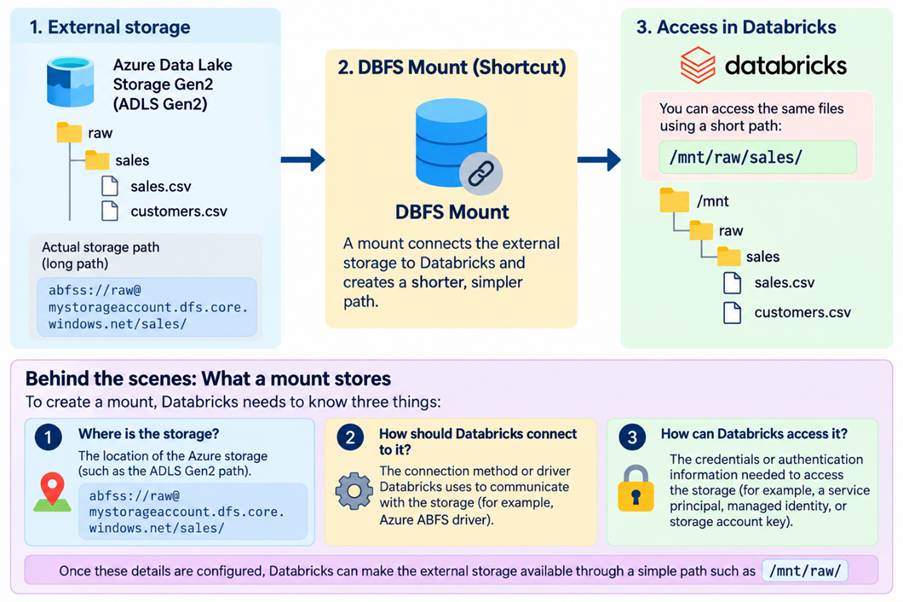
A mount point is like a shortcut in Databricks that connects to a folder or container in cloud storage. Instead of entering the full storage path every time, you can use a shorter path that starts with /mnt.
For example, suppose your sales files are stored in an Azure Data Lake Storage container called raw. The actual storage path might be long, such as:
abfss://raw@mystorageaccount.dfs.core.windows.net/sales/
With a DBFS mount, this storage location could be made available in Databricks through a shorter path such as:
/mnt/raw/sales/
So, when you access /mnt/raw/sales/ in Databricks, you are accessing the files stored in the connected cloud storage location. The /mnt/raw/ path is the mount point that provides a simple way to access that external storage.
| Without a mount | With a mount |
| abfss://raw@mystorageacct.dfs.core.windows.net/sales/sales.csv | /mnt/raw/sales/sales.csv |
Behind the scenes, a mount stores three things in the workspace: where the storage is, which driver to use to talk to it, and which credentials to use to get in.
dbutils.fs.mounts() command is a legacy DBFS command used to view mount information. DBFS mounts are deprecated and are not compatible with Databricks Serverless compute. If you run this command on Serverless compute, it is not supported. This command is included in this lesson to help you recognise legacy DBFS mount usage in existing projects. For new workloads, Databricks recommends using Unity Catalog volumes, external locations, or workspace files as appropriate.
Databricks’ current documentation confirms that DBFS root and DBFS mounts are deprecated, and recommends Unity Catalog volumes, external locations, or workspace files instead.
2. How a Mount Is Created (Legacy Example)
You do not need to memorise this code. It is shown so you can recognise it when you see it in older notebooks. The example uses a service principal (an application identity you will study in Lesson 22) and a secret scope to hold its secret.
configs = {
  "fs.azure.account.auth.type": "OAuth",
  "fs.azure.account.oauth.provider.type":
      "org.apache.hadoop.fs.azurebfs.oauth2.ClientCredsTokenProvider",
  "fs.azure.account.oauth2.client.id": "<application-client-id>",
  "fs.azure.account.oauth2.client.secret":
      dbutils.secrets.get(scope="<scope-name>", key="<secret-name>"),
  "fs.azure.account.oauth2.client.endpoint":
      "https://login.microsoftonline.com/<tenant-id>/oauth2/token"
}

dbutils.fs.mount(
  source = "abfss://raw@<storage-account>.dfs.core.windows.net/",
  mount_point = "/mnt/raw",
  extra_configs = configs
)
What this does, step by step:
- The configs dictionary tells Databricks how to log in to the storage account (OAuth with a service principal).
- The source is the real ADLS Gen2 address of the container.
- The mount_point is the short name you will use from now on: /mnt/raw.
- After the mount succeeds, you can read files with a simple path:
df = spark.read.csv("/mnt/raw/sales/sales.csv", header=True)3. Useful Commands to Inspect Existing Mounts
When you land in an existing project, these commands help you discover what is already mounted:
| Command | What it does |
| dbutils.fs.mounts() | Lists all mount points in the workspace and the storage each one points to |
| dbutils.fs.ls(“/mnt/raw”) | Lists the files inside a mount point |
| dbutils.fs.refreshMounts() | Makes a newly created mount visible on a cluster that was already running |
| dbutils.fs.unmount(“/mnt/raw”) | Removes the mount (the data in storage is NOT deleted) |
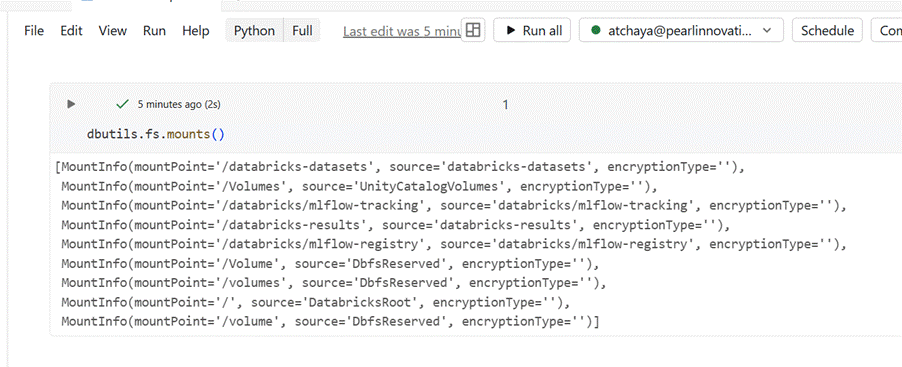
The output is showing a list of MountInfo entries.
The dbutils.fs.mounts() command is a legacy command used to view mount information in DBFS. Because DBFS mounts are a deprecated pattern, you may see existing or system-related entries rather than a typical <code>/mnt/raw</code> cloud-storage mount in a newer workspace. The command is included here to help you recognise mount information in existing Databricks projects. For new workloads, Databricks recommends using Unity Catalog volumes and external locations instead.
4. Real-World Example
Contoso Retail started using Databricks in 2021. The team connected three ADLS Gen2 containers to Databricks using mount points: /mnt/raw, /mnt/curated, and /mnt/reports. This made it easy for everyone to access the data without having to remember the long storage paths.
As the company grew, 60 people, including contractors, started using the workspace. The finance team then realised that contractors could also access files under /mnt/raw, including sensitive payroll data. This showed the team that DBFS mounts did not provide the level of access control they needed, so they started planning to move to Unity Catalog for more governed access.
5. Why Mounts Were So Popular (Advantages)
- Short, friendly paths. /mnt/raw is easier to type and remember than a long abfss:// address.
- Beginner friendly. Users did not need to understand cloud storage addresses or authentication.
- Set up once, used everywhere. Notebooks did not need to contain credentials.
- Familiar feel. Storage behaved like a folder on a computer.
6. Limitations of Mounts
The same simplicity that made mounts popular is also what causes problems today:
- Access is shared, not individual. A mount uses one credential for everyone. Anyone who can use a cluster with access to the mount can generally read the data, and Microsoft warns that a badly configured mount can give unsecured access to all users in the workspace.
- Weak governance. You cannot easily say “NameX can read /mnt/raw/sales but not /mnt/raw/payroll” the way you can with Unity Catalog permissions.
- Stored credentials to maintain. Mounts that use secrets are not refreshed automatically. If the secret is rotated, expires or is deleted, users can start seeing 401 Unauthorized errors until someone unmounts and remounts the storage.
- Workspace-specific. A mount lives in one workspace. Another workspace needs its own mounts, which leads to inconsistent setups.
- Manual and fragile. Mounts are created with code. Unmounting while jobs are running can cause failures.
- Not compatible with Unity Catalog or serverless compute. Mounted data does not work with Unity Catalog, and mounts are not compatible with Databricks serverless compute.
Important Update
Older Databricks tutorials often show DBFS mounts as the normal way to connect Databricks to cloud storage. This is an older approach and is no longer recommended for new workloads. Databricks now considers DBFS mounts a deprecated pattern, and newer workspaces may not provide access to these features. For new implementations, Databricks recommends using Unity Catalog external locations instead.
7. How Unity Catalog Changes Everything
Unity Catalog moves security from “who can reach this cluster” to “who has been granted permission on this specific data”. We have already seen this in our previous lesson 19.
- Access Connector and storage credential – the secure identity Unity Catalog uses to reach storage.
- External location – links that credential to one specific storage path.
- Volume or table – the object your users work with, such as /Volumes/main/default/raw_volume/.
Here is how the two approaches compare:
| Mount points (legacy) | Unity Catalog (recommended) | |
| Path style | /mnt/raw/… | /Volumes/<catalog>/<schema>/<volume>/… or catalog.schema.table |
| Who can access | Anyone using a cluster that can see the mount | Only users and groups you grant permissions to |
| Credentials | Stored in the mount, often via secrets | Handled by a storage credential (managed identity), no secrets in notebooks |
| Auditing and lineage | Very limited | Built in |
| Scope | One workspace | Shared across workspaces attached to the same metastore |
| Serverless compute | Not compatible | Supported |
| Status | Deprecated pattern | Recommended approach |
Back to Contoso Retail: after moving to Unity Catalog, the team created one external location for the raw container and granted the analysts group read access only to the sales volume. Contractors got no access at all to payroll. Nobody had to touch a password.
8. How to Move from Mounts to Unity Catalog
Do not delete anything on day one. Follow a careful, step-by-step approach:
- Discover. Run dbutils.fs.mounts() and list every mount and the storage it points to.
- Find the usage. Search your notebooks and jobs for “/mnt/” to see who depends on each mount.
- Create the Unity Catalog objects. Set up a storage credential and an external location for the same storage path (see Lesson 19), then create an external volume or external tables.
- Update the code. Replace paths such as /mnt/raw/sales/ with /Volumes/main/default/raw_volume/sales/ or with table names.
- Test. Run the updated notebooks and jobs and compare results with the old version.
- Retire the mount. Only when nothing depends on it, unmount it with dbutils.fs.unmount(). The files stay safely in ADLS Gen2.
# Before (legacy mount)
df = spark.read.csv(“/mnt/raw/sales/sales.csv”, header=True)
# After (Unity Catalog volume)
df = spark.read.csv(“/Volumes/main/default/raw_volume/sales/sales.csv”, header=True)
9. What Should You Do as a Beginner?
- For new projects, never create mounts. Use Unity Catalog external locations and volumes.
- For existing projects, treat every /mnt/ path as a migration candidate, but understand it before changing it.
- Keep your storage in ADLS Gen2. Only the way Databricks reaches it changes.
Conclusion
Mount points made Databricks easier to use because they allowed long cloud storage paths to be accessed through shorter paths such as /mnt/raw. However, they had limitations because the same configured access could be used by everyone, they required manual maintenance, and they are not supported with Unity Catalog or Serverless compute.
Unity Catalog provides a more modern way to access data by using permissions, secure authentication without putting secrets in notebooks, and auditing. It also provides a consistent way to manage access to data across workspaces.
In the next lesson, we will look at the identities used for secure access, including managed identities and service principals, and learn how they are used.
| Tags | Working with Mount Points and Why Unity Catalog Changes Everything |
| Microsoft Learn | |
| Databricks | |
|
Test Your Knowledge |
Quiz |