
Microsoft Fabric is a powerful platform to manage all your data, from ingestion to visualization. But what if you could have an intelligent assistant to help you write code, build dashboards, analyse data, and can interact with plain English?
That’s where Copilot in Microsoft Fabric comes in!
Let’s see what Copilot is, where you can use it, and how it can help you work smarter not harder.
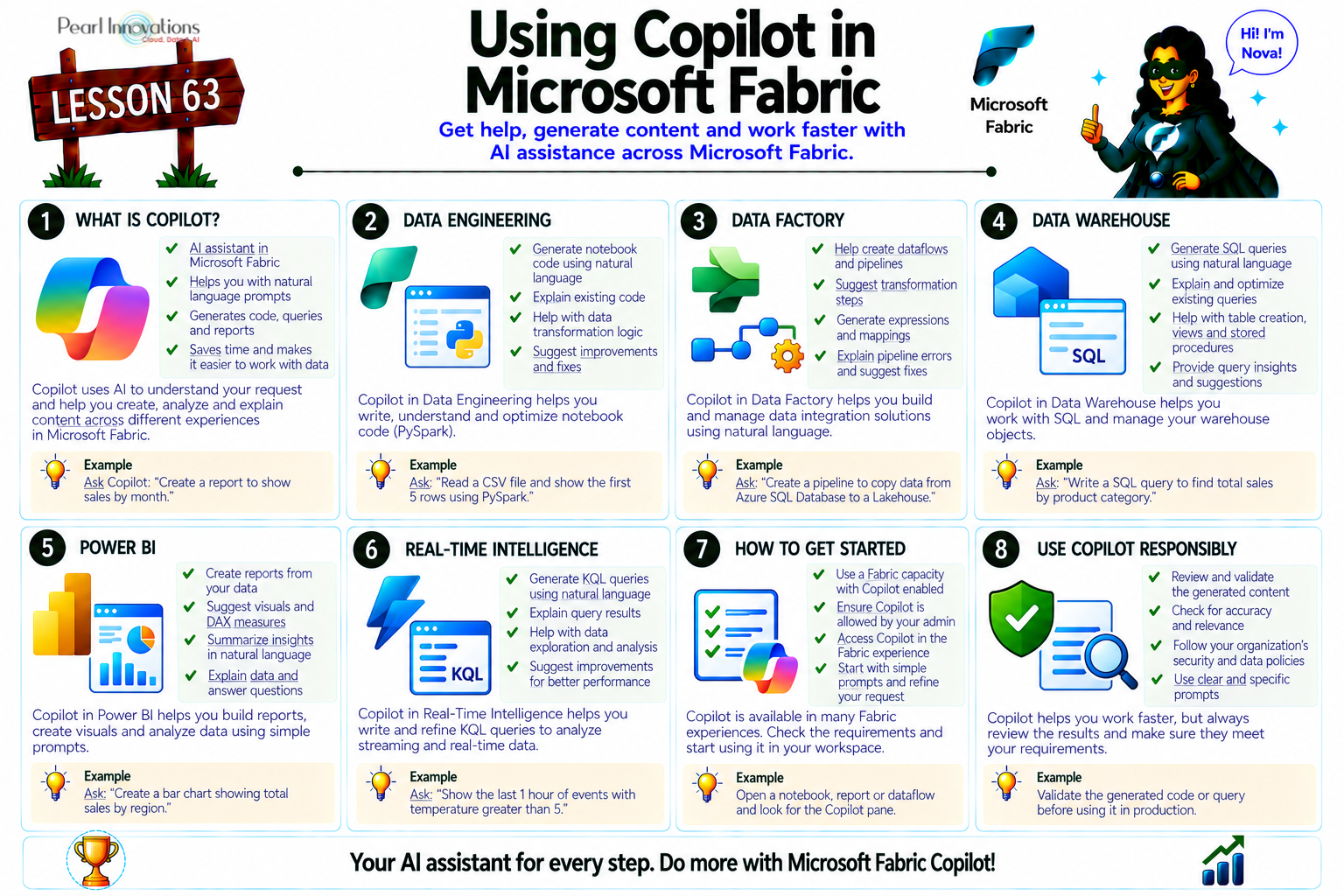
🚀 Learn It in 5 Minutes
Skip the long read.
See the key concepts in one easy-to-follow infographic.
What is Copilot in Fabric?
Copilot is a Generative AI assistant built into Microsoft Fabric. It uses Large Language Models (LLMs) (like the ones behind ChatGPT) to help you:
- Write and fix SQL/DAX/KQL queries
- Generate visuals and dashboards
- Explain complex code or logic
- Automate repetitive tasks
- Interact with data using natural language
In short, Copilot makes working with data easier whether you’re a developer, data engineer, or business user.
Copilot has now evolved into Copilot Cowork, a new agent that doesn’t just suggest or summarize — it executes tasks end‑to‑end. Cowork can send emails, schedule meetings, generate polished documents, and even remember your schema quirks and preferences across sessions.
Copilot has now evolved into a Cowork agent, capable of executing tasks end‑to‑end and delivering polished outputs. It also supports persistent memory, remembering schema quirks, naming conventions, and your preferences across sessions.
Who Benefits from Copilot?
Copilot is useful for everyone working with Fabric:
- Enterprise developers – Get code suggestions and automation.
- Self-service users – Ask questions in plain English.
- BI teams – Accelerate reporting and dashboarding.
- Fabric admins – Control who can use Copilot and how.
Even if you’re not a coding expert, Copilot can help you understand and work with data.
Where Can You Use Copilot in Fabric?
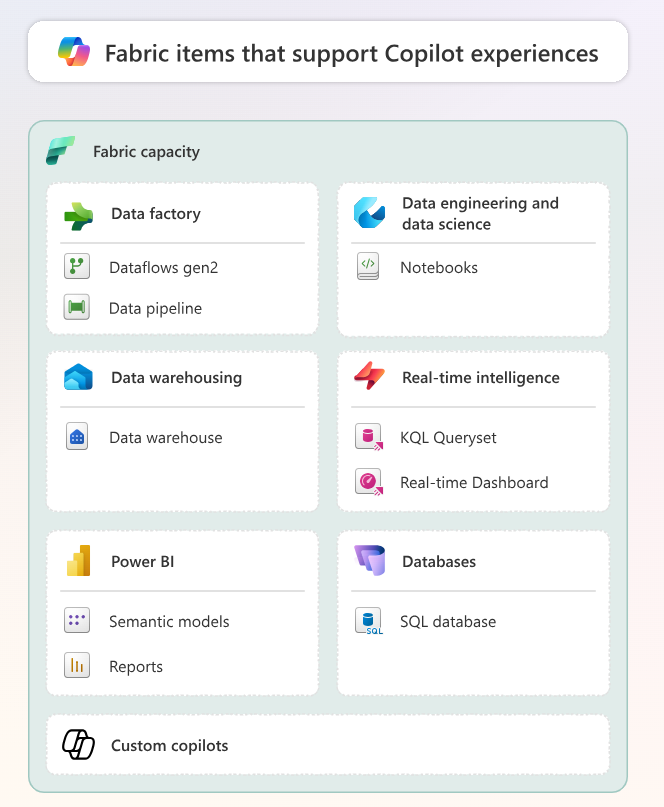
Source: Microsoft Learn
Copilot works across almost all workloads in Fabric with paid capacity license. Here’s how it helps in each area:
1. Data Science & Engineering (Notebooks)
- Generate code or markdown
- Explain notebook cells
- Add comments and fix errors
- Visualize or analyse data automatically
2. Data Factory
- Auto-generate dataflow queries
- Create and summarize pipelines
- Troubleshoot errors easily
3. Data Warehouse
- Convert natural language to SQL
- Suggest SQL code completions
- Explain or fix SQL queries
4. SQL Database
(Similar to Data Warehouse Copilot)
- Write or explain SQL queries
- Complete or correct SQL syntax
- Enable question-and-answer capabilities
5. Power BI
- Suggest visuals, report pages, and narratives
- Explain report visuals
- Generate DAX and semantic model descriptions
- Power BI Desktop also supports Copilot (if workspace uses F2 capacity or higher)
Copilot is deeply integrated into the Microsoft 365 cloud environment, pulling data from Teams, Outlook, and SharePoint to automate enterprise workflows.
6. Real-Time Intelligence (KQL)
- Convert plain English to Kusto Query Language (KQL)
- Modify or explain existing KQL queries
- Create real-time dashboards
With Cowork, insights from Fabric workloads don’t stop at dashboards. They flow into Outlook, Teams, and Word — turning analysis into action.
Build Your Own Copilot
If you want to build a custom Copilot using your own enterprise data Microsoft provides solution accelerators:
- Client Advisor Copilot – Helps advisors use both structured and unstructured data
- Conversational Knowledge Mining – Helps analyse call/chat transcripts with generative AI
These solutions use Azure OpenAI, Fabric, and Azure AI Search/Speech.
Regional Availability & Data Security
Originally limited to US and France Central, Copilot now supports:
- UK South
- Australia East
- India Central
- Japan East
Cross‑geo processing is rarely needed now, Microsoft expanded hosting.
Microsoft ensures your prompts, schemas, and conversation history are protected. No actual table data is sent to Azure OpenAI unless you explicitly allow it.
How to Enable Copilot in Your Organization
Before using Copilot:
- You must have Fabric F2 capacity or higher.
- Fabric admins need to enable Copilot from the admin portal.
- You may need to allow cross-geo data processing based on your region.
Enterprises should upgrade to F64 capacity to unlock Cowork and persistent memory features.
Responsible AI Usage
Copilot is here to support human intelligence, not replace it. Always:
- Double-check generated queries.
- Use Copilot to augment your decisions, not automate everything blindly.
- Follow Microsoft’s privacy and responsible use guidelines.
Microsoft has added consent‑based voice recording for agents and expanded compliance dashboards for admins.
Follow Link to know more on how to use Copilot responsibly https://learn.microsoft.com/en-us/fabric/fundamentals/copilot-privacy-security
| Tags | Microsoft Fabric |
| Useful Links | |
| MS Learn Modules | |
Test Your Knowledge |
Quiz |