
In this Blog, we’re going to level up our KQL skills by learning how to use functions in KQL. Functions are super helpful when you want to reuse logic, make your queries cleaner, or even share them with others.
Think of functions like mini reusable programs inside your KQL queries. Instead of repeating the same logic again and again, you define it once and use it wherever needed. Just like how we use sum () or avg () those are built-in functions. But we can also create our own functions.
Types of Functions in KQL
So far, we have seen how to create functions using let, which is perfect for quick reuse within a query. But KQL supports two main types of user-defined functions and a bunch of built-in ones.
Built-in Functions
KQL comes packed with a variety of built-in functions — like sum(), avg(), todatetime(), bin(), iif(), ago(), in(), and many more. These are predefined, ready-to-use functions that help you perform common operations with ease.
You can’t modify or delete these built-in functions, but you can use them freely in your queries to simplify logic and boost efficiency.
Whether you’re:
- Summarizing data,
- Manipulating text,
- Working with dates and times,
- Writing conditional logic, or
- Performing mathematical calculations…
KQL’s built-in functions have got you covered!
They are broadly categorized into:
- Aggregating Functions
- Date and Time Functions
- String Functions
- Conditional Functions
- Mathematical Functions
These functions make your queries more powerful and your analysis more insightful all with simple code.
User-Defined Functions (UDFs)
These are custom functions you create to suit your own logic. They are categorised into two:
- Query-defined Functions
- Stored Functions
Query-defined Functions
These are defined inside a query using the let keyword. They work only within that query perfect for ad hoc analysis or dashboards.
- Defined using let inside your query
- Exist only within the current query
- Good for quick, reusable snippets
- Clean, readable, and reusable.
Example
Let’s continue working with the Yellow Taxi trip sample data we already loaded into our Eventhouse. Suppose we want to analyse revenue from long-distance trips — specifically, those where the trip distance is greater than 10 miles.
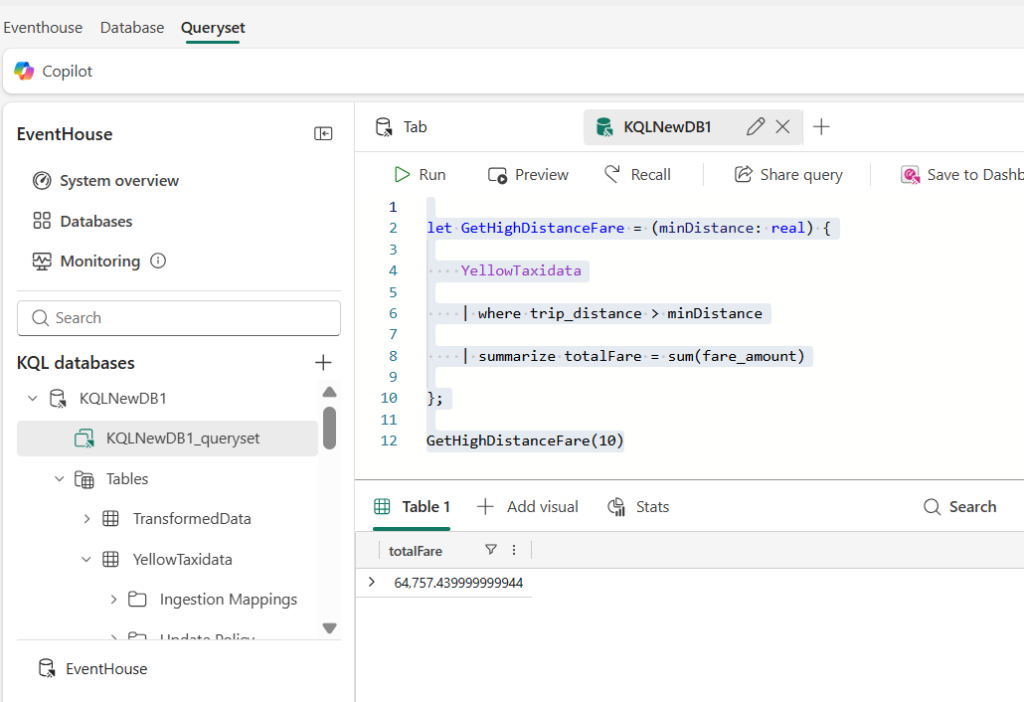
Instead of repeating the same filter and summarization logic every time, we can make it easier by defining a query-defined function using the let keyword. We’ll name it GetHighDistanceFare.
let GetHighDistanceFare = (minDistance: real) {

    YellowTaxidata

    | where trip_distance > minDistance

    | summarize totalFare = sum(fare_amount)

};

GetHighDistanceFare(10)
This function filters trips longer than a given distance and then calculates the total fare for those trips. In the example above, we’re calculating the total fare for trips over 10 miles. The below output shows the total revenue from these long-distance rides.
Stored Functions
Stored functions are reusable KQL query definitions that are saved as part of your database or KQL project. Unlike ad-hoc functions created with let, stored functions are centrally managed, can be versioned, and are accessible across multiple queries making them ideal for production use or team collaboration.
- Saved directly in the database schema
- Can be reused across workspaces, dashboards, or scheduled queries
- Created using. create function command
- Ideal for standardized logic you want to reuse everywhere
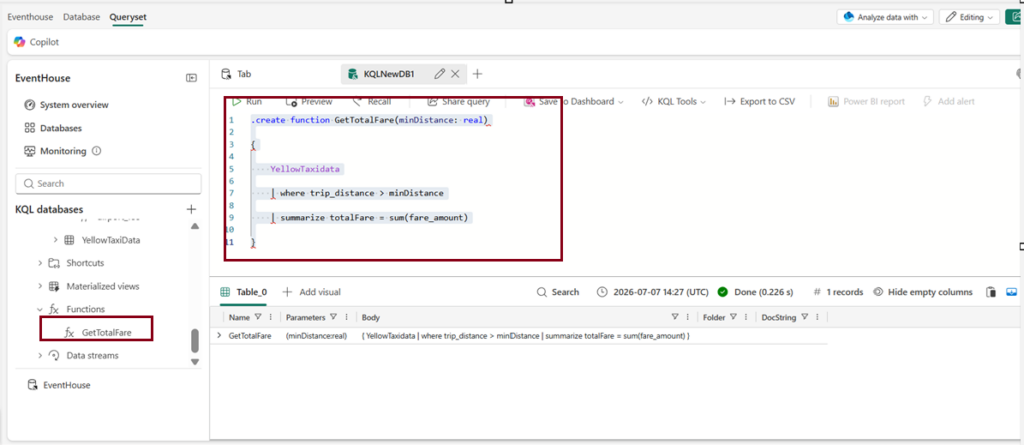
We create stored function for the same scenario as like query defined function (total revenue for long distance trips) .Only difference is this stored function will be stored in schema and it will be available for use across multiple queries.
.create function GetTotalFare(minDistance: real)

{

    YellowTaxidata

    | where trip_distance > minDistance

    | summarize totalFare = sum(fare_amount)

}
Now once the function is created, you call the function anywhere.
If you want to drop the function simply follow the below code
.drop function GetTotalFareWhen to Use Stored vs. Query-Defined Functions
Now that we’ve looked at both query-defined and stored functions, let’s briefly compare when to use each:
Use a query-defined function (let):
- When the function logic is only needed within the scope of a single query.
- Ideal for temporary or ad-hoc queries where you don’t need to store the function for future use.
- When you want to keep things flexible and quick for analysis.
Use a stored function (.create function):
- When the function logic needs to be reused across multiple queries or dashboards.
- Ideal for maintaining consistency in your analysis any changes to the function are reflected automatically across all queries.
- Best for shared logic within teams or organizations, ensuring everyone uses the same function definitions.
Conclusion
By leveraging these functions, you not only save time but also ensure consistency and clarity in your analytics workflows. As you continue working with real-time data, using the right type of function can make your KQL experience smoother and more powerful.
| Tags | Microsoft Fabric |
| Useful Links | |
| MS Learn Modules | |
Test Your Knowledge |
Quiz |