
What is Real time Intelligence generally?
Real-Time Intelligence is the ability to collect, analyse, and act on data as soon as it’s created or received with less amount of time insights. Instead of waiting hours or days to analyse data (like in traditional systems), real-time intelligence gives you instant, enabling faster decisions and actions. we all know the importance of time, In many scenarios, acting quickly on fresh data can make a huge difference for example
- Detecting fraud as it happens
- Updating inventory as sales occur
- Showing personalized ads while the user browses
- Monitoring sensors in industrial equipment or vehicles
In Microsoft Fabric, Real Time Intelligence is a fully integrated solution that helps you:
- Ingest and process streaming data (like from IoT sensors, logs, or social media feeds),
- Analyse that data in near real-time,
- Visualize insights instantly,
- Take immediate action using alerts, dashboards, or automated workflows.
- It turns live data into live insights which helps your business stay informed and proactive.
Below image shows architecture diagram on how Real-Time Intelligence works inside Microsoft Fabric.
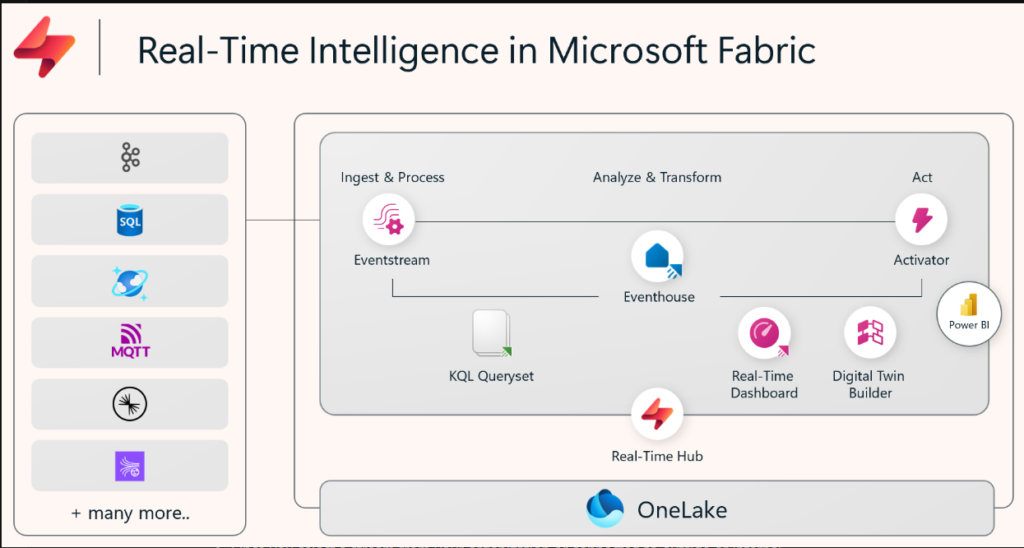
Source: Microsoft Learn
Key Concepts
Real-Time Hub – The control centre for all your real-time data streams. It helps discover, manage, and share streaming data across your organization.
Event streams – These are pipelines that capture and process live events (like “someone clicked a button” or “a temperature exceeded 100°C”).
Eventhouses – Storage areas optimized for time-based data, perfect for analyzing streams quickly and efficiently. Eventhouse is actually a container that can hold multiple KQL databases, sharing capacity and resources. It now include native anomaly detection that runs directly on live time-series data without needing to copy or export it.
KQL (Kusto Query Language) – A user-friendly language to explore and query real-time data. This is more like SQL but built for streaming data with pipe-based commands. KQL Queryset is a standalone Fabric item you create, not just a feature inside Eventhouse.
Dashboards – Visual interfaces that update in real-time, helping users see what’s happening now.
Alerts & Automation – Trigger actions when certain conditions are met (like sending a message or kicking off a workflow).
Digital Twin Builder – It’s a Fabric item that lets you build low-code/no-code ontologies – digital replicas of assets, processes, or environments — by mapping data from multiple sources and defining semantic relationships between them, then exploring or visualizing that modeled data through Real-Time Dashboards or Power BI. It’s currently in preview and sits alongside, not inside, Eventhouse.
These insights can be turned into actions with Fabric Activator, as you set up alerts from various parts of Fabric to react to data patterns or conditions in real-time.
How It All Works (Step by Step)
Here’s a high-level view of how Real-Time Intelligence works inside Microsoft Fabric:
1.Discover Streaming data
- Real-Time hub is a central place in Microsoft Fabric to discover and manage streaming data which is more like a control room you can see all your live data as it happens.
- It acts as a catalog of live (real-time) data coming from different sources.
There are 3 main types of real-time data:
Data Streams – live data flowing through Fabric.
Microsoft Sources – built-in connectors to pull data from tools like Event Hubs, IoT Hub, SQL, etc.
Fabric Events – special events (like changes in a workspace or blob storage) that can trigger actions automatically.
All this real-time data can be used across different parts of Fabric (e.g., for analytics, alerts, automations).
2.Connect to Streaming Data
Start by bringing in data from sources like:
- Azure Event Hubs
- Azure IoT Hub
- SQL or Cosmos DB Change Data Capture (CDC)
- Using no-code connectors, Fabric makes it easy to plug in your sources.
3. Capture and Process with Eventstreams
Once data is connected, Eventstreams act like live pipelines. Eventstreams now support DeltaFlow (Preview), which turns database CDC changes into structured, analytics-ready streams automatically, handling schema evolution without custom code.They allow you to:
- Clean the data
- Filter unnecessary events
- Route events to multiple destinations (e.g., dashboards, storage, alerts)
Example: If a sensor reports temperature every second, you can filter it to only send alerts when it crosses 100°C.
4.Store and Analyse with Eventhouses
Store your cleaned data in Eventhouses. These are tailor-made for time-based data, and they:
- Automatically index and partition data by time
- Data stored in eventhouses can be made available in OneLake for consumption by other Fabric experiences.
- Data in Eventhouses can flow to Fabric data agents that reason over live and historical data to automate actions and workflows this complements the alert-driven automation
- Allow lightning-fast queries
- Work with structured, semi-structured, and unstructured data
- You can analyse this using KQL, or even natural language via Copilot if you’re not comfortable with code.
5.Visualize in Dashboards and Power BI
Time to visualise the data! Microsoft Fabric supports:
- Real-time dashboards – Refreshes every second
- Power BI integration – for deeper reporting and sharing
You can build these dashboards using drag-and-drop visual tools, or with code if you prefer.
6.Act with Alerts and Automation
Alerts keep an eye on changing data and automatically respond when specific patterns or conditions are found.
They can track live data from the Real-Time hub, results from a Kusto (KQL) query, or insights from a Power BI report.
Using alerts, you can:
- Notify a user
- Trigger a workflow in Power Automate
- Launch a pipeline or other Fabric job
- You define the logic (e.g., “If CPU usage > 90% for 5 minutes”), and Fabric takes care of the rest.
Conclusion
This was a quick and simple introduction to Real-Time Intelligence in Microsoft Fabric. We explored the basics from discovering live data in the Real-Time Hub to capturing, analyzing, and reacting to it in real-time. Thus, Real-Time Intelligence helps you make faster, smarter decisions by working with data the moment it arrives.
Since this was a beginner-level overview, many hands-on demos on real time intelligence are yet to come our upcoming blogs.
| Tags | Microsoft Fabric |
| Useful Links | |
| MS Learn Modules | |
Test Your Knowledge |
Quiz |